EasyManua.ls Logo

Blueview BV5000 - Typical ROV Configuration

Blueview BV5000
52 pages
Print Icon
To Next Page IconTo Next Page
To Previous Page IconTo Previous Page
Loading...
© BlueView Technologies Corp BlueView BV5000 User Handbook
48
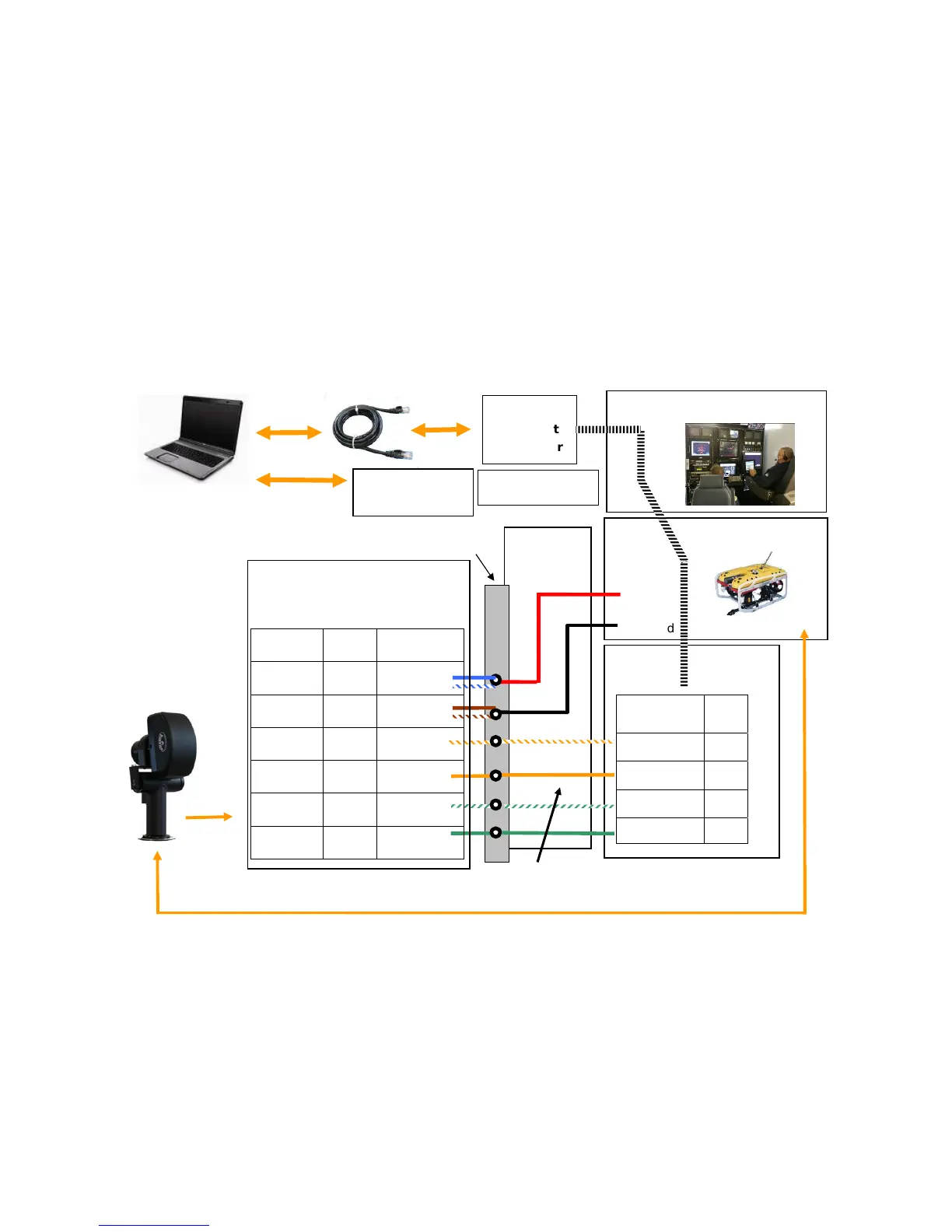
Typical ROV Configuration
User Computer
Customer
Supplied
Whip
ROV Console
Customer Potted
Connection
Fiber to
Ethernet
Converter
12-
48 VDC
Ground
BV5000 Head
RO
Fiber
Fiber
Note: Try a straight Ethernet connection first. Then try
a crossed connection (swap 1&3 , 2&6)
Function RJ45
Pins
Ethernet Rx+ 1
Ethernet Rx- 2
Ethernet Tx+ 3
Ethernet Tx- 6
Ethernet
to Fiber
Converter
Sonar
Pan & Tilt
RS485
BlueView Supplied Whip
(Sonar to Customer Whip)
Function Pin Whip Cable
Color
12-48 VDC 4 Blue and
Blue/White
Ground 7 Brown and
Brown/White
Ethernet
Rx+
1 Orange/White
Ethernet
Rx-
2 Orange
Ethernet
Tx+
3 Green/white
Ethernet
Tx-
6 Green
RS485 Mux
RS485 USB
Converter