EasyManua.ls Logo

BMC G3 A20 - User Manual

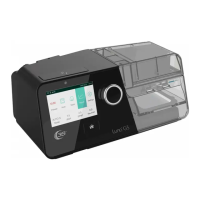
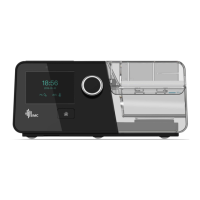
BMC G3 A20
55 pages
Print Icon
To Next Page IconTo Next Page
Loading...
User Manual
Auto CPAP / CPAP System
G3 A20 / G3 C20
0123

Table of Contents

Other manuals for BMC G3 A20

Questions and Answers

  • H
    Heather ChenAug 12, 2025
    What to do if I have a dry mouth and throat using BMC G3 A20?
    • D
      donald96Aug 12, 2025
      If you experience a dry mouth and throat, it's likely because you're sleeping with your mouth open, causing pressurized air to escape and leading to dryness. To address this, try using a chin strap to keep your mouth closed during sleep, or switch to a full-face mask. For more detailed advice, it's recommended to contact your physician.
  • O
    omarwilliamsAug 16, 2025
    What to do if I have a dry, cold, runny, and blocked nose using BMC G3 A20?
    • M
      Melanie LewisAug 16, 2025
      If you are experiencing a dry, cold, runny, or blocked nose, it could be a reaction to the airflow and cold air from the device. The fast airflow can cause the air to become cold, which irritates the nasal mucosa, leading to dryness and swelling. To alleviate this, increase the humidity setting on your device. It's also advisable to contact your physician and continue treatment unless they advise otherwise.
  • C
    chasemarieAug 19, 2025
    How to prevent dry mouth and throat when using BMC G3 A20 Medical Equipment?
    • J
      Justin HowardAug 20, 2025
      Dry mouth and throat can happen if you sleep with your mouth open, causing pressurized air to escape and dry out your nasal passage and throat. A possible solution is to use a chin strap to keep your mouth closed during sleep, or switch to a full-face mask. Contact your physician for details.
  • E
    Erica ClarkAug 23, 2025
    Why is my face red when using BMC G3 A20?
    • D
      Daniel ArnoldAug 23, 2025
      Facial reddening can occur for several reasons. It might be because the mask is too tight; try loosening the headgear. The distance between the forehead support and your forehead may also be incorrect, so experiment with different distances, noting that the angle and size of the forehead support vary by mask type. Finally, the mask size could be wrong; contact your equipment supplier for a correctly sized mask.
  • M
    michaelsanchezAug 27, 2025
    How to fix eye irritation caused by BMC G3 A20?
    • A
      Amy MarquezAug 27, 2025
      Eye irritation may arise if the mask size or model isn't right, or if the mask isn't positioned correctly, causing air leakage. Try narrowing the distance between the forehead support and your forehead, but be careful not to overtighten the mask, which can leave marks. You can also add filling to the mask to prevent leaks. If problems persist, contact your equipment supplier for a suitable mask or replace the mask or mask cushion if it hardens.
  • J
    Julie SmithAug 31, 2025
    What to do if I am allergic to the materials of the BMC Medical Equipment mask?
    • T
      Tonya BoydAug 31, 2025
      If you suspect you're allergic to the mask materials, contact your physician and equipment supplier. Use a mask that isn't made with natural rubber latex, and place a lining between your skin and the mask.
  • B
    Brenda RobertsSep 4, 2025
    What to do if I have eye irritation using BMC G3 A20?
    • A
      Andre VegaSep 4, 2025
      Eye irritation can occur if the mask doesn't fit properly, leading to air leaks. Try adjusting the forehead support to narrow the distance between it and your forehead, but be careful not to overtighten the mask, as this can leave marks. If needed, add filling to the mask to prevent leaks. Also, the mask cushion may have hardened. In this case, replace the mask or just the cushion. Contact your equipment supplier for an appropriate mask.
  • K
    Kimberly SteeleSep 7, 2025
    How to treat a dry, cold, runny, and blocked nose when using BMC G3 A20 Medical Equipment?
    • D
      Daniel SanchezSep 7, 2025
      A dry, cold, runny, or blocked nose can occur as a reaction to the airflow and cold air from the device, which irritates the nasal mucosa. To address this, increase the humidity setting on your device. Also, contact your physician, and continue treatment unless they advise otherwise.
  • L
    Apr 25, 2026
    how to change pressure?

    Summary

    Safety, Warnings, and Intended Use

    2.1 Safety Alerts and Definitions

    Clarifies WARNING!, CAUTION!, and IMPORTANT TIP! labels for user safety.

    3. Intended Use and Contraindications

    Outlines the device's purpose, usage restrictions, and conditions that contraindicate therapy.

    Technical Specifications

    5.1 Device and Environmental Specs

    Details the device's physical dimensions, weight, operating environment, and power requirements.

    System Features and Controls

    Initial Setup and First Use

    11.1 Device Placement and Filter Installation

    Guides on proper device placement, environmental considerations, and filter installation.

    11.3 Connecting to Power

    Step-by-step instructions for connecting the device to the power supply.

    11.7 Starting Treatment

    Procedures for initiating a therapy session after completing the initial setup.

    Heated Humidifier Operation

    13.1 Filling the Water Chamber

    Provides instructions on removing, filling, and returning the water chamber.

    SpO2 Monitoring Kit Usage

    14.1 Connecting the SpO2 Kit

    Steps for connecting the SpO2 probe and connector to the device for monitoring.

    Network Connectivity Setup

    Navigating the Patient Menu

    16.1 Menu Navigation and Interface

    Explains how to access the main interface, initial setup, and exit the menu.

    Device Alerts and Notifications

    17. Alerts

    Lists all alert messages and their descriptions for immediate user response.

    Cleaning and Disinfection Procedures

    Troubleshooting Common Issues

    24.1 Patient-Related Problems

    Addresses common patient issues such as dry nose, mouth, or mask leaks.

    24.2 Device-Related Problems

    Solves common problems concerning the device's functionality and display.

    Electromagnetic Compatibility (EMC)

    BMC G3 A20 Specifications

    General IconGeneral
    BrandBMC
    ModelG3 A20
    CategoryMedical Equipment
    LanguageEnglish

    Related product manuals