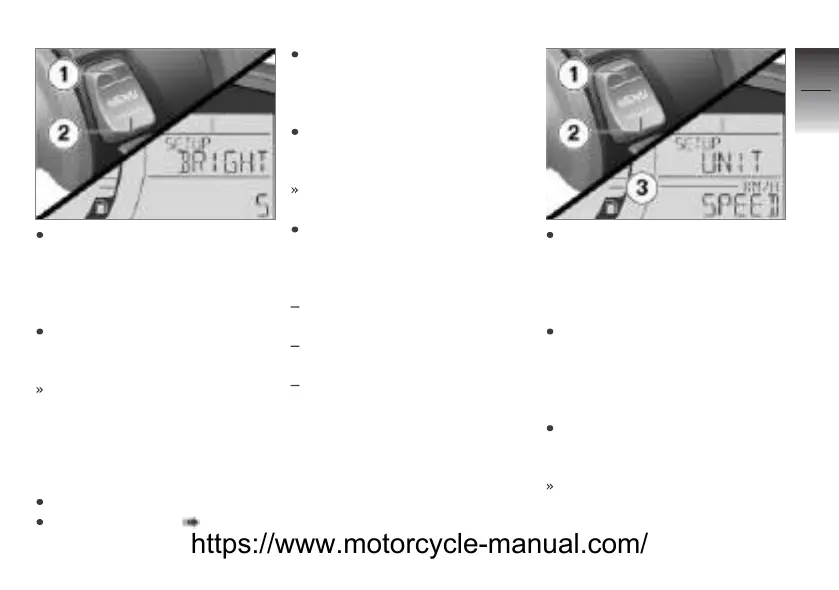
Briefly press the bottom of the
MENU rocker button 2 repeat-
edly until the desired bright-
ness of the backlighting is ad-
justed.
Press and hold the top of
the MENU rocker button 1 to
exit SETUP.
SETUP ENTER is displayed.
Setting the units
Requirement
The Scooter is stationary.
Switch on the ignition.
Selecting SETUP ( 67).
Briefly press the top of the
MENU rocker button repeat-
edly until SETUP UNIT ENTER
is displayed.
Press and hold the bottom of
the MENU rocker button to
activate SETUP UNIT.
SETUP UNIT SPEED is dis-
played.
Briefly press the top of the
MENU rocker button 1 repeat-
edly to select the following pa-
rameters in SETUP UNIT:
Change the speedometer unit,
KMH or MPH
Change the odometer unit, KM
or MI
Reset the units of the
speedometer and odometer to
the factory setting.
Briefly press the bottom of the
MENU rocker button 2 repeat-
edly until the desired unit 3
of the speedometer or the
odometer is set.
To exit the setting, briefly press
the top of the MENU rocker
button 1 repeatedly until
SETUP UNIT EXIT is
displayed.
Press and hold the bottom of
the MENU rocker button 2 to
exit SETUP UNIT.
SETUP RESET is displayed.
4
75
z
Operation
https://www.motorcycle-manual.com/


 To Next Page