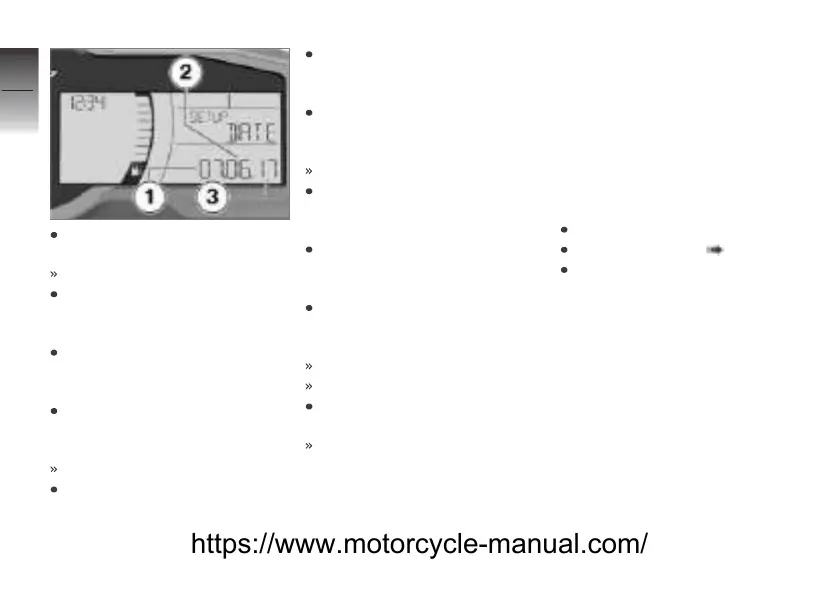
Press and hold the bottom of
the MENU rocker button.
Month 1 flashes.
Briefly press the top of the
MENU rocker button to in-
crease the month setting.
Briefly press the bottom of the
MENU rocker button to de-
crease the month setting.
After the month is set, press
and hold the bottom of the
MENU rocker button.
Day 2 flashes.
Briefly press the top of the
MENU rocker button to in-
crease the day setting.
Briefly press the bottom of the
MENU rocker button to de-
crease the day setting.
After the day is set, press
and hold the bottom of the
MENU rocker button.
Year 3 flashes.
Briefly press the top of the
MENU rocker button to in-
crease the year setting.
Briefly press the bottom of the
MENU rocker button to de-
crease the year setting.
After the year is set, press
and hold the bottom of the
MENU rocker button.
Year 3 stops flashing.
The clock is now set.
Press and hold the top of the
MENU rocker button.
SETUP ENTER is displayed.
General settings in the
multifunction display
Adjusting the brightness
of the backlighting for the
instrument cluster
Requirement
The Scooter is stationary.
Switch on the ignition.
Selecting SETUP ( 67).
Briefly press the top of the
MENU rocker button repeat-
edly until SETUP BRIGHT is
displayed.
4
74
z
Operation
https://www.motorcycle-manual.com/


 To Next Page