G12�Driver�Assistance�Systems
19.�Cruise�Control
122
19.2.3.�Operation
The�driver�has�the�option�of�adjusting�the�set�speed�in�small�or�large�increments,�which�is�then�set�and
maintained�by�the�system�by�controlling�the�drive�and�brakes.�It�can�be�changed�using�the�left-hand
switch�block�on�the�multifunction�steering�wheel�(MFL).�The�speed�is�increased�or�reduced�by�1km/
h�by�tapping�the�rocker�switch.�Each�time�the�rocker�button�is�pressed�beyond�the�pressure�point,�the
speed�increases�or�reduces�by�10km/h.�The�DCC�steadily�maintains�a�selected�speed�from�about
30km/h.
The�set�speed�is�indicated�in�the�instrument�cluster�KOMBI�in�the�familiar�way;�by�a�mark�that�moves
round�the�speed�reading.�Notes�are�added�to�the�displays�in�the�instrument�cluster�if�necessary.
If�the�vehicle's�own�deceleration�is�not�sufficient�to�maintain�the�preset�speed,�the�brake�is�activated
accordingly.
The�adjustment�range�for�the�set�speed�is�limited�to�a�maximum�of�210km/h.
If�ECO�PRO�or�SPORT�mode�is�activated,�the�cruise�control�is�also�set�to�a�fuel-efficient�or�sporty
driving�style.�Due�to�the�fuel-efficient�driving�style�in�ECOPRO�driving�mode,�in�some�situations�the
vehicle's�speed�may�exceed�or�drop�below�the�set�speed,�for�example�on�downhill�gradients�or�inclines.
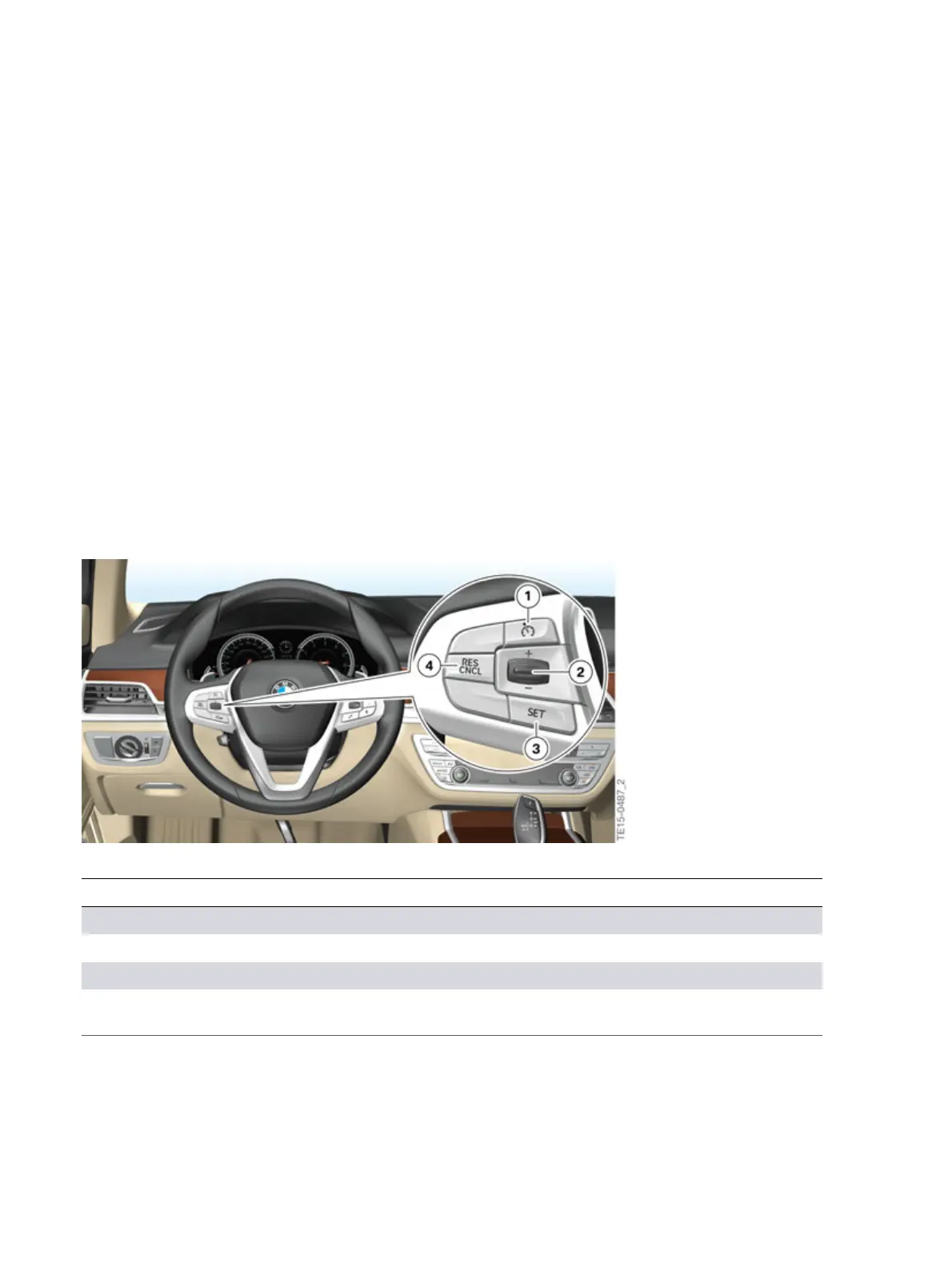
G12�Dynamic�Cruise�Control�(DCC)�buttons
Index Explanation
1 Button�for�activating�or�deactivating�the�Dynamic�Cruise�Control�DCC
2 Rocker�switch�for�changing�the�set�speed
3 “SET”�button�for�setting�the�speed�of�cruise�control
4 Button�for�calling�up�a�saved�set�speed/temporarily�switching�off�the�cruise
control



 To Next Page