G12�Driver�Assistance�Systems
16.�Park�Distance�Control
87
• there�is�an�object�closer�than�0.6m�from�the�front�of�the�vehicle�when�driving�forwards
• there�is�an�object�closer�than�1.5m�from�the�rear�of�the�vehicle�when�reversing
• the�speed�driven�does�not�exceed�approximately�4km/h
The�PDC�view�is�automatically�displayed�on�the�central�information�display.�The�activation�distance�of
the�Park�Distance�Control�depends�on�the�respective�situation�and�therefore�may�vary.
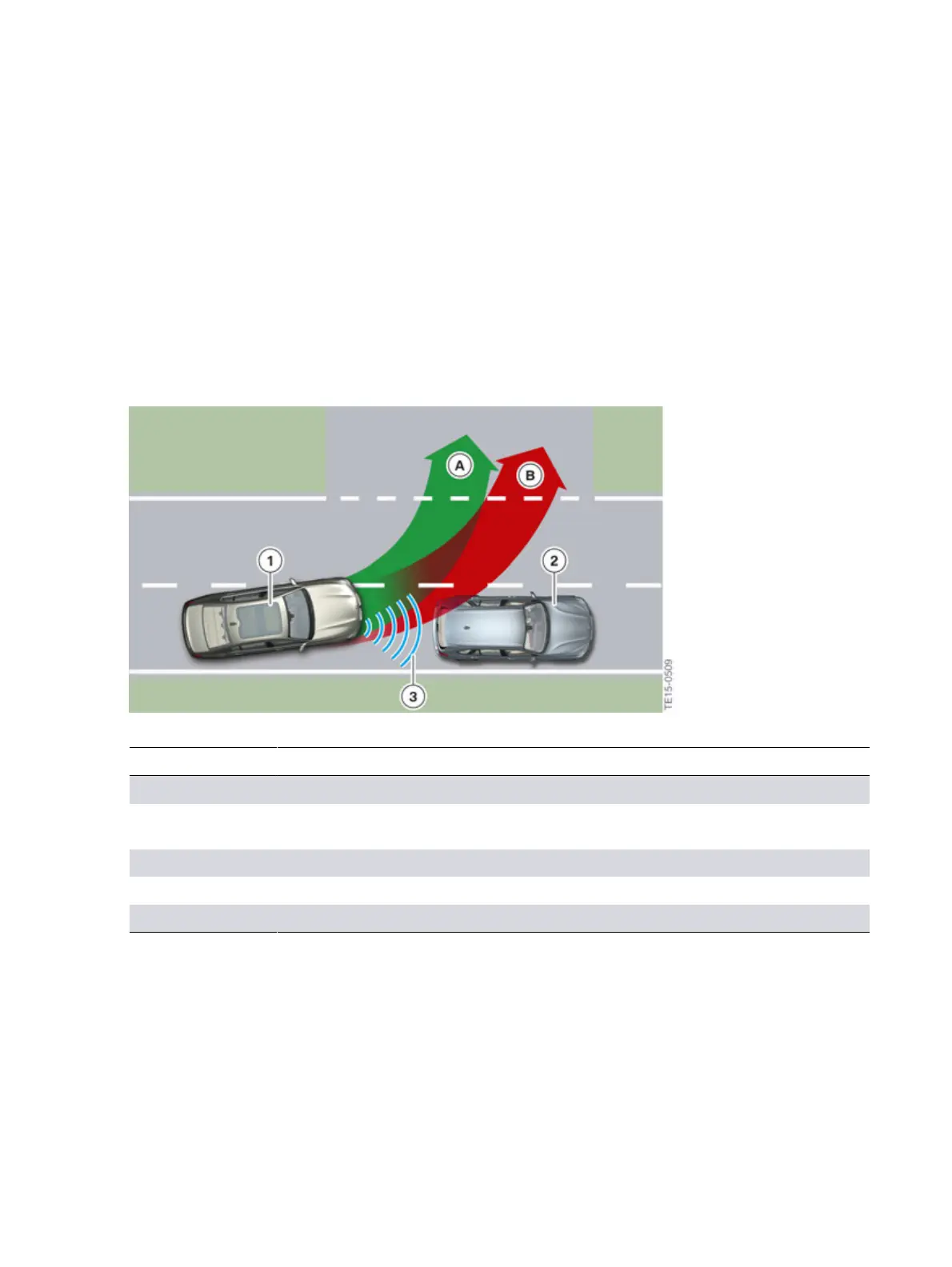
A�sound�is�only�output�if�the�detected�object�(in�front�of�or�behind�the�vehicle)�is�directly�in�the�lane
(risk�of�collision).�If�the�detected�object�is�not�directly�in�the�lane,�there�is�only�visual�acknowledgement
on�the�central�information�display.
Automatic�PDC
Index Explanation
A Lane�without�object�contact�(the�driver�receives�visual�acknowledgement)
B Lane�with�object�contact�(the�driver�receives�visual�and�acoustic
acknowledgement)
1 Turning�vehicle
2 Detected�object
3 Detection�of�obstacle�by�the�ultrasonic�sensors
If�an�object�has�been�detected�by�Auto�PDC,�the�system�must�be�reactivated�so�that�it�cannot�be
accidentally�switched�on,�for�example�in�a�car�wash.�Reactivation�is�effected�by:
• driving�speed�>�5km/h
• drive�position�change
If�a�drive�position�change�is�made�into�neutral,�the�Park�Distance�Control�is�not�activated�automatically,
again�to�avoid�it�being�switched�on,�for�example�in�a�car�wash.
The�automatic�switch-on�function�when�obstacles�are�detected�can�be�switched�on�and�off�via�iDrive.



 To Next Page