General
The display is on the Head-Up Display or in the
instrument cluster.
No shift lights are displayed in the instrument
cluster if the shift lights in the Head-up Display
are active.
Shift Lights in the instrument
cluster
Activating/deactivating
1. "My Vehicle"
2. "iDrive settings"
3. "Displays"
4. "Instrument cluster"
5. "INDIVIDUAL"
6. "Shift lights"
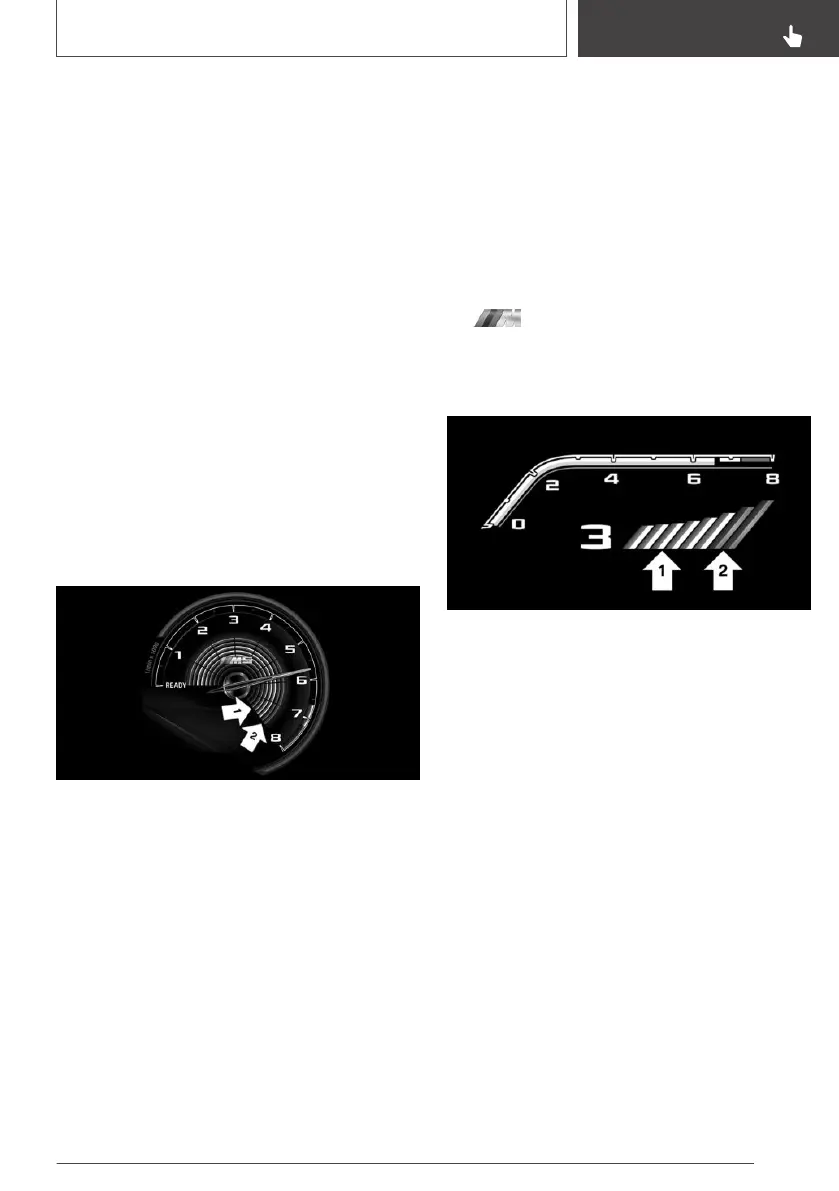
Display
▷ Current engine speed is shown in the revolu‐
tion counter.
▷ Arrow 1: yellow buttons illuminating succes‐
sively indicate when a gearshift is due.
▷ Arrow 2: buttons illuminate red. Latest point
to upshift.
When the maximum permitted engine speed is
reached, the entire display flashes red.
When the maximum permissible engine speed is
reached, the entire display flashes and the fuel
supply is limited to protect the engine.
Shift Lights on the Head-Up
Display
Activating/deactivating
Shift Lights are only displayed on the Head-Up
Display in M view, see page 161.
1. Switch on Head-Up Display, see page 160.
2. "My Vehicle"
3. "Setup"
4. "Head-up display M view"
Display
▷ Current engine speed is shown in the revolu‐
tion counter.
▷ Arrow 1: yellow buttons illuminating succes‐
sively indicate when a gearshift is due.
▷ Arrow 2: buttons illuminate red. Latest point
to upshift.
When the maximum permissible engine speed is
reached, the entire display flashes red and the
fuel supply is limited to protect the engine.
Seite 163
Displays
CONTROLS
163
Online Edition for Part no. 01402989787 - II/18



 To Next Page