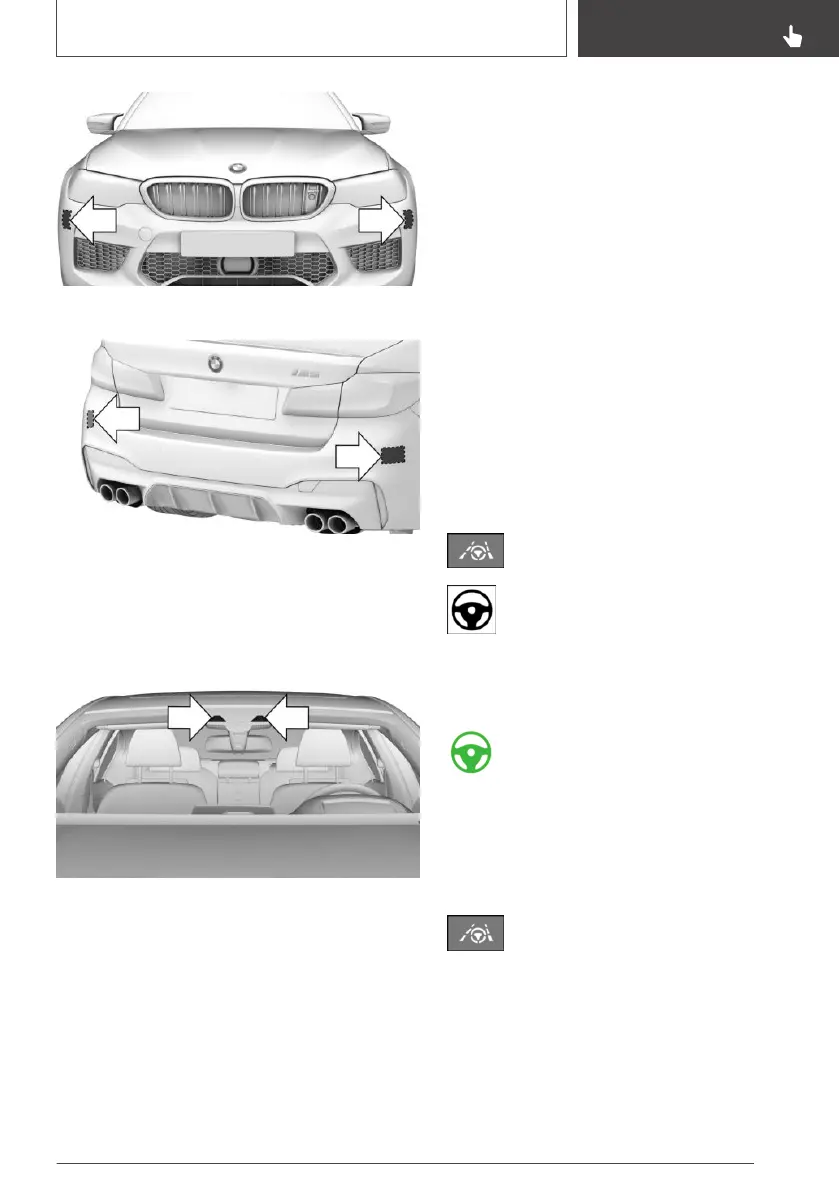
Front bumper at side.
Rear bumper.
Keep the bumpers clean and unobstructed in the
area of the radar sensors.
Camera
The camera is located on the front side of the
rearview mirror.
Keep the windscreen clean and clear in the area
in front of the rearview mirror.
Operating requirements
The following operating requirements must be
met for the system:
▷ Speed under 210 km/h/130 mph.
▷ The driving path is sufficiently wide.
▷ Above 70 km/h, approximately 43 mph: lane
demarcations are detected on both sides.
▷ Below 70 km/h, approximately 43 mph: lane
markings on both sides or a vehicle driving in
front is/are detected.
▷ Hands on the steering wheel.
▷ Sufficient corner radius.
▷ Driving in the centre of the lane.
▷ Turn indicator switched off.
▷ Camera calibration procedure directly after
vehicle delivery is completed.
Switching on/off
Switching on
Press the button on the steering wheel.
Steering wheel symbol illuminates grey.
System is on standby and does not make
any steering movements.
System activates automatically when all operat‐
ing requirements are met, see page 229.
Steering wheel symbol illuminates green.
The system is active.
When the system switched on, the person warn‐
ing with City braking function and the side colli‐
sion warning are active.
Switching off
Press the button on the steering wheel.
The display is no longer illuminated.
The system does not execute any supporting
steering movements.
Seite 229
Driver Assistance Systems
CONTROLS
229
Online Edition for Part no. 01402989787 - II/18



 To Next Page