Split screen
General
Additional information, for example information
from the on-board computer, can be displayed
on the right-hand side of the screen in some me‐
nus.
This information remains visible in the split
screen view even if you switch to another menu.
Switching the split screen view
on/off
1. Press the button.
2. "Split screen"
Selecting the display
In the menus in which a split screen view is pos‐
sible, you can select the desired display.
1.
Tilt the Controller to the right until the split
screen is selected.
2. Press the Controller.
3. Select the desired setting.
Defining the display selection
The display selection can be defined.
1.
Tilt the Controller to the right until the split
screen is selected.
2. Press the Controller.
3. "Personalise menu"
4. Select the desired setting.
5. Tilt the Controller to the left.
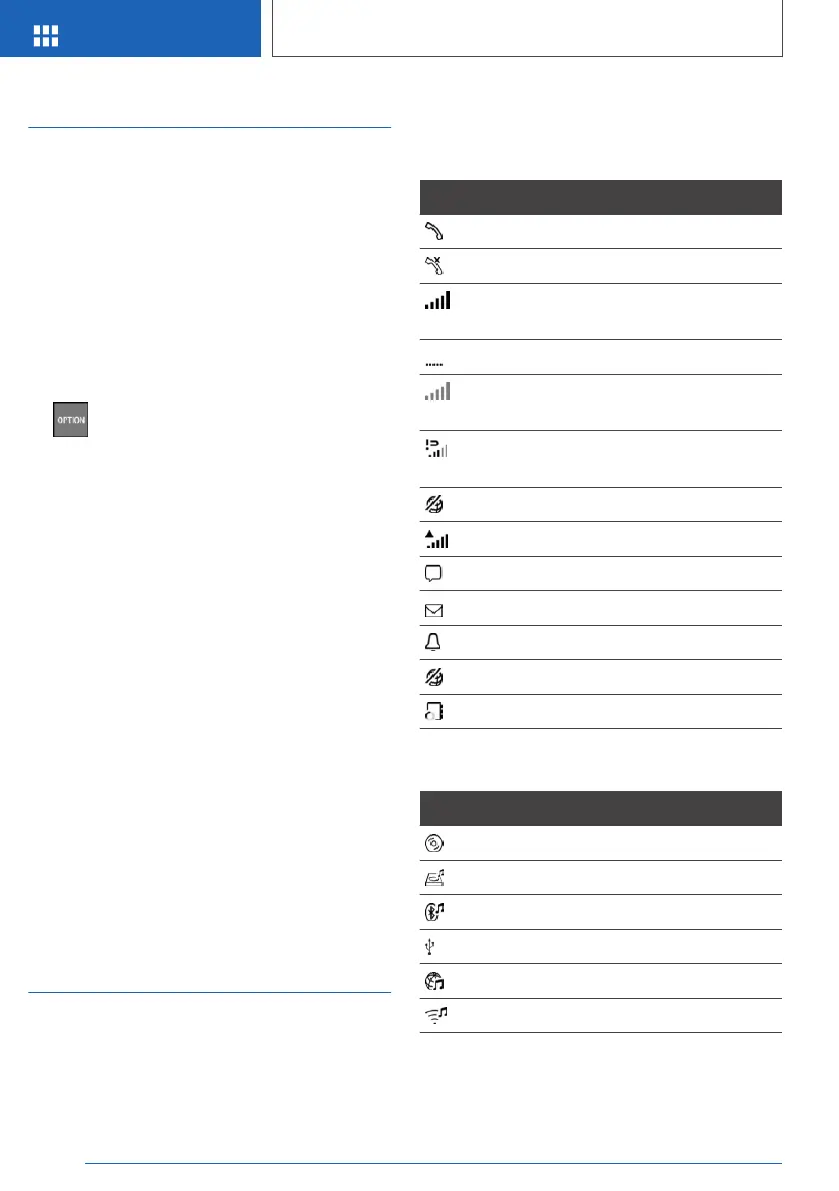
Status information
General
The status field is located in the top area of the
Control Display. Status information is displayed
in the form of symbols.
Symbols in the status field
Telephone
Symbol Meaning
Incoming or outgoing call.
Missed call.
Reception level of mobile telephone
network.
Searching for network.
No mobile telephone network avail‐
able.
Critical charge state of the mobile
telephone reached.
Data transfer not possible.
Roaming active.
Text message received.
Message received.
Reminder.
Sending not possible.
Contacts are being loaded.
Entertainment
Symbol Meaning
CD/DVD player.
Music hard disc.
Bluetooth audio.
USB audio interface.
Online Entertainment.
WLAN.
Seite 46
OVERVIEW
iDrive
46
Online Edition for Part no. 01402989787 - II/18



 To Next Page