8
EN
Installing the Flight Battery
CAUTION: AlwaysdisconnecttheLi-Pobatteryfromtheaircraftreceiverwhennotyingtoavoidover-dischargingthebattery.Batteriesdischargedtoa
voltage lower than the lowest approved voltage may become damaged, resulting in loss of performance and potential fire when batteries are charged.
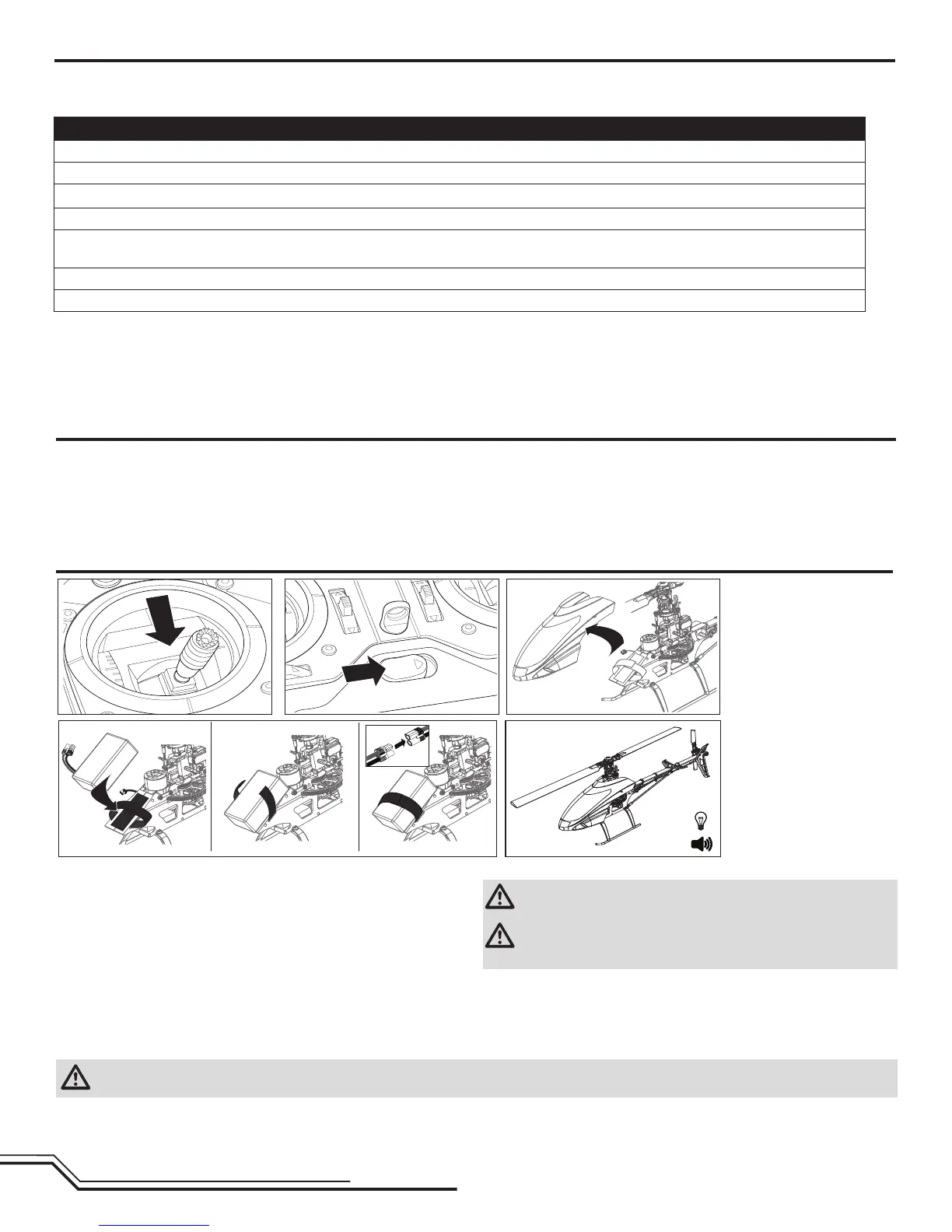
1. Lower the throttle.
2. Power on the transmitter.
3.Centerthethrottletrim.
4.ToallowtheESCtoarmandtokeeprotorsfrominitiatingatstartup,turn
onthrottleholdandnormalightmodebeforeconnectingtheight
battery. Please refer to your transmitter manual for more information on
programmingthrottleholdandnormalightmode.
5.Attachhookmaterialtothehelicopterframeandloopmaterialtothe
battery.
6.Installtheightbatteryonthehelicopterframe.Securetheightbattery
withahookandloopstrap.ConnectthebatterycabletotheESC.
CAUTION:AlwayskeepthepowerleadpositionedAWAYfromtheeleva-
tor servo. Failure to do so could cause the lead to get caught and will
result in crash causing property damage and injury.
CAUTION: Makesuretheightbatterydoesnotcomeincontactwith
themotor.Failuretodosowillcausethemotor,ESCandbatteryto
overheat, resulting in crash, causing property damage and injury.
7.DonotmovethehelicopteruntiltheAR7200BXinitializes.Theswashplate
willmoveupanddownindicatingthattheunitisready.TheAR7200BX
willalsoemitasolidBLUEStatusLEDwhenitisready
8.Thehelicoptermotorwillemit2tones,indicatingtheESCisarmed.
Binding Procedure
1. ProgramyourtransmitterusingtheTransmitterSetupfoundinthismanual.
2. InsertthebindplugintheBND/DATportonthereceiver.
3. ConnecttheightbatterytotheESC.TheHmenuLEDshouldbeashing,indicatingtheAR7200BXisinbindmode.
4. Movethethrottlesticktothedesiredfailsafeposition(lowthrottlepositioninnormalmode).
5. FollowtheproceduresofyourspecictransmittertoenterBindMode.Thesystemwillconnectwithinafewseconds.Onceconnected,theHLEDwill
turnoffandtheAR7200BXwillstarttheinitializationprocess.
6. Whentheinitializationprocessiscomplete,theStatusLEDlightwillcomeONsolidBLUE.
7. DisconnecttheightbatteryandremovethebindplugfromtheAR7200BX.Storethebindpluginaconvenientplace.
NOTICE: Removethebindplugtopreventthesystemfromenteringbindmodethenexttimethepoweristurnedon.
If you encounter problems, obey binding instructions and refer to transmitter troubleshooting guide for other instructions. If needed, contact the appropriate
HorizonProductSupportofce.
ForalistofcompatibleDSMtransmitters,pleasevisitwww.bindny.com.
BindingistheprocessofprogrammingthereceivertorecognizetheGUID(GloballyUniqueIdentier)codeofasinglespecictransmitter.Youneedto‘bind’your
chosenSpektrum™DSM2/DSMXtechnologyequippedaircrafttransmittertothereceiverforproperoperation.
Transmitter and Receiver Binding
Throttle Hold
Throttle hold only turns off the motor on an electric helicopter. You must
maintain pitch and direction control.
The blades will spin if throttle hold is OFF. For safety, turn throttle hold ON any
timeyouneedtotouchthehelicopterorcheckthedirectioncontrols.
Throttle hold is also used to turn off the motor if the helicopter is out of control,
in danger of crashing, or both.
Please refer to your transmitter manual for more information on programming
throttle hold.



 To Next Page