9
EN
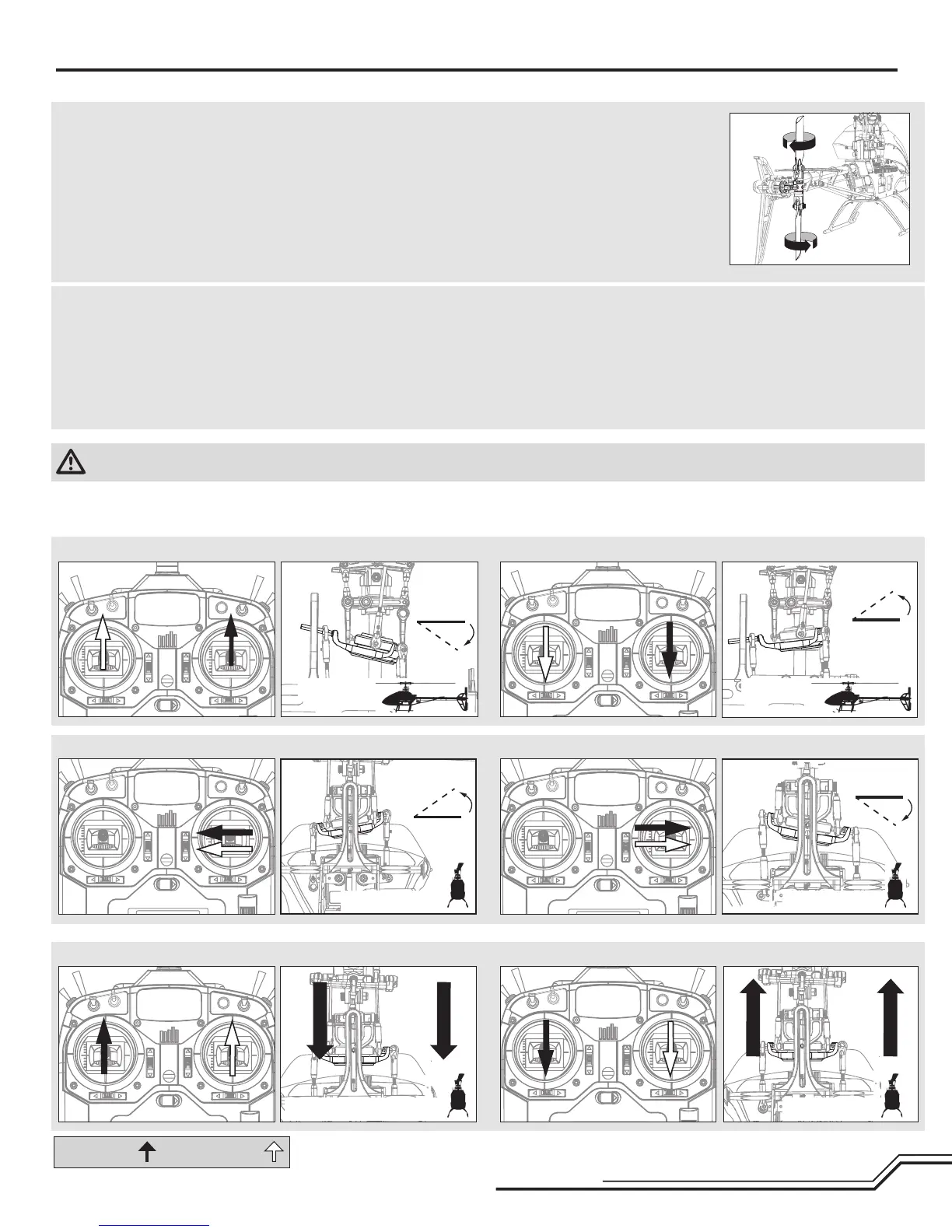
Rudder
1. Power on the transmitter.
2. Turn TH HOLD ON and put the transmitter into normal mode.
NOTICE:DonotallowthehelicoptertomoveuntiltheStatusLEDissolid
blue and all menu LEDs are OFF. The gyro will not operate correctly if the
helicoptermovesbeforetheStatusLEDissolidblue.
3. ConnectthehelicopterbatterytotheESC.
4. Movetheruddersticktotheright.Thetailrotorbladesmoveasshown.If
they do not move as shown, reverse the rudder channel in the transmitter
(refertoyourtransmittermanualforinstructions).
5. Releasetheruddercontrol.Manually
turn the helicopter nose to the left.
The tail rotor blades automatically
move as shown. If they do not move
asshown,refertotheAR7200BX
manual for information on reversing
thetailsensordirection(Setupmenu
pointF).
Cyclic
Whenusingaybarlessrotorhead,youarecontrollingrotationalrateswhile
theAR7200BXcontrolstheservos.Youarenotdirectlycontrollingtheservos
with the transmitter.
It is normal for the swashplate to slowly move back to its original posi-
tion after a stick input and for the servos to not move at the same speed
as your control sticks.
1.Tiltthehelicopterforward.Theswashplateshouldtiltbackward.
2.Tiltthehelicopterbackward.Theswashplateshouldtiltforward.
3.Rollthehelicopterleft.Theswashplateshouldrollright.
4. Roll the helicopter right. The swashplate should roll left.
5. If the swashplate does not move in the correct direction, you will need to
reversethecyclicsensordirection.RefertotheAR7200BXmanualfor
moreinformation(SetupmenupointM).
Control Tests
MODE 2 MODE 1
Elevator
Side View
Side View
Aileron
Rear ViewRear View
Cyclic and Collective Control Test
Turn on Throttle Hold when doing the control tests
Collective Pitch
Rear ViewRear View
Rudder and Cyclic Gyro Test
CAUTION:YoumustcompletetheRudderandCyclictestspriortoight.Failuretocompletethetestsandensurethesensordirectionsarenotreversedcan
cause the helicopter to crash, resulting in property damage and injury.



 To Next Page