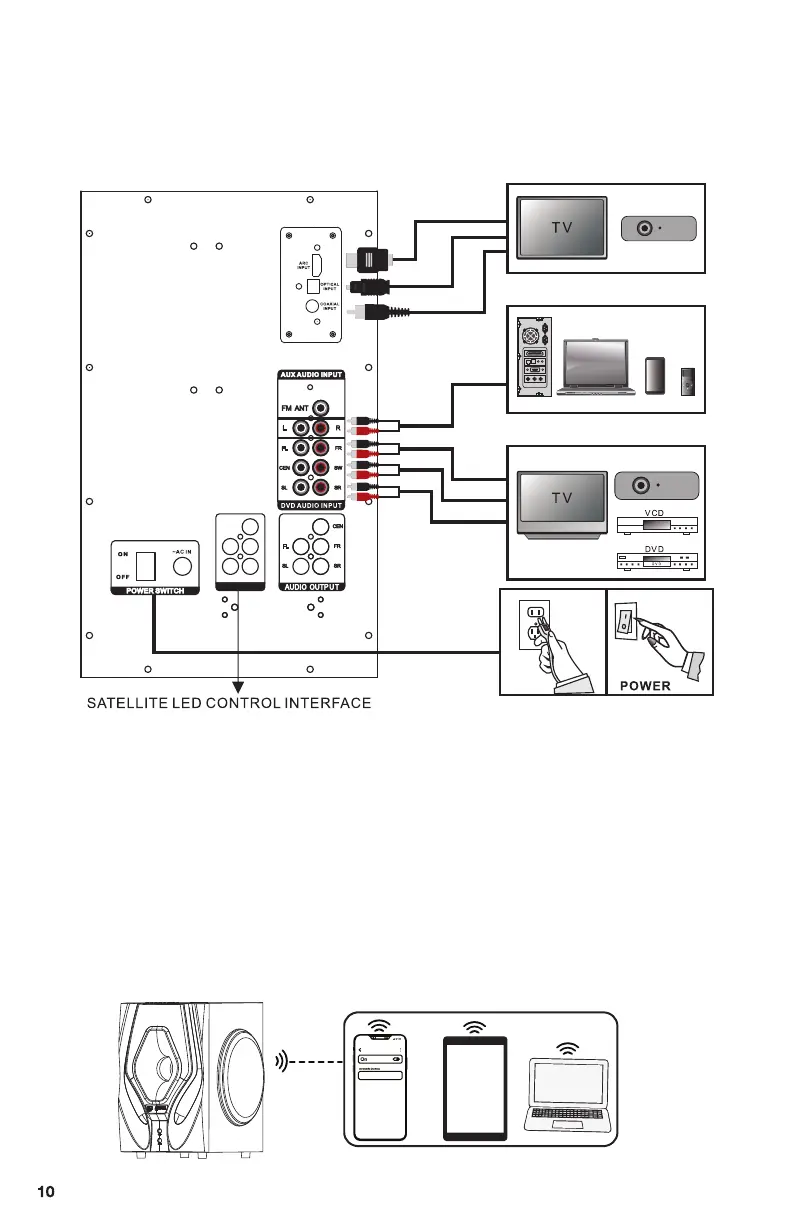
Verify that your device can be used to input sound from audio/video for
other external sound source devices, and ensure your device have an
available jack to match the appropriate port on the subwoofer.
B901 D
BT device
How to use the wireless BT
SYSTEM CONNECTION DIAGRAM
1. Make sure the 5pcs speakers are plugged into the audio output sockets of
subwoofer and power " ON " status.
2. Press the " ST.BY" button before selecting the mode.
3. Press the "INPUT" button to switch mode to“ BT ”status, which is showing
in the LED display of the subwoofer.
4. Search BT device with name" B901D "
5. Connect the BT
Note: If your BT device is below 2.0 version, input password " 0000 "
when connecting.
LED POWE R
PROJECTOR
PROJECTOR
AUX INPUT
TV ARC/OPT/COA INPUT
DVD AUDIO INPUT
MENU
COMPUTER
PC
Mp3
PHONE


 To Next Page