5
1
2
3
4
5
6
7
8
9
10
11
12
12
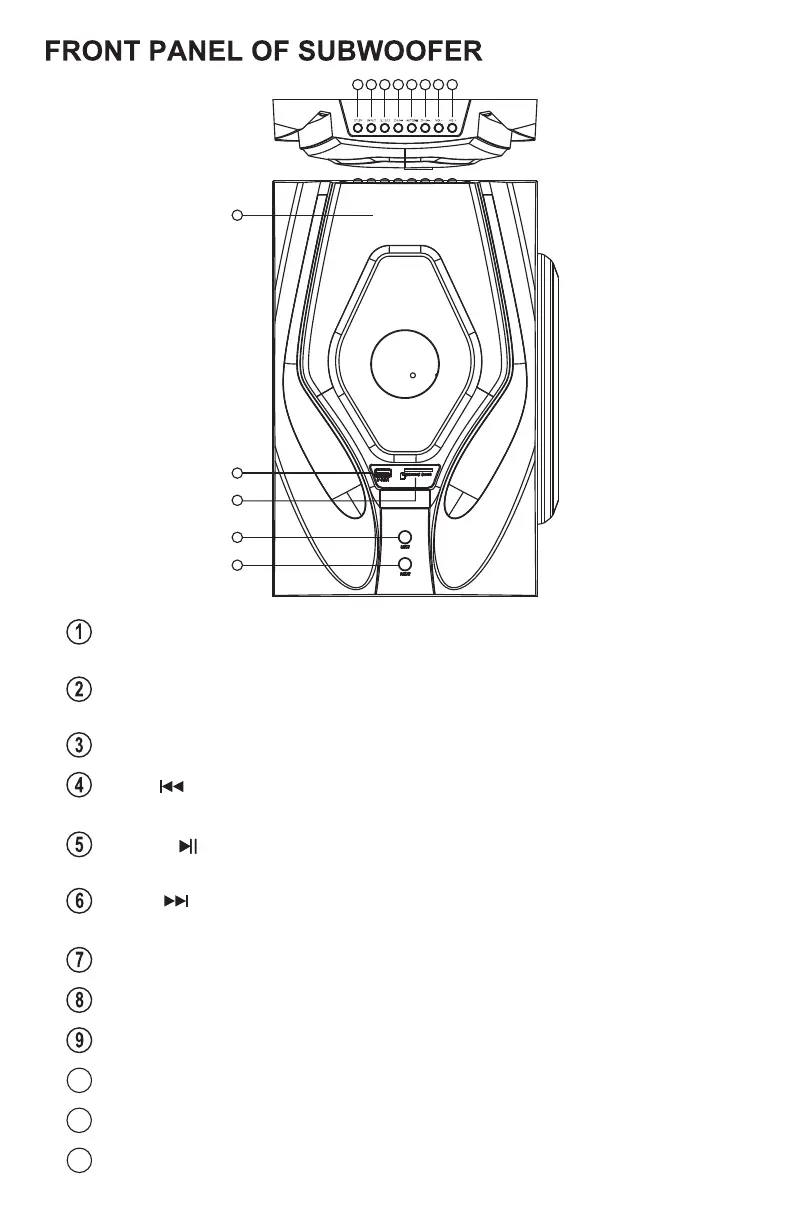
INPUT
SD/DVD/FM/BT/OPTICAL/COAXIAL/TV ARC mode.
--------------
Input function key, switch among AUX/USB/
ST.BT---------------Stand by function by pressing it 3 secs in
/SD/FM/BT/OPTICAL/COAXIAL/TV ARC mode;
AUX/SUB
5.1/2.1------------- 5.1/2.1 function key.
CH-/ ------------
Previous” function key.Previous song when USB/SD
input;Previous channel when FM input.
“
CH+/ ------------ Next” function key.Next song when USB/SD input;
Next channel when FM input.
“
AUTO/ ----------
when the automatic search and save the radio station.
USB/SD Pause/Play function key; When the FM state
VOL- --------------
Decrease the volume button.
10
U DISK------------- USB socket(max file size 64Gb)
VOL+ -------------- Increase the volume button.
11
SD/MMC CARD----SD card socket(max file size 64Gb)
Digital Display
12
MIC 1/2------------ MIC socket.


 To Next Page