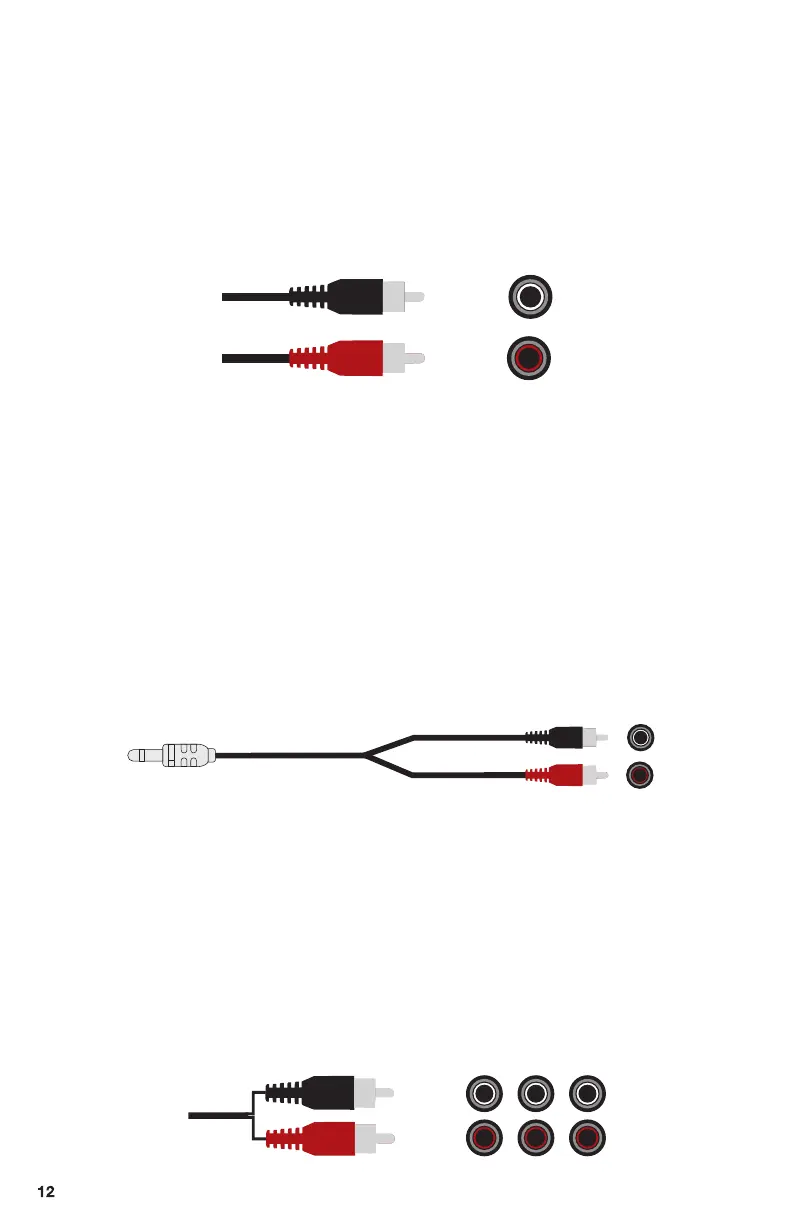
1. Plug the RCA Stereo Audio cable in back of the subwoofer. White to White
Connector, Red to Red Connector, another (White/Red) port plug into the
L&R Output slots of your device.
2. Make sure the 5pcs speakers are plugged into the audio output sockets of
subwoofer and power "ON" status.
3. Press the " ST.BY " button before selecting the mode.
4. Press the "INPUT" button to switch mode to" AU "status, showing in the
LED display of the subwoofer.
1. Plug the RCA L/R Stereo Audio cable in back of the subwoofer, White to White
Connector, Red to Red Connector, and 3.5mm AUX port plug into the
Headphone Output slot of your device.
2. Make sure the 5pcs speakers are plugged into the audio output sockets of
subwoofer and power "ON" status.
3. Press the " ST.BY " button before selecting the mode.
4. Press the "INPUT" button to switch mode to" AUX "status, showing in the
LED display of the subwoofer.
1. Plug the 3RCA Stereo Audio cable in back of the subwoofer, White to White
Connector, Red to Red Connector
2. Make sure the 5pcs speakers are plugged into the audio output sockets of
subwoofer and power "ON" status.
3. Press the " ST.BY " button before selecting the mode.
4. Press the "INPUT" button to switch mode to" DV "status, showing in the LED
display of the subwoofer.
How to connect your device by 3.5mm to RCA Audio
Stereo Cable
How to connect your device by RCA Stereo Audio Cable
How to connect your device by 3RCA Audio Stereo Cable
R
L
X 3
X 3
SW SL
FL
CEN
SR
FR
3.5mm AUX Plug
R
L


 To Next Page