7
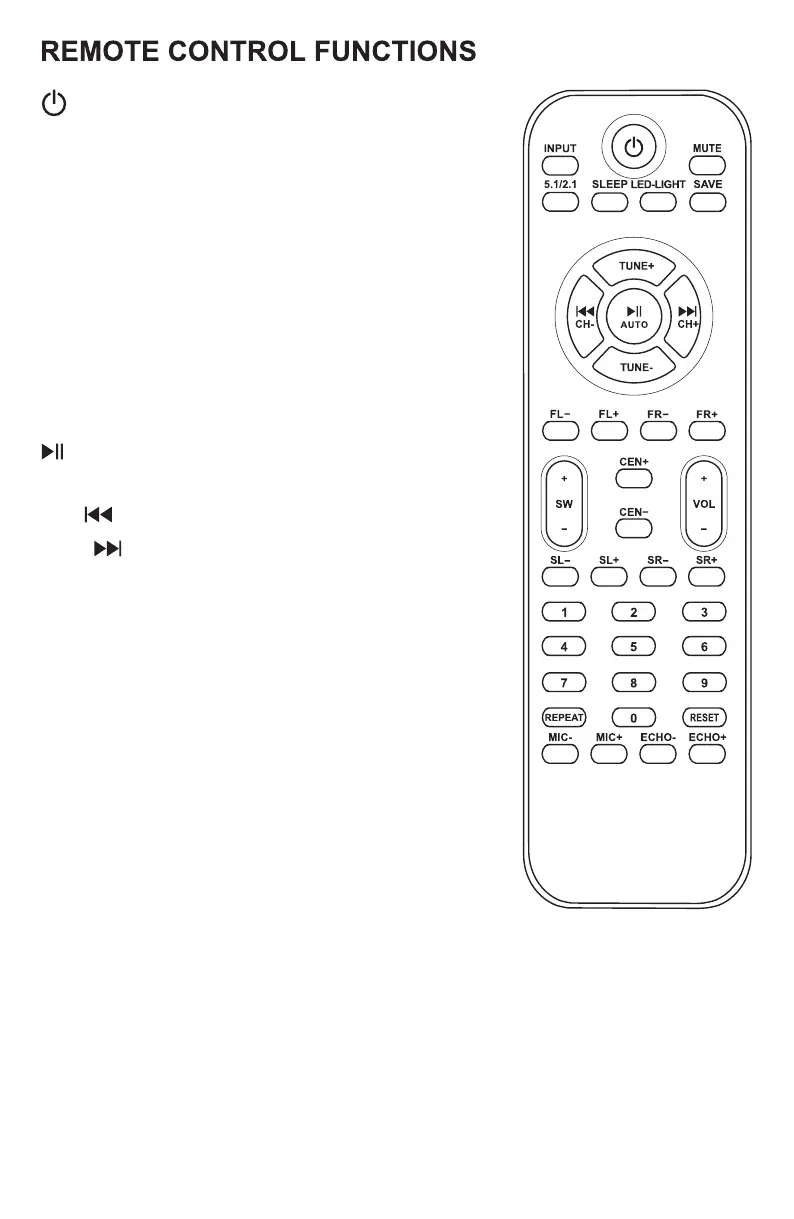
5.1/2.1: Channel mode select
SLEEP: Setting the sleep time
LED LIGHT: Long press to turn on/off the LED light of
5 small speakers;
Short press to change the Subwoofer's
light modes or turn light off.
SAVE: Save stations to unit memory
TUNE+/-: Manually tune FM stations
AUTO: Automatic station search
FL+/-: Front left speaker volume control
FR+/-: Front right speaker volume control
SW+/-: Subwoofer volume control
CEN+/-: Center speaker volume control
VOL+/-: Master volume control
SL+/-: Rear satellite left speaker volume control
SR+/-: Rear satellite right speaker volume control
0-9: Number pad used to direct select tracks when
in USB/SD mode
REPEAT: Repeat one song/repeat all songs/shuffle
RESET: Reset volume level
MIC+/-(EQ+/-):when a pair of microphone are connected,
these buttons will control the mic volume. In USB/SD mode,
they will allow you to navigate the 5 preset EQ curves. Please
note: connecting mics will override the EQ+/- function.
ECHO+/-(DISP+/-):when a pair of microphone are connected,these buttons
will control the echo effect. If there are no mics connected,
they will control the display brightness. Please note:
connecting mics will override the DISP+/- function.
INPUT: Switch between input modes:USB/SD/FM/
AUX/DVD/OPT/COA/TV ARC/BT
MUTE: Mute all output
: Play/Pause in USB/SD/BT modes
CH-/ :Previous FM station/previous track(USB/SD)
CH+/ :Next FM station/next track(USB/SD)
: Power/Standby
NOTE:
1. Turn on the unit, please press the "Power" button before selecting the input mode.
2. If the remote control does not work, please replace the batteries and try again.


 To Next Page