20
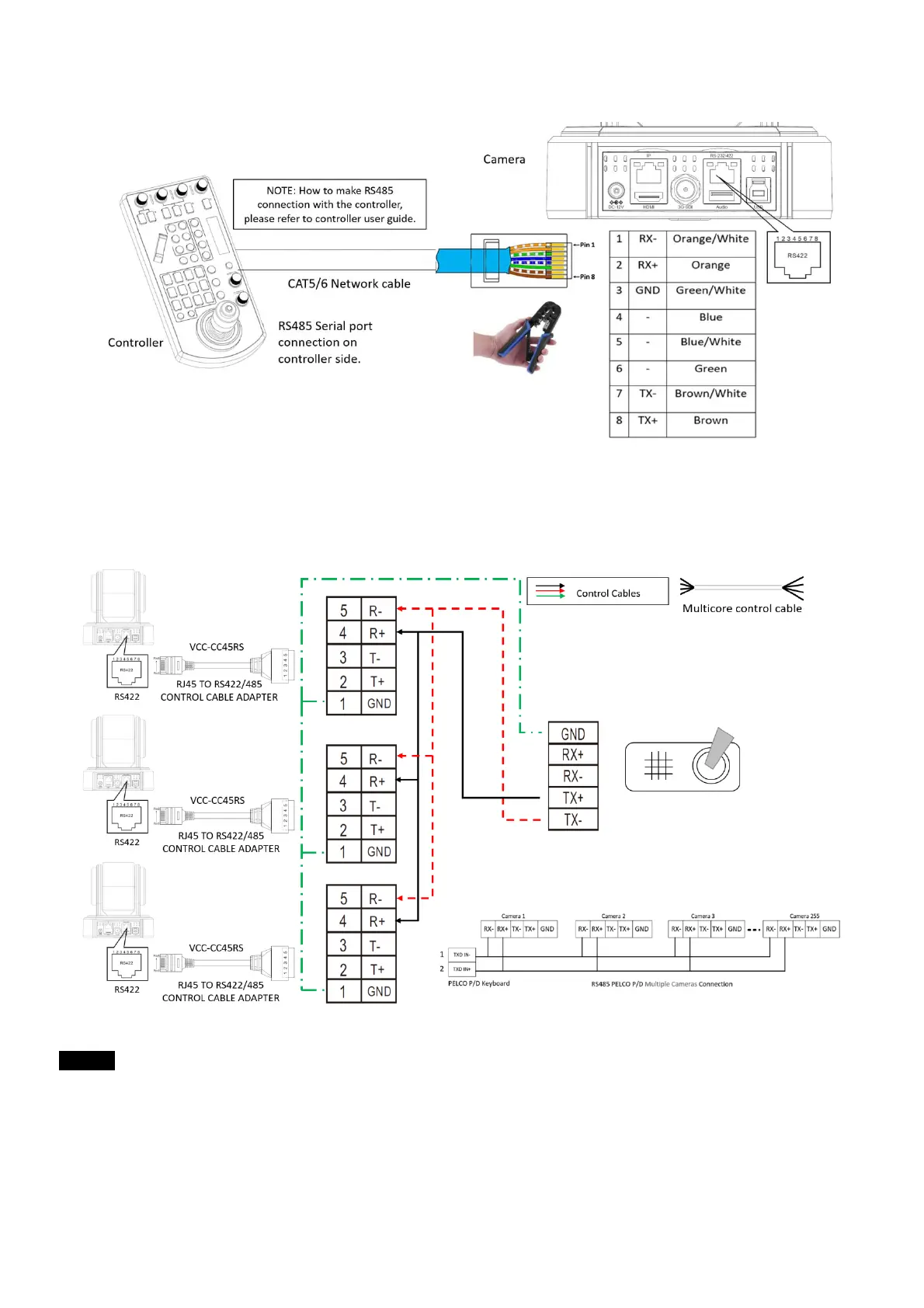
• Or you can use CAT5/6 T-568B Standard Ethernet cable direct connect between the camera and the controller to make
RS485 connection by following the pin definition below:
• How to make RS485 multiple cameras connection with RS485 standard serial port controller:
Note
For RS-232 VISCA control, this unit supports daisy chain connection for using multiple cameras.
For control details, refer to Operating Instructions of control keyboard/station software.
• You need to match the communication speed (Baud Rate) between the camera and the joystick controller.
• You cannot use the RS-232 connections while you are using the RS422/485 connection.
Operating Multiple Cameras Using RS-232,422/485
• Using RS-232 (VISCA), you can connect to 7 cameras.
• Using RS-422 (VISCA), you can connect to 7 cameras.
• Using RS-485 (PELCO), you can connect to 255 cameras.


 To Next Page