33
Recalling the stored settings
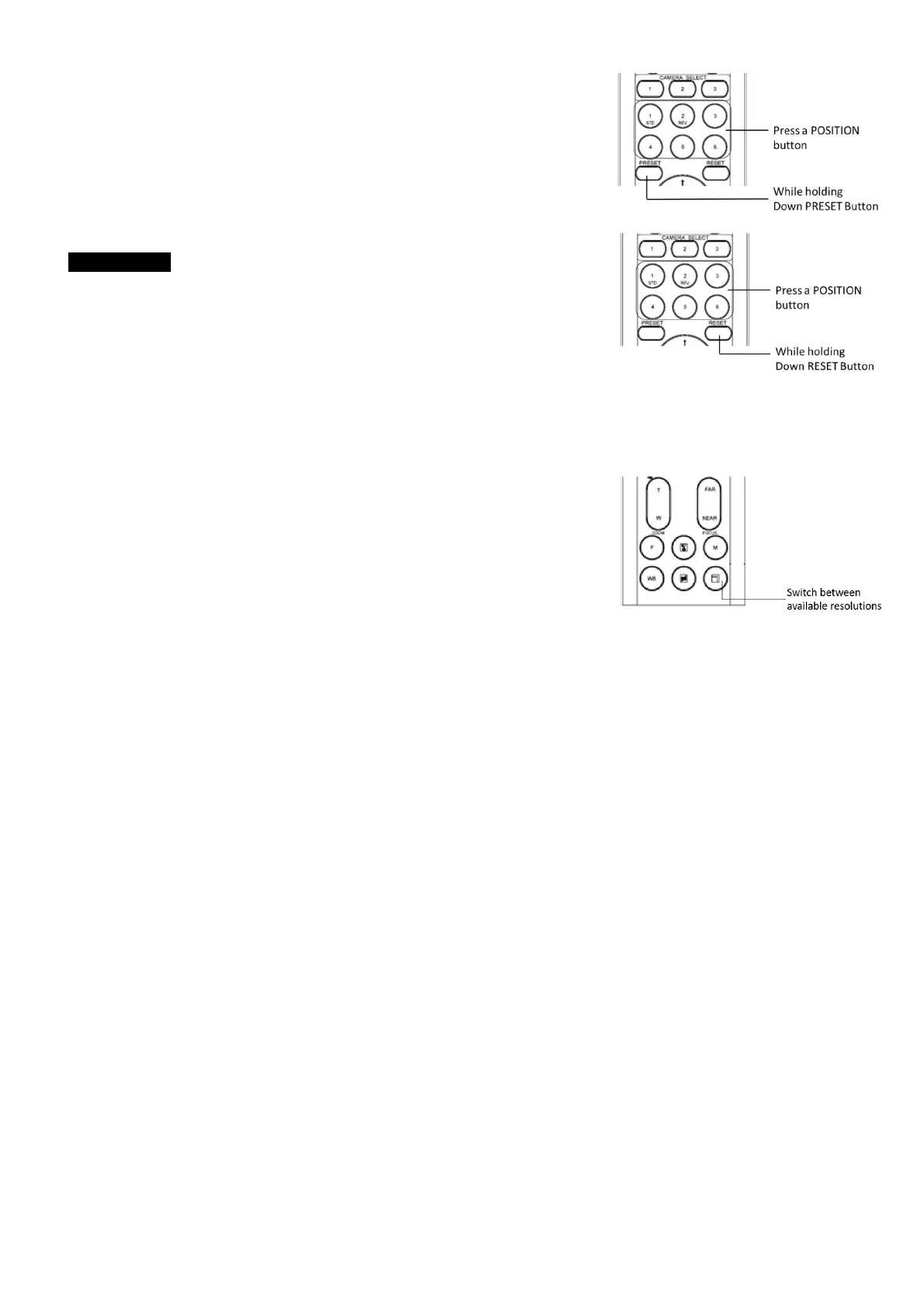
Press any of the POSITION buttons, 1] to [6], in which you have stored the
settings.
Cancelling the preset memory
While holding down the RESET button, press the POSITION button from
which you want to cancel the settings.
Notes
• When the power is turned on, the camera starts with the settings
stored in POSITION 1.
• If you want to retain the previous pan and tilt positions, etc. before
the power is turned off and turned on again, store those positions
in POSITION 1.
• When you are storing or cancelling the settings in one POSITION,
you cannot call up, store or cancel the settings in another POSITION.
• When the menu is displayed on the screen, you cannot perform the operation for storing, recalling, or
cancelling the setting. Be sure to return to the normal display before starting these operations.
Changing Resolutions
• Press the Video Format Switching button to populate a menu
where you can switch resolutions
• Use the arrow keys to navigate
• Press Home to select
• Screen will show ‘CHANGING…”
• Press Menu to exit
Menu Configuration
The menus of the camera are configured as described below. The initial settings of each item are in
bold.


 To Next Page