19
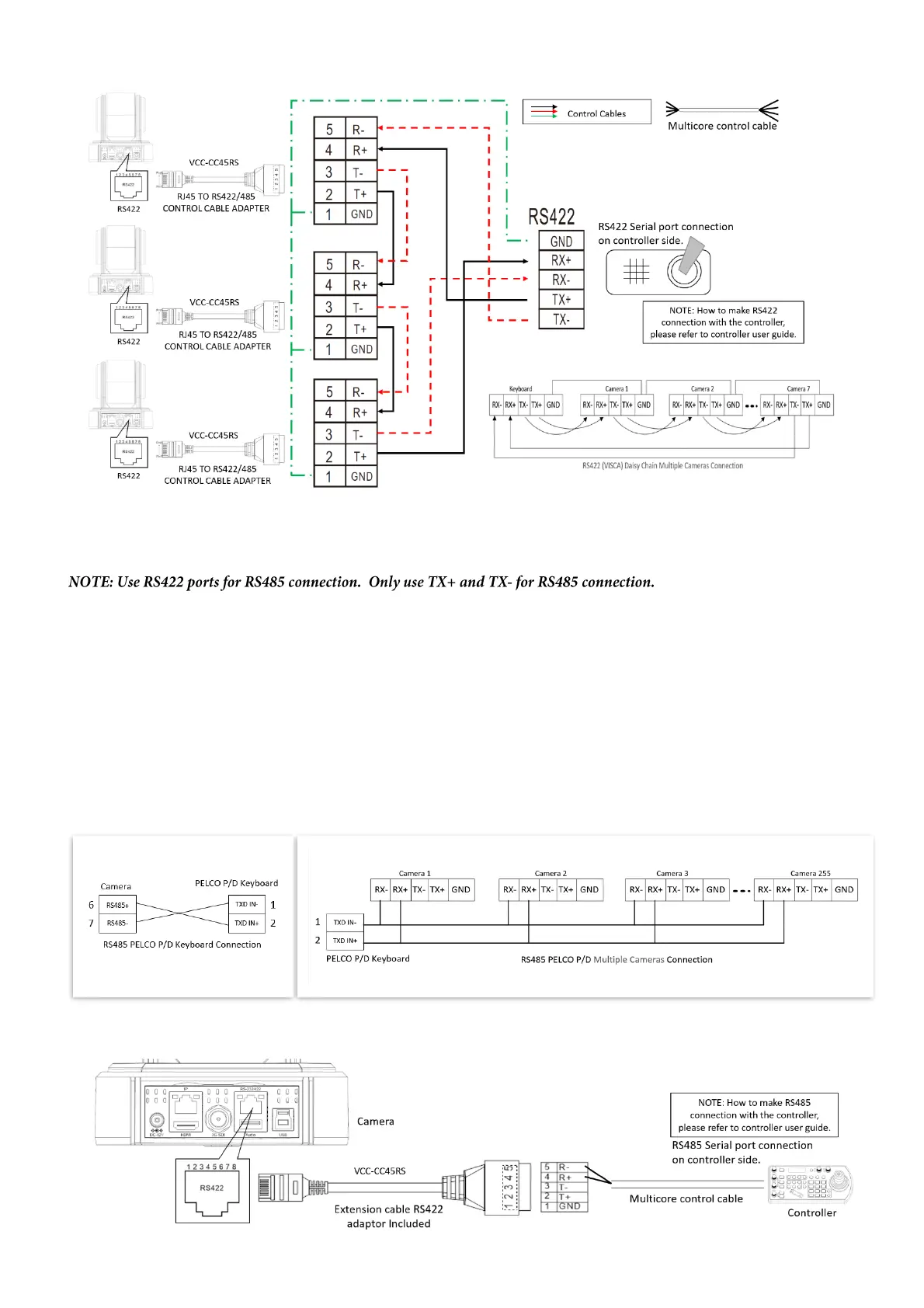
PELCO P/D Keyboard RS485 Connection
• Set RS422 control method on Bottom Dip Switch.
• Set Baud Rate on Bottom Dip Switch to the same as Baud Rate setting on the keyboard you are using.
• Set the camera ID on OSD menu by remote controller
• Reboot the camera by turning it Off/On after the Bottom Dip Switch has been set up correctly.
• Use PELCO P/D compatible keyboard.
• Use preset 95# on the keyboard to bring up/exit camera OSD menu.
• Use joystick and Button “OPEN” or “CLOSE” to navigate OSD menu.
• To operate keyboard, please refer to the user manual of the keyboard you are using.
PELCO RS485 Connection
• Use extension cables included RJ45 to RS422 Phoenix connecter adaptor to make RS485 connection for your control device.


 To Next Page