Home
Bolin Technology
Security Camera
2 Series
Page 24
Bolin Technology 2 Series - Page 24
36 pages
Manual
Save Page as PDF
To Next Page
To Next Page
To Previous Page
To Previous Page
Loading...
24
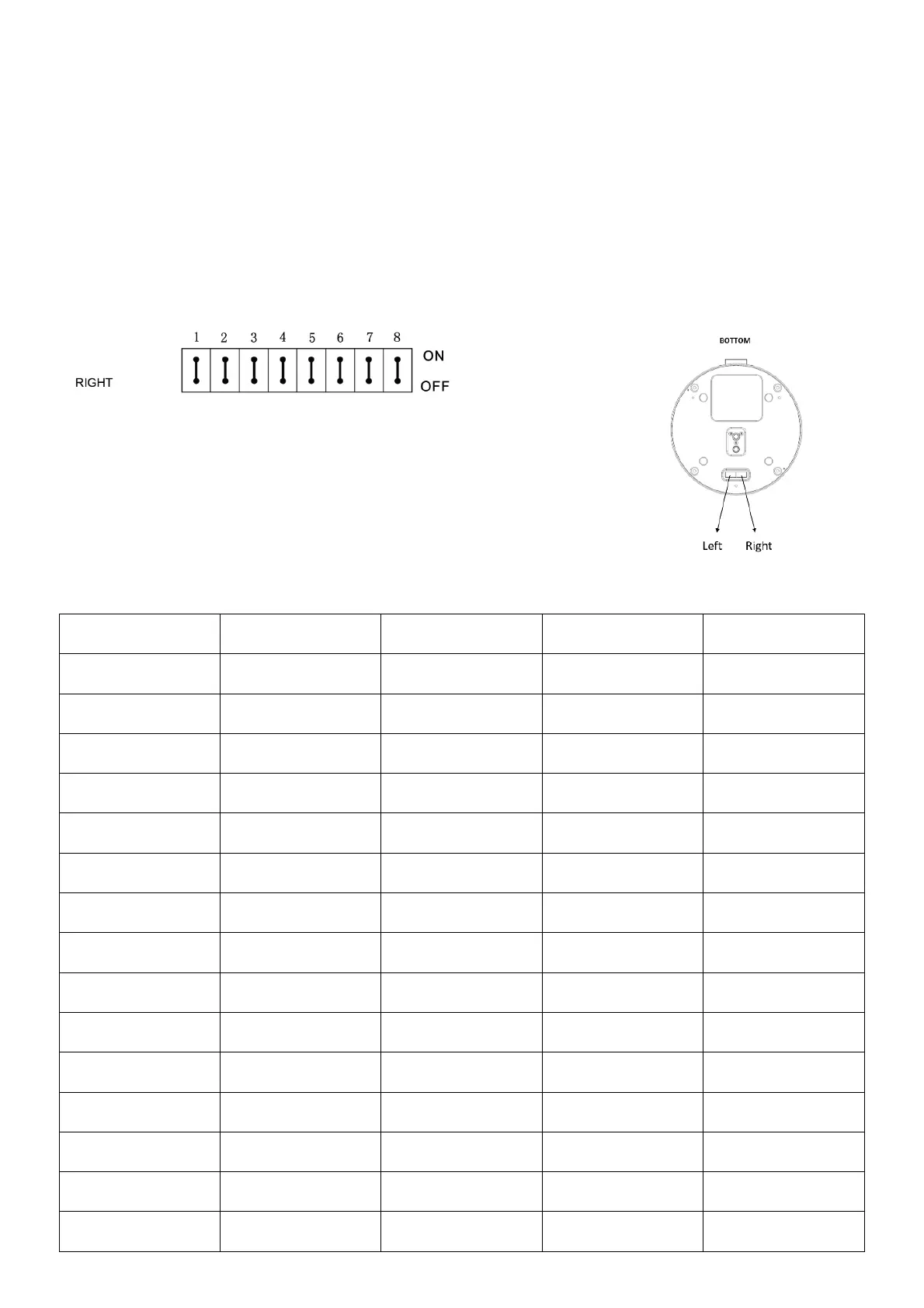
SW2:
Factory Default Setting: OFF, OFF, OFF, ON, OFF, OFF, OFF, OFF
Bit 1~4:
Video resolution setting
Bit5~6:
Reserve
Bit7~8:
IR remote controller ID setting
1.
Video Resolution Setting
B1
B2
B3
B4
Video Resolution
OFF
OFF
OFF
OFF
1080i59.94
OFF
OFF
OFF
ON
1080p29.97
OFF
OFF
ON
OFF
720p59.94
OFF
OFF
ON
ON
1080p59.94
OFF
ON
OFF
OFF
Empty
OFF
ON
OFF
ON
1080i60
OFF
ON
ON
OFF
1080p30
OFF
ON
ON
ON
1080p60
ON
OFF
OFF
OFF
1080i50
ON
OFF
OFF
ON
1080p25
ON
OFF
ON
OFF
720p50
ON
OFF
ON
ON
1080p50
ON
ON
OFF
OFF
Empty
ON
ON
OFF
ON
Empty
ON
ON
ON
ON
720p60
23
25
Table of Contents
Main Page
Table of Contents
2
Important Information
3
What's in the Box
6
Overview
7
Camera Diagrams
8
Remote Controller
9
System Configuration
10
Obtain Video Signal
11
Audio in / out
14
Camera Control Methods and System Configurations
15
Use the Infrared Remote Controller
15
Use Rs-232 (Visca)
15
Use Rs-422(Visca) / Rs485 (Pelco P/D)
17
Rs422 (Visca) Connection
17
Pelco P/D Keyboard Rs485 Connection
19
How to Make the Connection with Bolin Products
21
Visca over Ip Control
21
Visca over Ip Network Configuration
21
Dip Switch Settings
22
Adjusting and Setting with Menus
25
Exposure Menu
26
White Balance Menu
27
Picture Menu
28
Pan Tilt Zoom Menu
28
System Menu
29
Upgrading Mcu Firmware
30
Operation Using the Infrared Remote Controller
30
Pan/Tilt and Zoom Operation
30
Operating Multiple Cameras with the Infrared Remote Controller
31
Adjusting the Camera
31
Storing the Camera Settings in Memory - the Presetting Feature
32
Menu Configuration
33
Dimension
34
Related product manuals
Bolin Technology EX1030BHD-L5NA
65 pages
Bolin Technology KBD-1010
31 pages
VCC-M2H10BI-4FN1
36 pages
Bolin Technology 7 Series
34 pages
Bolin Technology VCC-7HD30S-3SMN
34 pages
Bolin Technology VCC-7HD20S-3SMC
33 pages


 To Next Page