12
Information of the camera initial setting status will display for 5 seconds.
1. Camera PELCO ID for RS-485 control
2. Camera ID for IR Remote Controller
3. IR remote control signal receive current setting
4. Baud Rate current setting
5. Control COMM Port current setting
6. Video format current setting
7. HDMI current setting
8. Model number
9. Firmware version
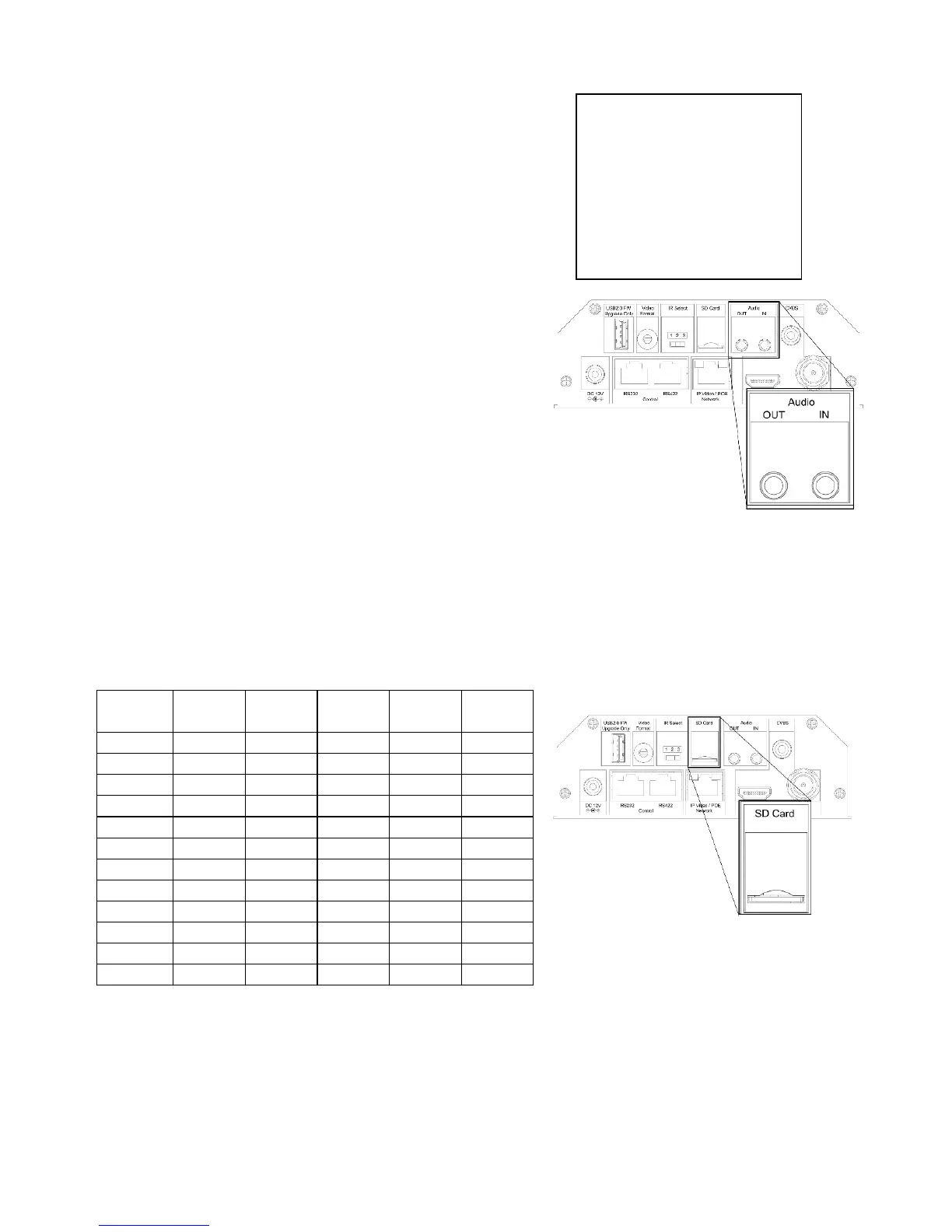
Audio IN / OUT
A microphone can be connected to the Audio IN port, which
feeds audio into the camera
A speaker can be connected to the Audio OUT port, which
will output any audio that is captured on the Audio In port
See Manual part 2 for more information about Audio capture
SD Card
Micro SD card can be inserted to the camera for local recording.
Ensure that the Micro SD card’s pins are faced downward (logo faced up)
Slide the card into the slot, and click into place
To remove the card, click inward, and it will pop outward and may be removed
See Manual part 2 for more information regarding SD recording
Currently, the following Micro SD cards are supported:
Kingston 16GB exFAT SDHC 10 IU1
Kingston 32GB FAT32 SDHC 10 IU1
Kingston 32GB exFAT SDHC 10 IU1
Kingston 64GB exFAT SDXC 10 IU1
Kingston 128GB exFAT SDXC 10 IU1
Samsung 32GB FAT32 SDHC 10 UHS-I (1)
Samsung 32GB exFAT SDHC 10 UHS-I (1)
Samsung 32GB FAT32 SDHC 10 UHS-I (1)
Samsung 32GB exFAT SDHC 10 UHS-I (1)
Samsung 64GB exFAT SDXC 10 UHS-I (3)
Toshiba 32GB FAT32 NA 10 U1
Toshiba 32GB exFAT NA 10 U1


 To Next Page