20
DIP SWITCH SETTINGS
The Dip switches are for setting the camera configuration for following items:
1. Camera ID Address for RS-485 PELCO protocol
2. Video output / Video color space
3. RS-232 / RS-422/485 selection
4. RS-232 / RS-422/485 baud rate
5. Video resolutions selection
6. IR remote controller ID
Setting of the BOTTOM DIP Switches
Turn off power to the camera before changing the DIP switch settings.
Power on the camera to have the new Dip Switch setting activated.
From the above list, No.1 Camera ID address and NO.2 Video resolution settings can be set in camera OSD menu as
well. The camera takes either the way of OSD menu setting or the way of bottom DIP switch setting. They override each
other. After the camera is turned on, the camera takes the last setting before it is turned on, either set through the OSD or
bottom DIP switch.
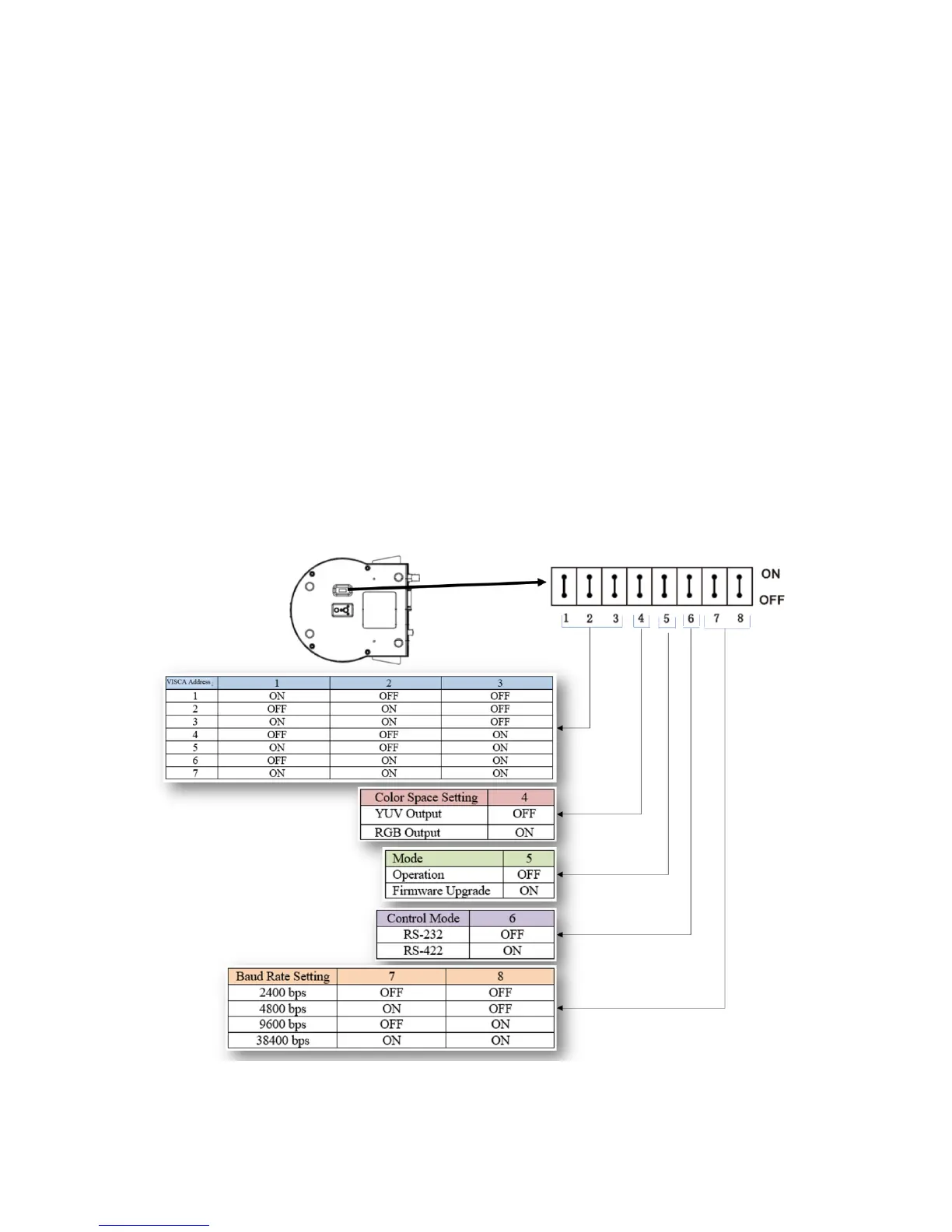
The Bottom DIP Switch Settings
Bit 1~3: Camera Address setting for VISCA protocol
Bit 4: Video Output/Video Color Space
Bit 5: Reserve
Bit 6: RS-232/RS-422
Bit 7~8: RS-232/RS-422 Baud Rate
Setting of the back panel Rotate DIP Switches
The Rotate Dip Switch is for setting video format.
Use small screw driver to turn the switch, the arrow points to the Numbers or the Letters. The video format that the
Number or Letter stands for refer to the video format as the chart following:


 To Next Page