Menu Adjustments
Audio Settings
The Audio menu offers options to make sound enhancements while listening through the built-in speakers or to
select digital audio options when connected to a Dolby Digital receiver though an optical digital output.
How to Navigate:
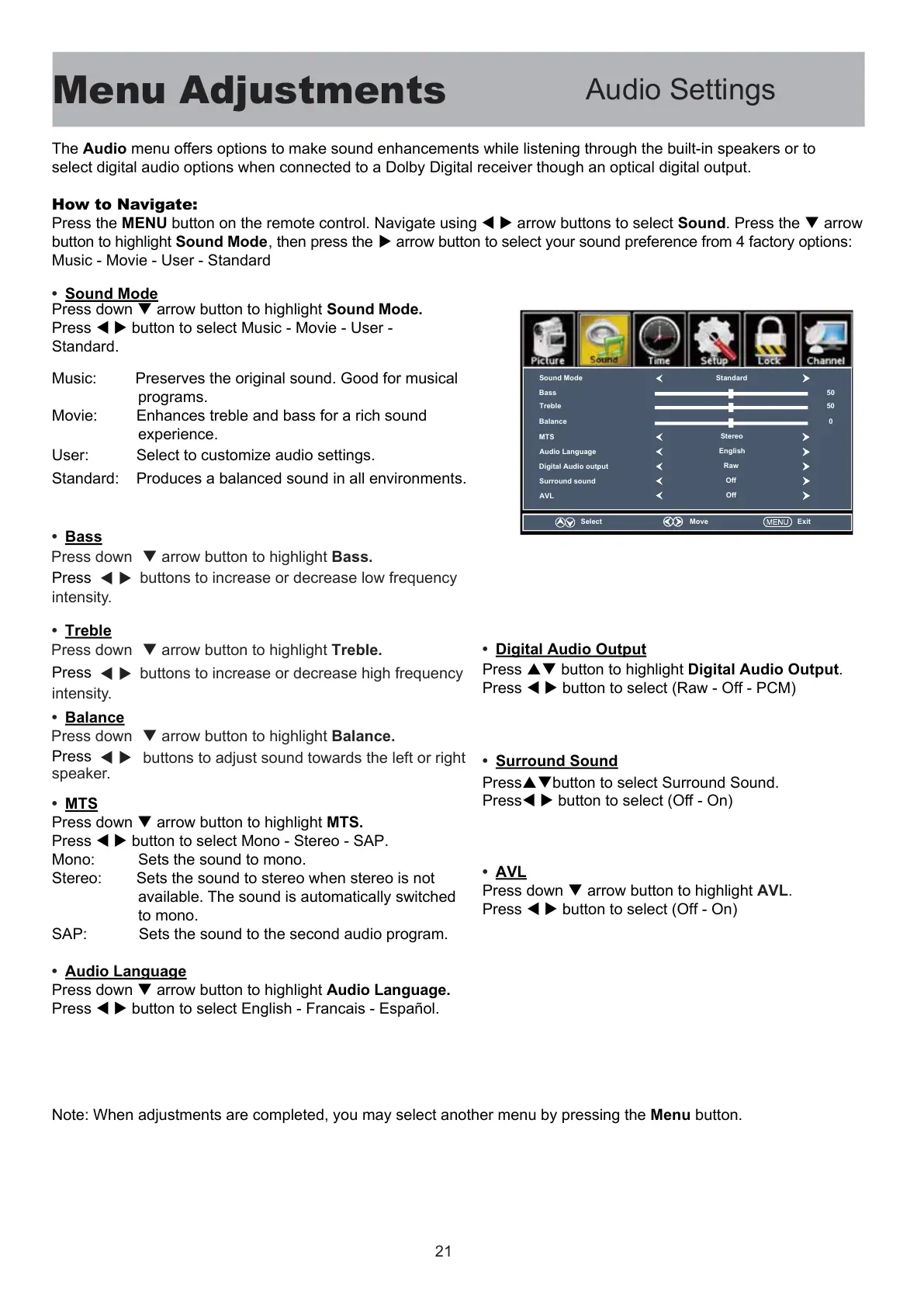
Press the MENU button on the remote control. Navigate using W X arrow buttons to select Sound. Press the T arrow
button to highlight Sound Mode, then press the X arrow button to select your sound preference from 4 factory options:
Music - Movie - User - Standard
Press down T arrow button to highlight Sound Mode.
Press
Press
W X button to select Music - Movie - User -
Standard.
Music: Preserves the original sound. Good for musical
programs.
Movie: Enhances treble and bass for a rich sound
experience.
User: Select to customize audio settings.
Standard: Produces a balanced sound in all environments.
• MTS
Press down T arrow button to highlight MTS.
Press W X button to select Mono - Stereo - SAP.
Mono: Sets the sound to mono.
Stereo: Sets the sound to stereo when stereo is not
available. The sound is automatically switched
to mono.
SAP: Sets the sound to the second audio program.
• Audio Language
Press down T arrow button to highlight Audio Language.
Press W X button to select English - Francais - Español.
• Digital Audio Output
Press ST button to highlight Digital Audio Output.
Press W X button to select (Raw - Off - PCM)
• Surround Sound
PressSTbutton to select Surround Sound.
PressW X button to select (Off - On)
• AVL
Press down T arrow button to highlight AVL.
Press W X button to select (Off - On)
Note: When adjustments are completed, you may select another menu by pressing the Menu button.
• Sound Mode
• Bass
• Treble
• Balance
Press down T arrow button to highlight Bass.
Press down T arrow button to highlight Treble.
Press down T arrow button to highlight Balance.
W X
Press
W X
buttons to increase or decrease low frequency
Press
W X
buttons to increase or decrease high frequency
intensity.
intensity.
buttons to adjust sound towards the left or right
speaker.
Sound Mode
Bass
Treble
Balance
MTS
Standard
50
50
0
Digital Audio output
Audio Language
Surround sound
AVL
Stereo
English
Off
Raw
Off
Select
Move
Exit
21



 To Next Page