마스터 부제목 스타일 편집
36
For your beautiful and comfortable life, BOMTECH skin diagnosis system A-ONE
Ⅲ. Instruction
5. Configuration
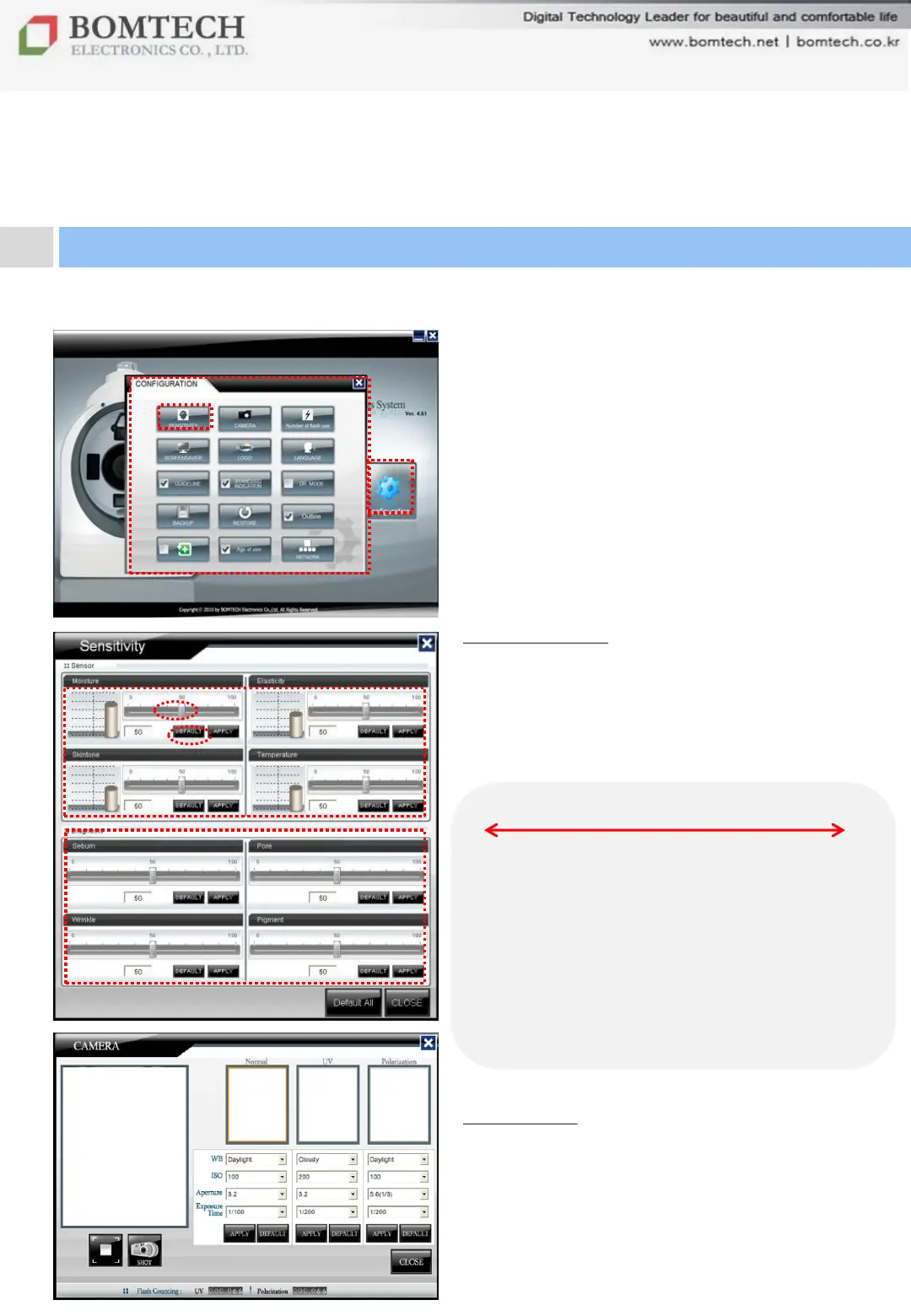
Click „Configuration‟ on the start-up page.
1) Sensitivity
To adjust the sensitivity of each
diagnosis value
Adjust the sensitivity by pulling the bar
and click „APPLY‟.
** Default value: 50
2) Camera
To adjust camera setting such as WB,
ISO, aperture, normal light, UV light,
polarization light.. etc.
We recommend to maintain factory
default.)
100
Moisture: Much
Elasticity: Higher
Skin tone: Brighter
Temperature: Higher
Sebum: Much
Pore: Larger
Wrinkle: Thicker
Pigmentation: Worse
0
Moisture: Less
Elasticity: Lower
Skin tone: Darker
Temperature: Lower
Sebum: Less
Pore: Smaller
Wrinkle: Thinner
Pigmentation: Better


 To Next Page