11
11
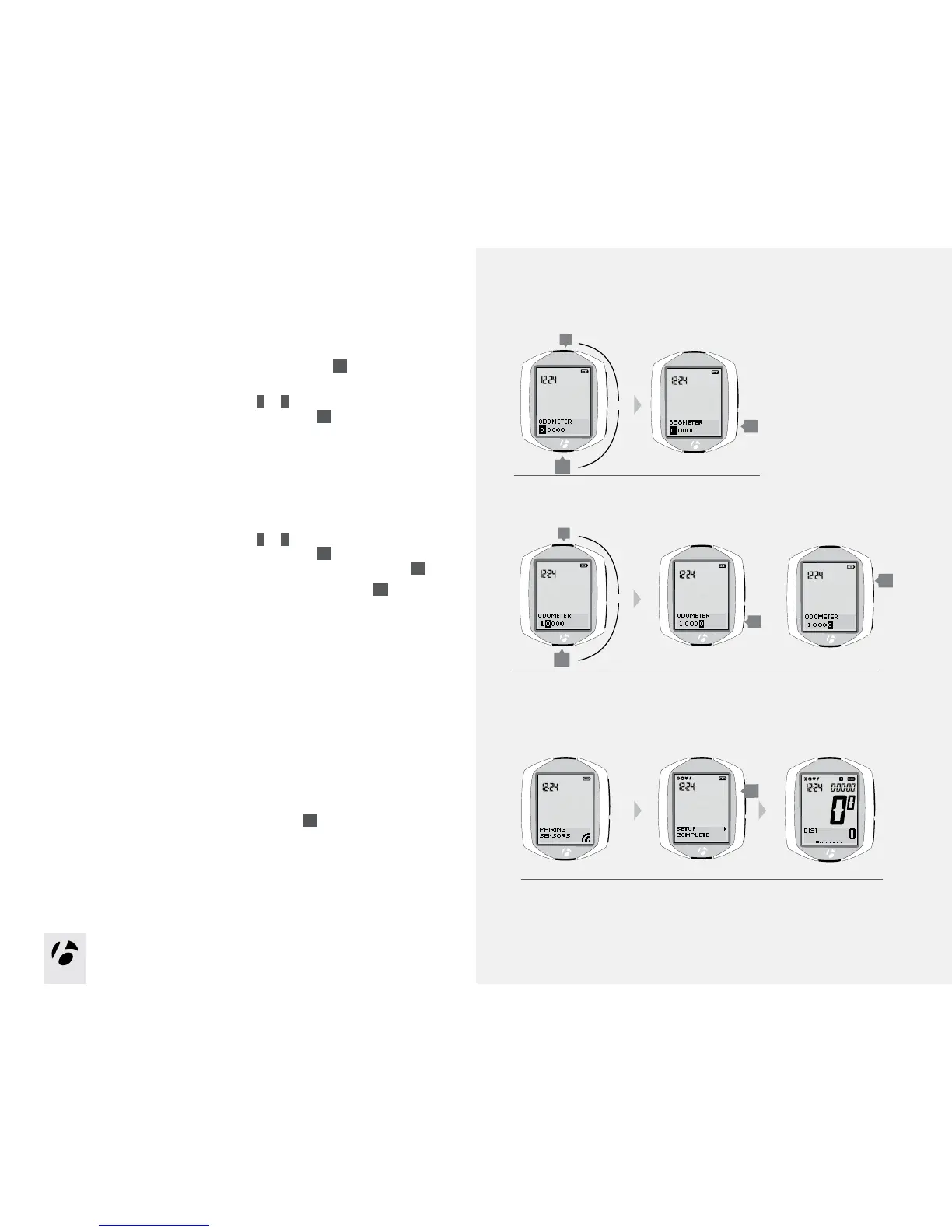
8. The odometer shows your accumulated distance.
You can skip this step and leave the value at 00000 by pressing
s1
,
and then go to step 10.
To change the highlighted number, press
T
or
B
.
To select a value and proceed to the next digit, press
s2
.
9. Repeat for each of the other four digits:
To change the highlighted number, press
T
or
B
.
To select a value and proceed to the next digit, press
s2
.
If desired, you can go back to the first digit (and then the other digits) by pressing
s2
.
To save the Odometer and proceed to the Pairing Process, press
s1
.
10. After saving the odometer settings, the Node goes into the Pairing Process.
For the Node to Pair to a sensor signal, you must activate the sensor so that
it sends a signal:
•Speed:spinthewheel
•Cadence:rotatethecrankarm
•Heartrate:wearthecheststrap
•Power:rotatethecrankarm(or,forahubsensor,turnthewheel)
The next page explains the display during pairing.
11. When the screen shows “Setup Complete,” press
s1
to save all your settings
and switch to the Ride mode.
8.
10.
T
B
9.
T
B
s2
s1
s2
s1
or
or



 To Next Page