Robert Bosch GmbH
Oper ation | BAT 490 | BAT 490 | | 7
en
4.4 Battery charging
4.4.1 Charging with "Standard" charging characte-
ristic
t
U
I
t1
t2
U
1
I
1
I
2
U
2
U
3
t3
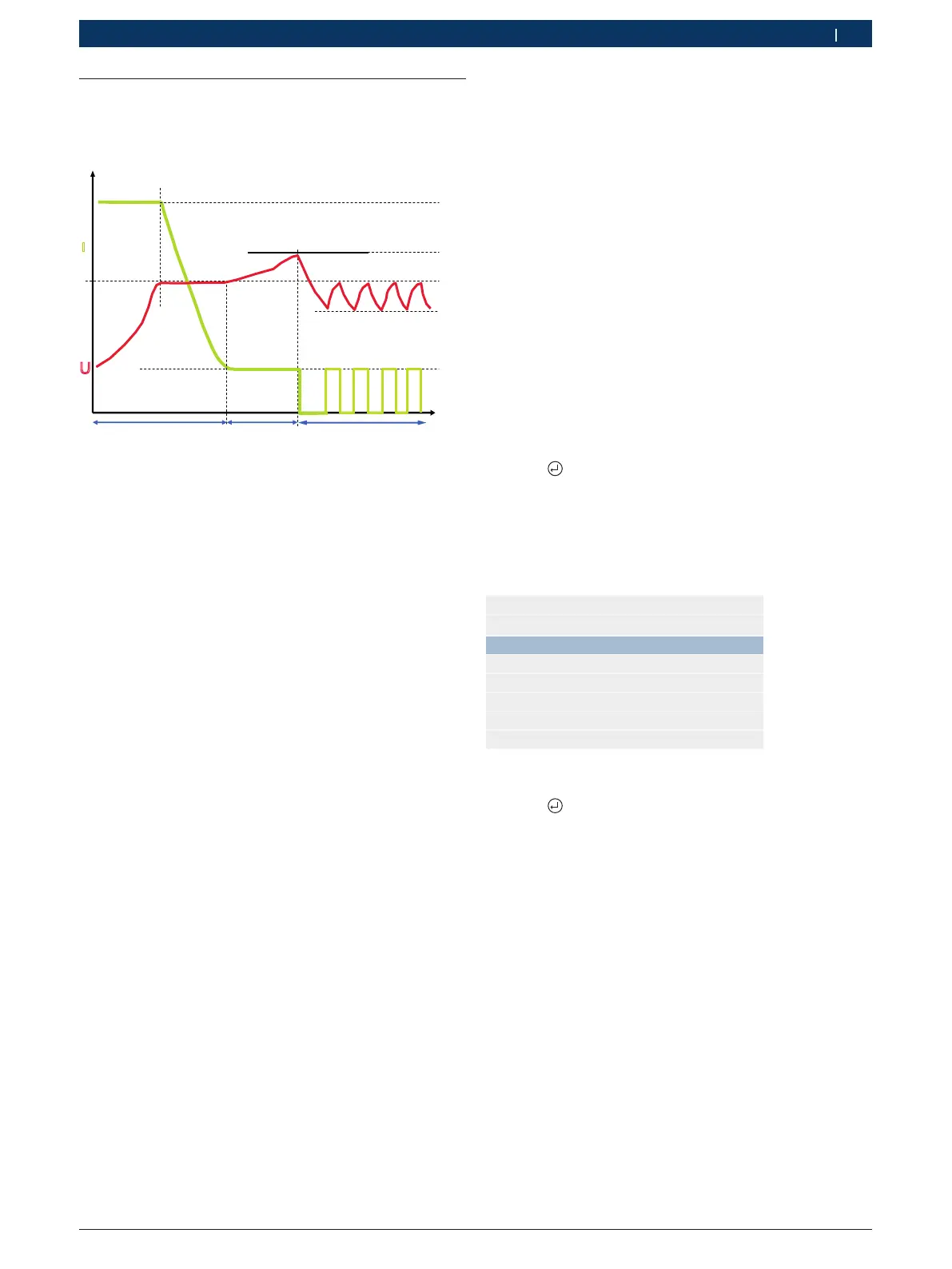
Fig. 4: "Standard" charging characteristic
I
1
= 20 % of set battery capacity
I
2
= 2 % of set battery capacity
U
1
=
14.0 V – 14.4 V (12 V)
28.0 V – 28.8 V (24 V)
U
2
= 14.4 V – 14.8 V (12 V)
28.8 V – 29.6 V (24 V)
U
3
=
12.8 V / 25.6 V
Phase 1 (t1): Main charging, green LED flashes
rapidly
The charging current I
1
is approx. 20 % of the set batte-
ry capacity. Once the battery has attained the charging
cut-off voltage U
1
, the charging current I
1
starts to de-
crease. Approx. 65
% of the battery capacity has then
been attained. The battery is ready for use as a starter
battery. Phase 1 is over when the charging current I
1
drops below approx. 2
% of the battery capacity. The
battery is then approx. 97
% charged.
Phase 2 (t2): Secondary charging, green LED flashes
slowly
The charging current I
2
is approx. 2 % of the set battery
capacity. Phase 2 is time-controlled with a duration cor-
responding to 65
% of the phase 1 time. The charging
voltage is restricted to U
2
.
Phase 3 (t3): Trickle charging, green LED lights
The charging current is always activated when the
battery voltage drops below U
3
. The charging current
remains active until the charging voltage U
1
is attained
again.
Example:
For a set battery capacity of 80 Ah, the charging current I
1
is approx. 16 A and the charging current I
2
approx. 1.6 A.
i The battery need not be disconnected from the ve-
hicle electrical system during charging.
i The BAT 490 automatically detects whether a 12 V or
a 24 V battery is connected.
If the voltage of the 24 V battery is less than 17 V,
each of the two series-connected 12 V batteries
must be charged separately.
Below 17 V, the BAT 490 only detects a 12 V battery
and charging would therefore also only be performed
for a 12 V battery.
1. Switch on the BAT 490 by way of the on/off switch
(Fig. 2, Pos. 1).
? The red LED (Fig. 1, Pos. 3) lights.
2. Connect the red charging clip to the positi-
ve post (+).
3. Connect the black charging clip to the negati-
ve post (–).
4. Press .
? The battery voltage is displayed for three seconds
and the "Modes" menu then appears.
i The BAT 490 modes are only displayed if a battery is
connected.
Mode
Standard charging
Expert charging
Buffer mode
Backup mode
5. Select "Standard charging" mode.
6. Press
.


 To Next Page