Robert Bosch GmbH
Oper ation | BAT 490 | BAT 490 | 9 | en
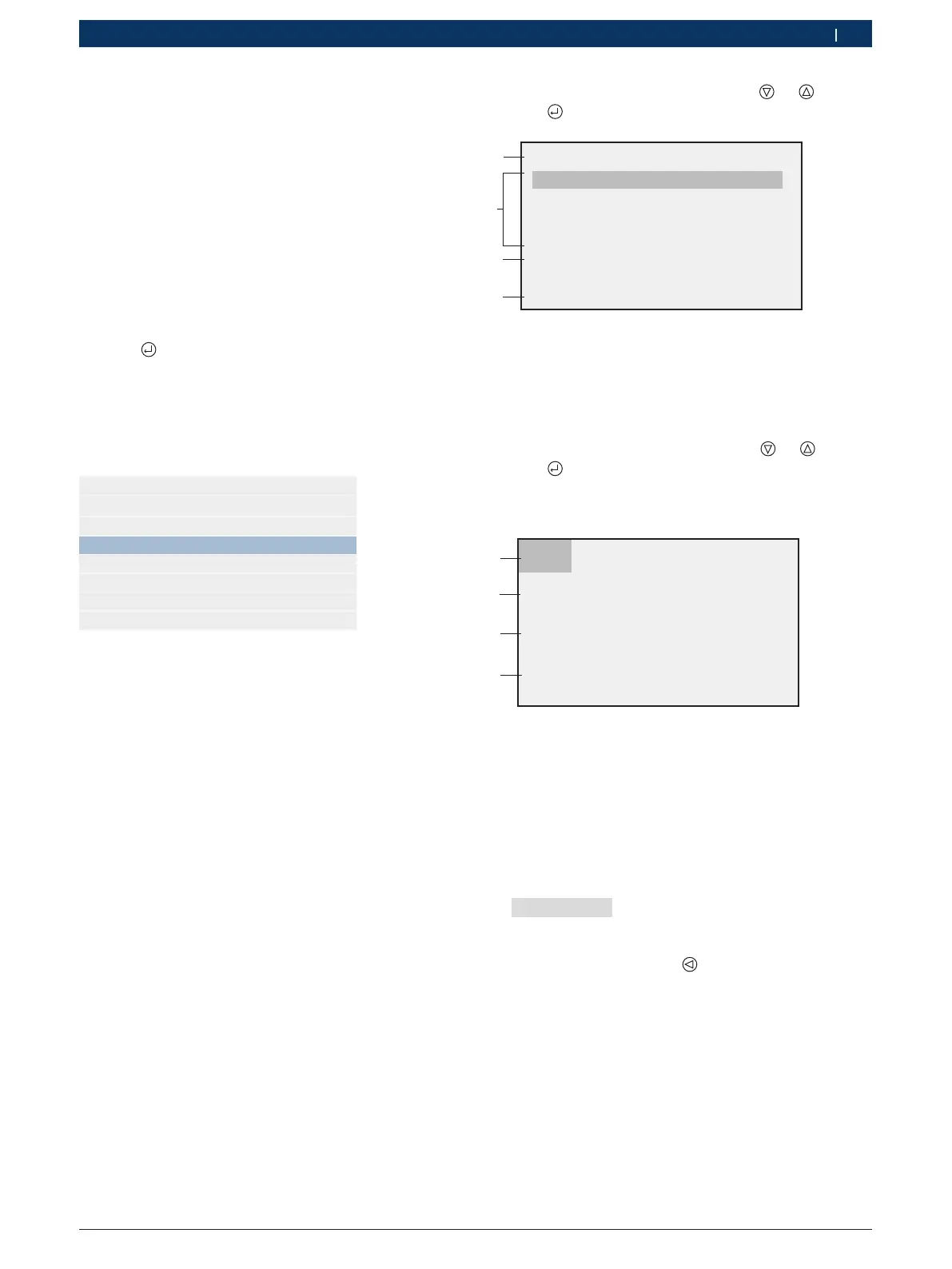
5. Select "Expert charging" mode with or .
6. Press .
I U1 o U2
30A 14,2V 1,5A 13,4V
Expert charging 12V
1
4
3
60A 14,2V 3,0A 13,4V
30A 14,7V 1,8A 13,7V
60A 14,7V 3,6A 13,7V
24V charging
2
Fig. 7: Expert charging parameters
1 Parameters (refer to charging characteristic Fig. 6)
2 12 V parameter sets
3 Call-up of 24 V parameter sets
4 Display of mode selected (12 V or 24 V)
7. Select parameter characteristic with or .
8. Press .
? The green LED flashes (Fig. 1, Pos. 4).
? The battery is charged.
I U1 o U2
23Ah charged
13,47V 65,0A
Expert charging
60A 14,4V 3,0A 13,4V
1
4
3
2
Fig. 8: Expert charging
1 Charging progress (refer to charging characteristic Fig. 6)
2 Charging current supplied so far
3 Current battery charge
4 Information on mode and parameter set selected
i For exhausted batteries, the BAT 490 initially em-
ploys soft charging. The charging current level is
governed by parameter I (15 % of I). The message
"Soft charge" appears on the display and the
green and yellow LEDs flash at 1-second intervals.
9. Charging is stopped with
or by disconnecting the
charging clips.
? The yellow LED is off.
? The "Modes" menu is displayed.
i If charging is interrupted, the process must be
re-started.
10. Switch off the BAT 490 on completion of charging.
11. Remove the charging clips from the battery.
In the "Expert-charger" menu, 12 V and 24 V batteries
are charged on the basis of certain parameters. For the
two types of battery there are four parameter sets each
which can be configured in the "Parameters" menu
(refer to Section 5.1).
1. Switch on the BAT 490 by way of the on/off switch
(Fig. 2, Pos. 1).
? The red LED (Fig. 1, Pos. 3) lights.
2. Connect the red charging clip to the positi-
ve post (+).
3. Connect the black charging clip to the negati-
ve post (–).
4. Press .
? The battery voltage is displayed for three seconds
and the "Modes" menu then appears.
i The BAT 490 modes are only displayed if a battery is
connected.
Mode
Standard charging
Expert charging
Buffer mode
Backup mode


 To Next Page