12
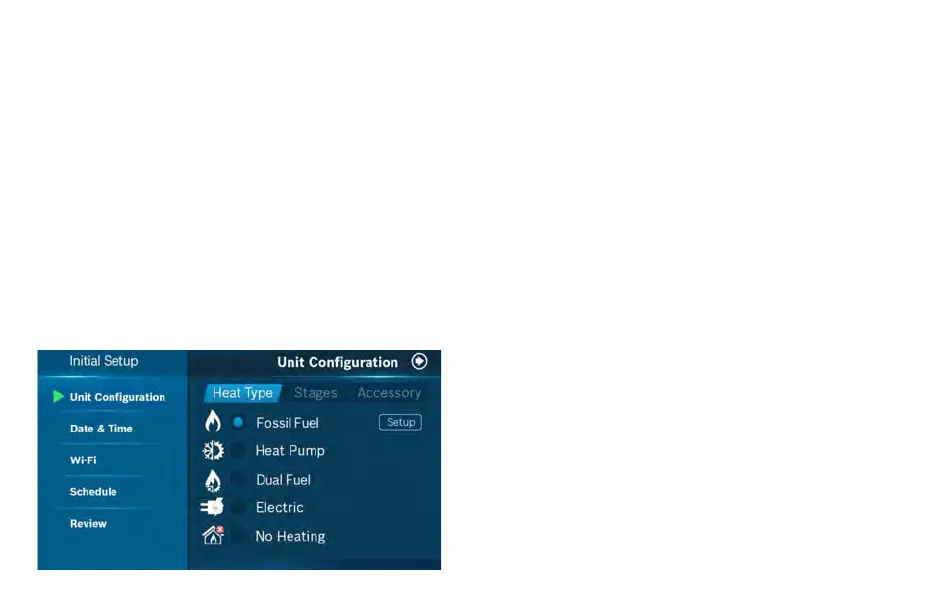
Initial Setup
If you have a dual fuel system
1. Select Dual Fuel and click the Next Arrow at the
top right corner of the screen.
2. Then follow the on-screen instructions to configure the fossil
fuel fan control settings
3. Click Next Arrow at the top right corner of the screen.
Then follow the on-screen instructions to configure
the heat pump dual fuel changeover settings.
If you have a furnace
1. Select Fossil Fuel and click the Next Arrow at the top right
corner of the screen.
2. Then select Appliance or Thermostat depending on your
personal preferences for fan control.
3. Click Next Arrow at the top right corner of the screen.
If you have a heat pump
1. Select Heat Pump and click the Next Arrow at the top right
corner of the screen.
2. Then follow the on-screen instructions.
3. Click Next Arrow at the top right corner of the screen.
4. Configure the reversing valve for O (energized in cool)
or B (energized in heat) and enable/disable Emergency
Heat and/or Auxiliary Heat.
If you have a boiler
1. Select Fossil Fuel and click the Next Arrow at the top right
corner of the screen.
2. Then select Appliance
3. Click Next Arrow at the top right corner of the screen.
Unit Configuration
Select your home’s heating type, stage configuration for heating
and cooling, and type of accessory (humidifier or dehumidifier) if
available.
Select your heat type
Select your Heat Type according to the heating appliance located in
your home. Below is a list of helpful tips that may guide you to
selecting the correct option for your home.
Note: If you are unsure of which option to select, contact
your local contractor or our support line: 1-800-283-3787.
For a quick and easy way to begin using your new smart thermostat,
the device will automatically direct you to the
Initial Setup screen after you have turned it on for the first time.


 To Next Page