37
Device Information
Device information will contain all the relevant Account and System
information.
Account: Change or remove the account associated with
the thermostat.
System: Displays the current hardware and software
information. This screen can also be used to update the firmware.
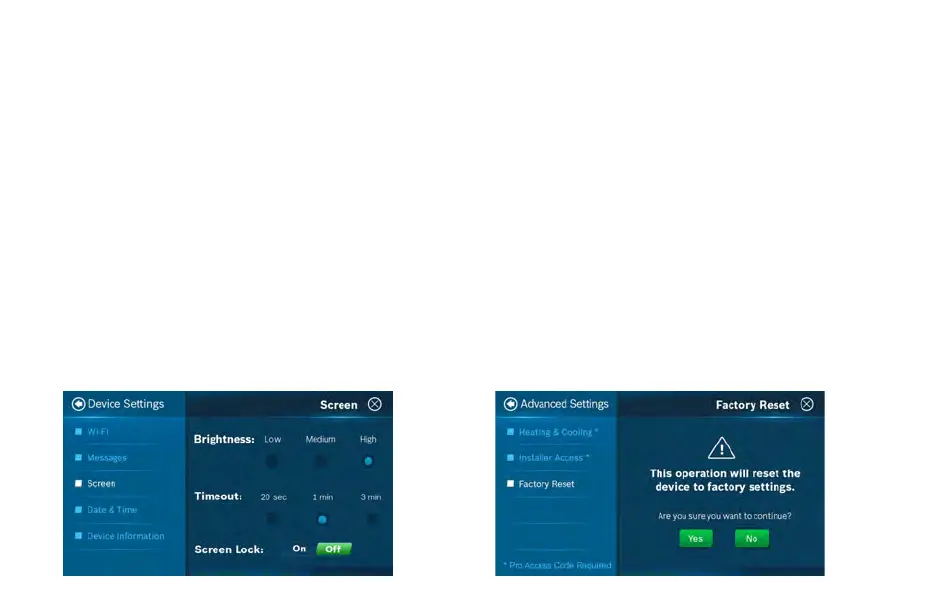
Factory Reset
To reset the thermostat to its default factory settings, select
Advanced Settings from the main menu, and choose Factory Reset.
Note: All settings will be lost and you will need to repeat the Initial
Setup process as outlined in the Installation Guide.
Weather Forecast
The weather forecast is based on the location of the installed
thermostat. The first time you connect your thermostat to the
app, your location was assigned to the thermostat.
Note: You must grant “location access” for the app to
enable this feature.
Screen Options
There are 3 levels of screen brightness and 3 options for Screen
Timeout.
You can also utilize this menu to Lock the screen.
A 4-digit passcode will be required to lock the screen.
Note: It is important that you remember your screen
lock passcode as you will not be able to unlock the
screen without this code.
Additional Information


 To Next Page