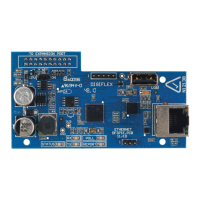
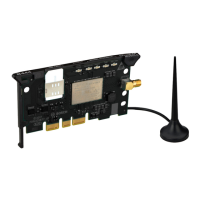
The Conettix Cellular Communicators, including models B442, B443, B444, B444-A, and B444-V, are plug-in modules designed to provide IP communications over supported cellular networks. These communicators directly connect into a control panel or an additional module, such as the Conettix Plug-in Communicator Interface or the Conettix Universal Dual Path Communicator modules. All models come equipped with a SIM card holder, facilitating cellular network connectivity.
Function Description:
The primary function of these cellular communicators is to enable alarm communication and other data transmissions over cellular networks. They serve as a vital component in security systems, ensuring reliable communication even when traditional landline or internet connections are unavailable or compromised. The communicators register on the cellular network and transmit signals to a central monitoring station or other designated recipients. For the B444-A and B444-V models, dual antenna connections (primary and secondary) are provided to optimize signal strength and reliability, especially when using external antennas.
Important Technical Specifications:
While detailed specifications are referred to in graphical installation manuals, the document highlights key aspects related to installation and performance:
- Antenna Connections:
- B442 and B443 models use a single antenna connection.
- B444-A and B444-V models feature dual threaded female SMA antenna connectors (primary and secondary). For these models, connections to both antenna ports are crucial for optimal signal strength. When using an external antenna (e.g., Bosch Multiband Antenna B40-P, B40-MB25, or B40-MB50), it must be connected to the primary connector, and the supplied antenna must be connected to the secondary connection. Failure to do so can result in poor signal strength or dropped connections.
- SIM Card: All communicators include a SIM card holder for network authentication and service.
- EN Certification (B442 and B443): For compliance with EN certification, the antenna cable length for these models must not exceed 30 m (98 ft).
- Power Requirements: The installation instructions emphasize removing all power (AC and battery) before making any connections to prevent personal injury and equipment damage, indicating that the device operates within a powered security system.
Usage Features:
- Plug-in Design: The communicators are designed as plug-in modules, allowing for easy integration into compatible control panels or interface modules. This design simplifies installation and maintenance.
- SIM Card Installation: The SIM card is inserted by sliding it into the card holder, ensuring the gold contact side faces the module.
- Antenna Installation:
- For B442 and B443, a magnetic antenna can be placed on top of the enclosure or a metal surface, with the cable routed through a knockout and connected to the module.
- For B444-A and B444-V, specific instructions are provided for dual antenna setup, often involving an external antenna for the primary connection and a supplied antenna for the secondary.
- Diagnostic LEDs: The communicators feature diagnostic LEDs that provide crucial feedback on signal strength and operational status.
- Signal Strength LEDs (Red, Yellow, Green): These LEDs indicate the quality of the cellular signal:
- Red: Unacceptable signal strength.
- Yellow: Marginal signal strength.
- Green (1 light): Good signal strength.
- Green (2 lights): Very good signal strength.
- No LED: Module has not acquired a tower yet.
These LEDs momentarily turn off to indicate an updated signal strength status.
- STATUS LED (Blue):
- Flashes once every 1 sec: Normal operation.
- On Steady: Communication Error State (unable to communicate on the cellular network).
- Off: LED Trouble State (communicator not powered, or other trouble preventing LED control).
- Configuration: Programming is performed through the compatible control panel, plug-in communicator interface, or universal dual path communicator. Remote programming software (RPS) or an online service portal (http://www.conettix.com/plansandrecommendedsettings) can be used for Bosch Cellular account status and management. Cellular carrier-specific settings like Access Point Name (APN) and SIM card security can also be configured.
- Activation (B444-A/B444-V): These models require a valid Bosch Installer Services account and activation with a cellular plan. Activation involves contacting Bosch Installer Services via support ticket or phone, providing the IMEI and ICCID numbers found on the device or its packaging.
Maintenance Features:
- Easy Removal: The module can be removed by holding the plug-in module retention clip open, grasping the top corners of the module support handle, and pulling the module out. This facilitates replacement or troubleshooting.
- Diagnostic Indicators: The comprehensive LED feedback system allows installers and technicians to quickly diagnose signal strength issues, communication errors, and power problems, simplifying troubleshooting and ensuring optimal performance.
- Documentation: The manual emphasizes referring to compatible documentation for control panels and additional modules, as well as remote programming software help, for detailed information on configuration and maintenance.
- Online Resources: Bosch Security Systems, Inc. provides an online portal for managing cellular accounts and accessing manufacturing date information (http://www.boschsecurity.com/datecodes/).

 Need help?
 General

 To Next Page