6720850722 (2015/06)CS200
Service menu | 13
– Keep hot
Diagnosis
– Function test
– Enable function tests
– Solar
– ...
– Monitored values
– Solar
– ...
– Fault displays
– ...
– System information
– ...
– Fault. Press BACK.
– ...
– Reset
– ...
– Calibration
– ...
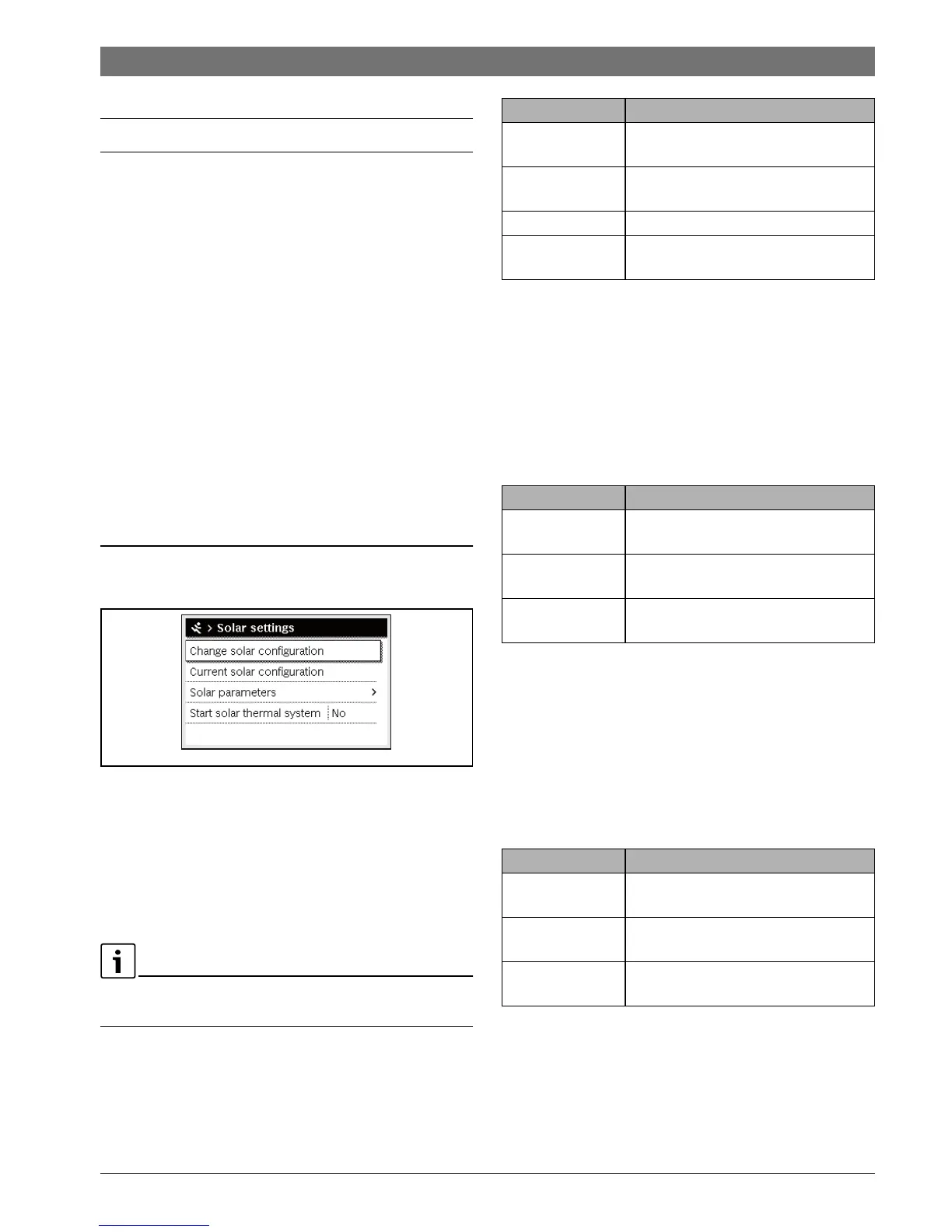
7.1 Solar system settings
Fig. 8 Solar settings menu
If a solar system with extended functionality is installed,
corresponding menus and menu items become active. The
menus of the solar system are described in detail in the
operating instructions of the module installed (e.g. MS 200).
In the Solar settings menu with all solar systems the sub-
menus listed in Tab. 9 are available.
If the solar collector area is incorrectly set, the solar yield
displayed in the info menu is wrong as well.
Table 9 General settings for the solar system
7.2 Settings for transfer systems
If a transfer system with extended function is installed,
corresponding menus and menu items are available. The menus
of the transfer system are described in detail in the operating
instructions of the used module.
In the Transfer settings menu with all transfer systems the
sub-menus listed in Tab. 10 are available.
Table 10 General settings for the transfer system
7.3 Settings for freshwater systems
If a freshwater system with extended function is installed,
corresponding menus and menu items are available. The menus
of the freshwater system are described in detail in the
operating instructions of the used module.
In the DHW settings menu with all freshwater systems the
sub-menus listed in Tab. 11 are available.
Table 11 General settings for the freshwater system
0010003272-001
Menu item Purpose of the menu
Change solar
configuration
Graphical configuration of the solar
system
Current solar
configuration
Graphical representation of the
configured solar system
Solar parameters Settings for the installed solar system
Start solar thermal
system
Once all required parameters have been
set, the solar system can be started up.
Menu item Purpose of the menu
Change transfer
configuration
Graphic configuration of the transfer
system
Current transfer
configuration
Graphic representation of the
configured transfer system
Transfer
parameters
Settings for the installed transfer system
Menu item Purpose of the menu
Change DHW
configuration
Graphic configuration of the freshwater
system
Current DHW
configuration
Graphic representation of the
configured freshwater system
DHW parameters Settings for the installed freshwater
system



 To Next Page