EasyManua.ls Logo

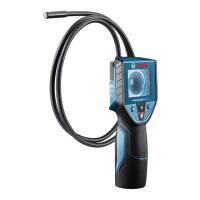
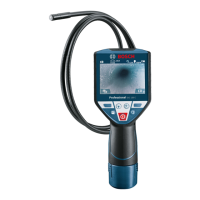
Bosch GIC4-23C - User Manual

Bosch GIC4-23C
48 pages
Print Icon
To Next Page IconTo Next Page
Loading...
Operating/Safety Instructions
Consignes d’utilisation/de sécurité
Instrucciones de funcionamiento y seguridad
Call Toll Free for Consumer Information & Service Locations
Pour obtenir des informations et les adresses de nos centres de service après-vente, appelez ce numéro gratuit
Llame gratis para obtener información para el consumidor y ubicaciones de servicio
For English Version
See page 2
Version française
Voir page 17
Versión en español
Ver la página 32
IMPORTANT
Read Before Using
IMPORTANT
Lire avant usage
IMPORTANTE
Leer antes de usar
1-877-BOSCH99 (1-877-267-2499) www.boschtools.com
GIC4-23C

Table of Contents

Questions and Answers

Summary

General Safety Rules

Work Area & Electrical Safety

Rules for safe work areas, battery handling, and electrical precautions.

Personal Safety & Use;Care

Guidelines for personal well-being, safety equipment, and proper tool usage and maintenance.

General Safety Rules

Battery Tool Use and Care

Detailed guidance on charging, using, and storing battery packs safely.

Service

Information on tool maintenance and repair by qualified personnel.

Safety Rules for Inspection Camera

Hygiene and Handling Precautions

Recommendations for personal hygiene, handling chemicals, and avoiding contamination.

Water & Electrical Hazard Warnings

Warnings about operating the device in wet conditions and potential electric shock risks.

Magnetic Accessory Safety

Warnings about keeping magnetic accessories away from medical devices and data storage.

FCC Caution

RF Radiation Exposure Compliance

Information on radio frequency exposure limits and compliance with FCC rules.

Industry Canada (IC) Compliance

Intended Use

Symbols

Getting to Know Your Inspection Camera

Specifications

Assembly

Power Supply and Battery Operation

Using Bosch batteries and chargers, safety warnings for battery packs.

Battery Pack Management

Instructions for inserting/removing batteries and understanding the charge indicator.

Assembly

Battery Handling Recommendations

Best practices for storing and maintaining the battery to ensure optimal performance.

Camera Cable and Accessory Fitting

Guidance on connecting the camera cable and attaching mirror, magnet, or hook accessories.

Operation

Product Description

Overview of the inspection device and its capabilities for viewing inaccessible places.

Using the Product Safely

Instructions for turning on the device, adjusting illumination, and handling safely.

Operation

Starting Operation

Procedures for powering on/off, adjusting illumination, and zooming.

Main Menu Navigation

How to access and navigate the device's main menu and options like Up Indication.

Operation

Saving and Transferring Recordings

Instructions on taking photos and accessing recorded files in the gallery.

Data Transfer via USB

Guide for connecting the device to a PC for data transfer using the USB Type-C interface.

Operation

Working Advice

Tips for effective inspection, adjusting camera position, and optimizing image clarity.

Maintenance and Service

Maintenance and Cleaning

Procedures for cleaning the tool and accessories, and warnings about damage.

Environment Protection

Guidelines for proper recycling of the unit, accessories, and batteries.

Troubleshooting

Error Causes and Corrections

Table detailing common error indicators, their causes, and corrective measures.

Accessories List

List of optional accessories and attachments available for the inspection camera.

Limited Warranty

Summary

General Safety Rules

Work Area & Electrical Safety

Rules for safe work areas, battery handling, and electrical precautions.

Personal Safety & Use;Care

Guidelines for personal well-being, safety equipment, and proper tool usage and maintenance.

General Safety Rules

Battery Tool Use and Care

Detailed guidance on charging, using, and storing battery packs safely.

Service

Information on tool maintenance and repair by qualified personnel.

Safety Rules for Inspection Camera

Hygiene and Handling Precautions

Recommendations for personal hygiene, handling chemicals, and avoiding contamination.

Water & Electrical Hazard Warnings

Warnings about operating the device in wet conditions and potential electric shock risks.

Magnetic Accessory Safety

Warnings about keeping magnetic accessories away from medical devices and data storage.

FCC Caution

RF Radiation Exposure Compliance

Information on radio frequency exposure limits and compliance with FCC rules.

Industry Canada (IC) Compliance

Intended Use

Symbols

Getting to Know Your Inspection Camera

Specifications

Assembly

Power Supply and Battery Operation

Using Bosch batteries and chargers, safety warnings for battery packs.

Battery Pack Management

Instructions for inserting/removing batteries and understanding the charge indicator.

Assembly

Battery Handling Recommendations

Best practices for storing and maintaining the battery to ensure optimal performance.

Camera Cable and Accessory Fitting

Guidance on connecting the camera cable and attaching mirror, magnet, or hook accessories.

Operation

Product Description

Overview of the inspection device and its capabilities for viewing inaccessible places.

Using the Product Safely

Instructions for turning on the device, adjusting illumination, and handling safely.

Operation

Starting Operation

Procedures for powering on/off, adjusting illumination, and zooming.

Main Menu Navigation

How to access and navigate the device's main menu and options like Up Indication.

Operation

Saving and Transferring Recordings

Instructions on taking photos and accessing recorded files in the gallery.

Data Transfer via USB

Guide for connecting the device to a PC for data transfer using the USB Type-C interface.

Operation

Working Advice

Tips for effective inspection, adjusting camera position, and optimizing image clarity.

Maintenance and Service

Maintenance and Cleaning

Procedures for cleaning the tool and accessories, and warnings about damage.

Environment Protection

Guidelines for proper recycling of the unit, accessories, and batteries.

Troubleshooting

Error Causes and Corrections

Table detailing common error indicators, their causes, and corrective measures.

Accessories List

List of optional accessories and attachments available for the inspection camera.

Limited Warranty

Bosch GIC4-23C Specifications

General IconGeneral
BrandBosch
ModelGIC4-23C
CategoryAnalytical Instruments
LanguageEnglish

Related product manuals