1 689 989 355 2019-04-08| Bosch Automotive Service Solutions GmbH
6 | MTS 6534 / MTS 6535 | Product Description VCIenen
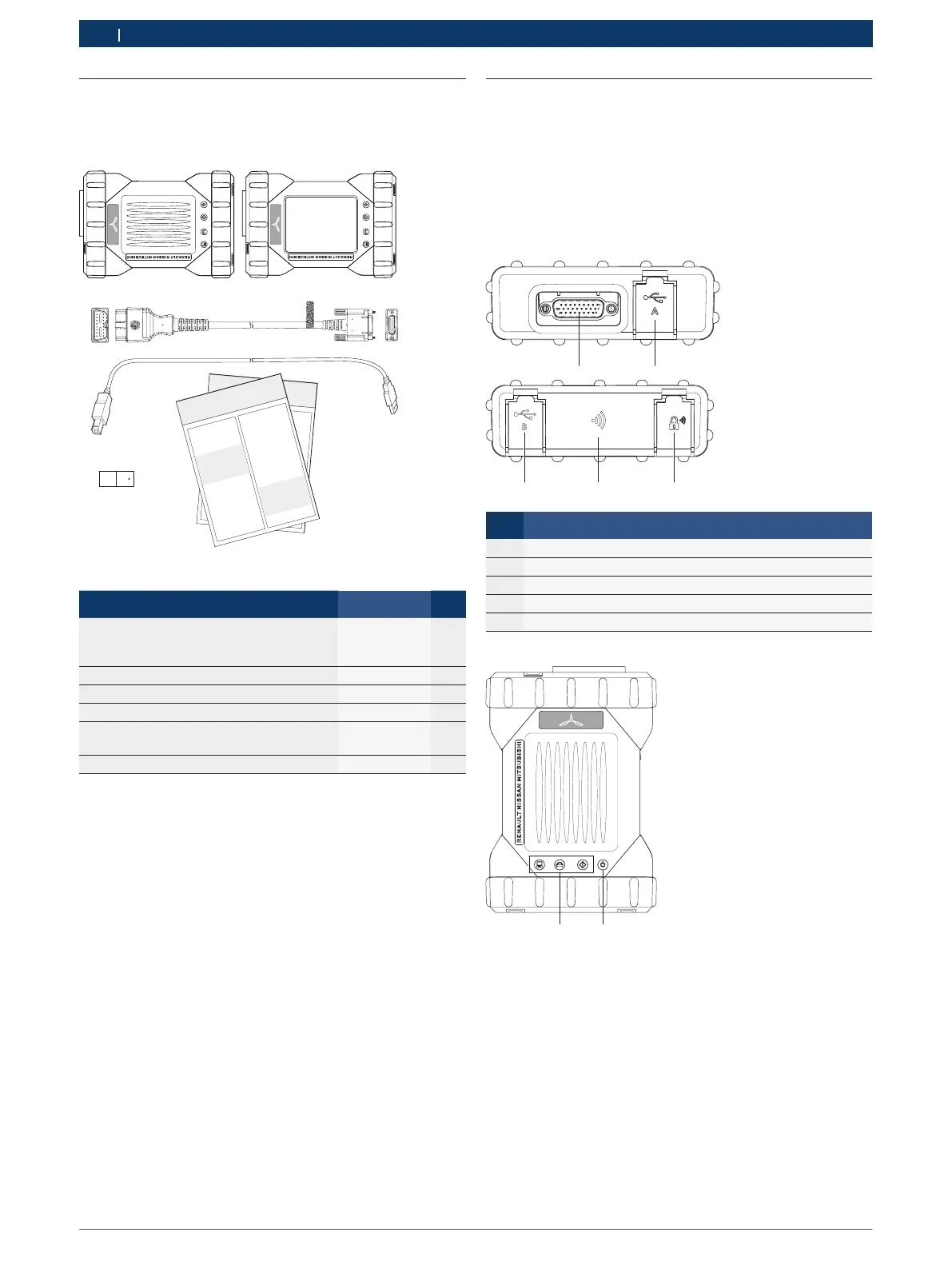
5.3 VCI Kit Contents
The VCI Base Kit includes cables and hardware needed
to transfer data and reprogram ECUs on vehicles of Mit-
subishi, Nissan and Renault through the DLC cable.
1a
2
3
4
5
1b
Pos. Kit Component Part Number Qty
1
VCI with display or without display
and with or without wireless adapters
(1 x plugged in VCI and 1 attached)
– 1
2 Cable: DLC J1962, VCI, 1.5m 1 699 200 366 1
3 USB A to USB B, 3 m cable F-00K-108-653 1
4
Wireless 802.11n, Adapter DWA-131 E1
1 699 200 155 1
5
5
Operating instructions
Quick start manual
1 689 989 355
1 689 989 363
1
1
6 VCI - VCI Manager Software
1)
1)
Available through download from http:diesisteinlink (Platzhalter)
i The VCI kit is available in 2 configurations, a Non-
Wireless kit and a Wireless P2P kit.
5.3.1 Non-Wireless kits
These kits include the VCI assembly without USB Wire-
less adapters. The USB Wireless adapters are optional
accessories (for part numbers, see "10.3 Spare and
wearing Parts").
5.3.2 Wireless P2P kits
These kits include the VCI assembly with two USB Wire-
less adapters (for part numbers, see "10.3 Spare and
wearing Parts"). One Wireless adapter is plugged inside
the VCI, the second Wireless adapter is attached.
5.4 VCI Connectors and Controls
A number of standard connectors and controls are
available on the VCI to facilitate operation and commu-
nication with vehicles and workshop networks. These
connectors and controls are shown in the following il-
lustrations.
5.4.1 Front and back side
3
4
5
Pos. Description
1 DB26 Connector (DLC Cable)
2 USB Port Type A (to connect the trigger switch)
3 USB Port Type B (to connect to a PC / Laptop)
4 Wireless Adapter (below the boot)
5 Ethernet Port (LAN)
5.4.2 VCI without display
1 2









 To Next Page