27Bosch Security Systems 10/22 BLCC615U
Solution 6000-IP User Guide
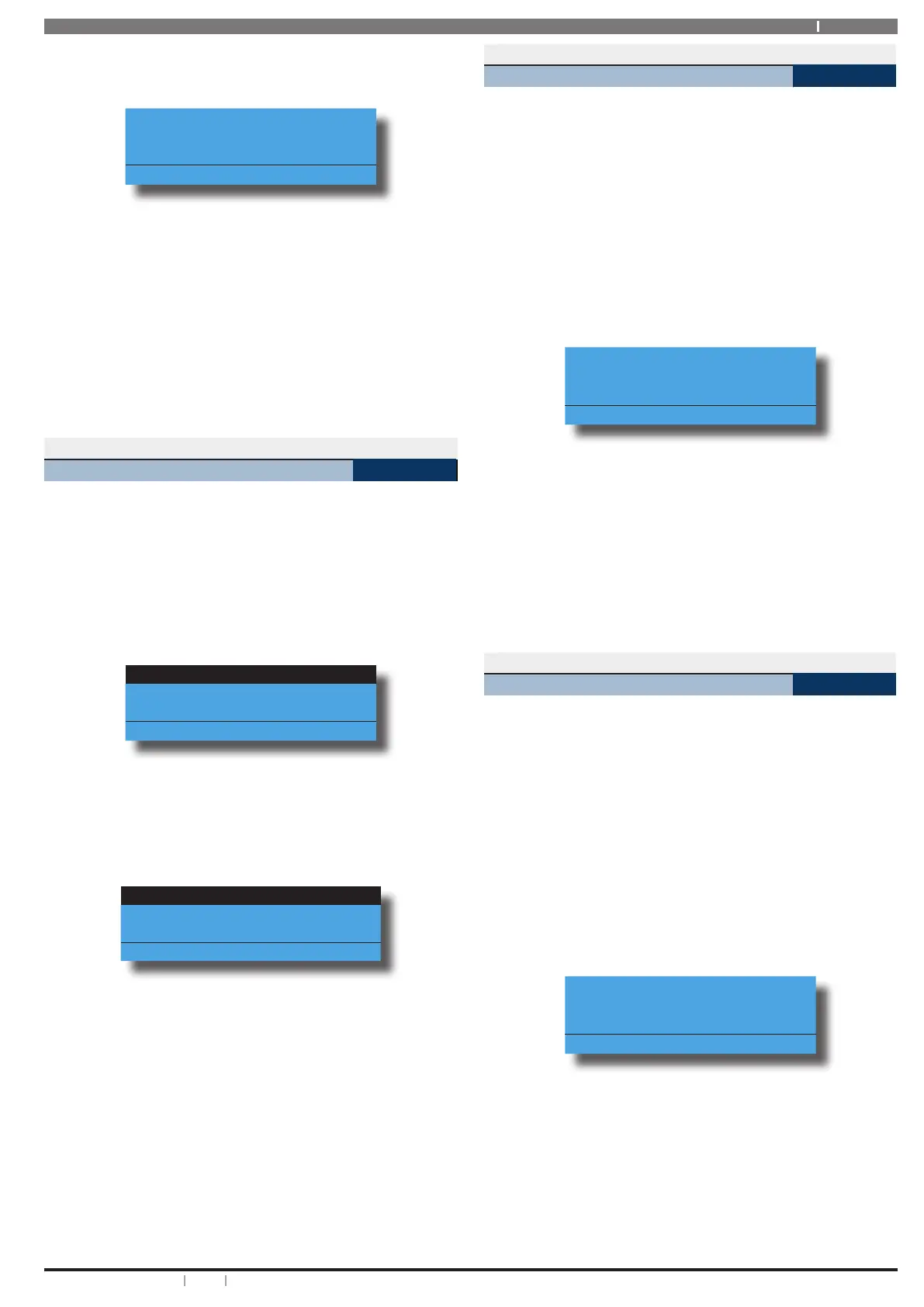
display the following door array information for
doors 1 to 16.
0000000001111111
1234567890123456
LLLLL---UUUUO---
Press OK or MENU
In the above example screen,
L = Doors 01 to 05 are Locked
O = Door 13 is Open
U = Doors 09 to 12 area Unlocked
- = Doors 06 to 08 and Doors 14 to 16 are Disabled or
Not Available
2. When finished press [OK] or [MENU] to exit.
Outputs > Commands >
Door Control
MENU 4-0-5
This menu allows a master user to operate a door, lock a
door or unlock a door.
Enter programming mode (PIN + MENU) then,
1. Enter [MENU] + [4] + [0] + [5].
A list of available doors will display on the keypad.
Dr1 Front Door
Dr2 Computer Room
Dr3 Warehouse Door
Press OK or MENU
2. Use the [] and [] keys to select the door that
you want to operate, then press [OK] to select.
Alternatively, you can enter the door number then
press [OK].
The keypad will display the following:
Operate
Lock
Unlock
To Go Back Press OK
3. Use the [] and [] keys to select the door option
you require, then press [OK].
Outputs > Properties >
Output Name
MENU 4-1-0
This menu allows you to program the name for each output.
Each output name supports up to 20 characters.
Enter programming mode (PIN + MENU) then,
1. Enter [MENU] + [4] + [1] + [0].
A list of available outputs will display on the keypad.
2. Use the [] and [] keys to select the output name
that you want to change, then press [OK] to select.
Alternatively, you can enter the output number,
then press [OK].
The keypad will display the following:
Output Name Op1
External Siren
Press OK to SAVE
3. Use the [] and [] keys to scroll the cursor left and
right across the output name text. Use the [] and
[] keys to scroll through the different characters
available. To clear all text from the cursor position
to the right, press the [OFF] key.
4. Press [OK] to save and exit, or press [MENU] to exit
without saving.
Outputs > Door Control >
Door Name
MENU 4-2-0
This menu allows you to program the name for each door
on the system. Each door name can be up to 20 characters
long.
Enter programming mode (PIN + MENU) then,
1. Enter [MENU] + [4] + [2] + [0].
A list of available doors will display on the keypad.
2. Use the [] and [] keys to select the door name
that you want to change, then press [OK] to select.
Alternatively, you can enter the door number, then
press [OK].
The keypad will display the following:
Door Name Dr3
Door 3 Name
Press OK to SAVE
3. Use the [] and [] keys to scroll the cursor left and
right across the door name text. Use the [] and
[] keys to scroll through the different characters
available. To clear all text from the cursor position
to the right, press the [OFF] key.
4. Press [OK] to save and exit, or press [MENU] to exit
without saving.








 To Next Page