Language
5Lt sH
Water hardness
HRRDIIESS
URTER 7
HRRDHESS
_RTER B
HRRBI_,ESS
[dRTER 9
HRRD_ESS
URTER cl
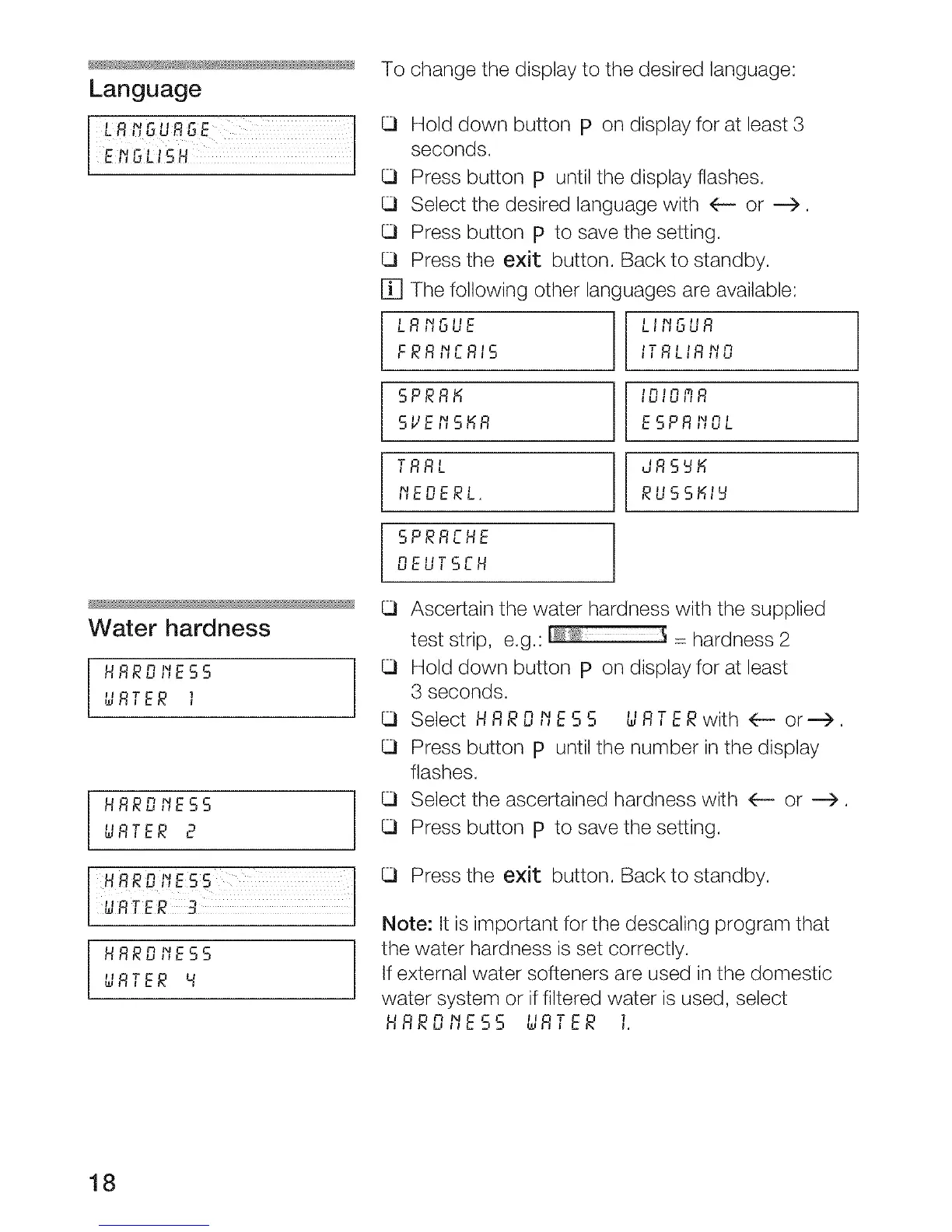
To change the display to the desired language:
[]
LRIIn '_cuuL
FRRPIERIS
SPRR_
SVEI_S_R
TRRL
MEDERL.
SPRREHE
DEUTSEH
Hold down button p on display for at least 3
seconds.
Press button p until the display flashes.
Select the desired language with (-- or ---->.
Press button p to save the setting.
Press the exit button. Back to standby.
The following other languages are available:
LIIIGUR
t N
_'_RLIR ,Iu
I I
ESPRPIOL
JRS_M
Ascertain the water hardness with the supplied
test strip, e.g.: = hardness 2
Hold down button p on display for at least
3 seconds.
Select HR RO t'_ES$ U RT ER with 4--- or--->.
Press button p until the number in the display
flashes.
Select the ascertained hardness with 4-- or ---).
Press button p to save the setting.
Press the exit button. Back to standby.
Note: It is important for the descaling program that
the water hardness is set correctly.
If external water softeners are used in the domestic
water system or if filtered water is used, select
II T 7,HRROt'IE55 wR,ER
18




 To Next Page