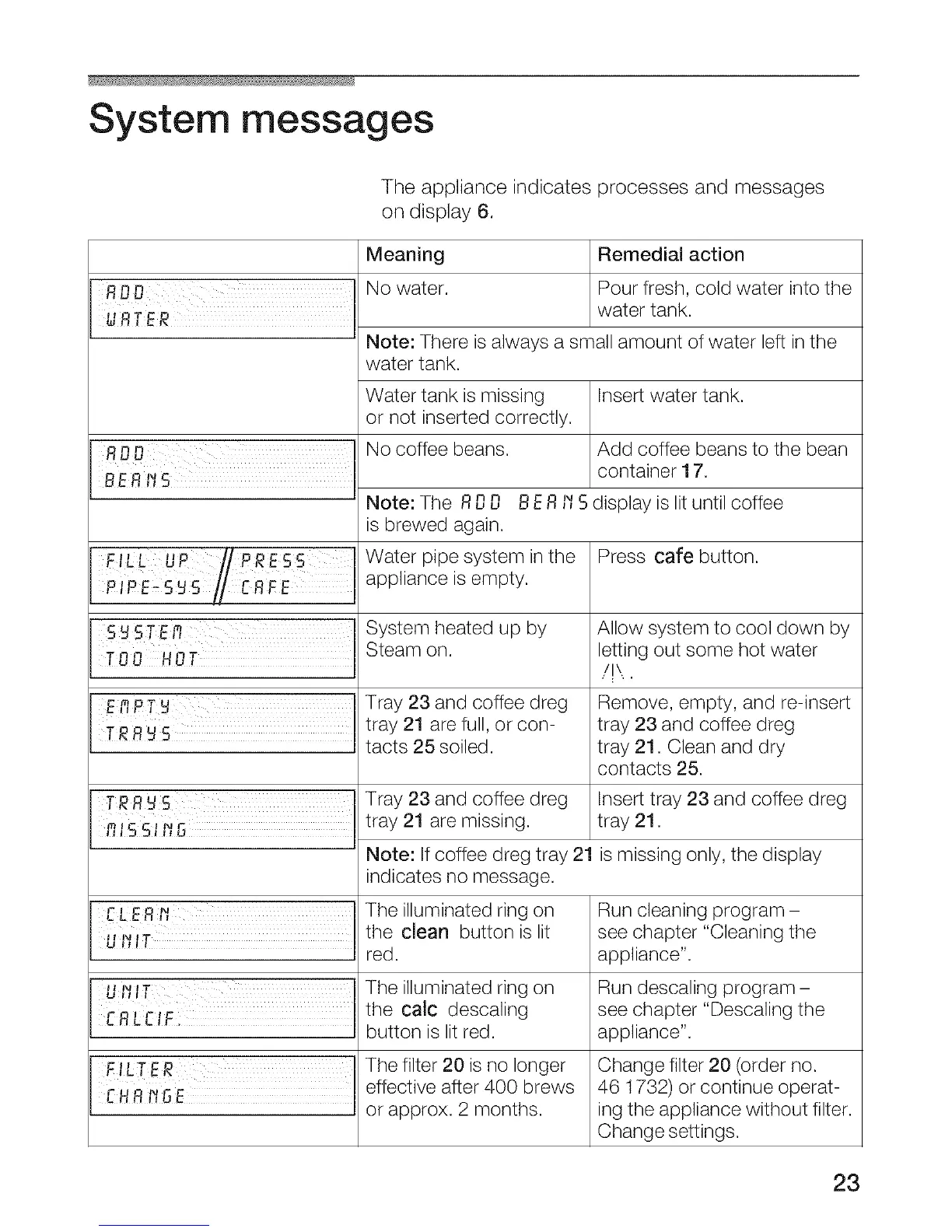
System messages
The appliance indicates processes and messages
on display 6.
n n
RUU
&lR ER ...............
BE RI_
FILL UP r/PRESS
P sU r
S_STE_
EPIPTN
TRR _S
TRR_S
Meaning Remedial action
No water. Pour fresh, cold water into the
water tank.
Note: There is always a small amount of water left in the
water tank.
Water tank is missing
or not inserted correctly.
No coffee beans.
Note: The ROO
is brewed again.
Water pipe system in the
appliance is empty.
System heated up by
Steam on.
Insert water tank.
Add coffee beans to the bean
container 17.
Tray 23 and coffee dreg
tray 21 are full, or con-
tacts 25 soiled.
Tray 23 and coffee dreg
tray 21 are missing.
Note: If coffee dreg tray 21
indicates no message.
UI_IT
_01 r'l F
FILTER
effective after 400 brews
EHR_ GE
or approx. 2 months.
The illuminated ring on
the clean button is lit
red.
The illuminated ring on
the calc descaling
button is lit red.
The filter 20 is no longer
BER ,,"Sdisplay is lit until coffee
Press care button.
Allow system to cool down by
letting out some hot water
/!\,.
Remove, empty, and re-insert
tray 23 and coffee dreg
tray 21. Clean and dry
contacts 25.
Insert tray 23 and coffee dreg
tray 21.
is missing only, the display
Run cleaning program -
see chapter "Cleaning the
appliance".
Run descaling program-
see chapter "Descaling the
appliance".
Change filter 20 (order no.
46 1732) or continue operat-
ing the appliance without filter.
Change settings.
23




 To Next Page