The filter 20 reduces calcification, protects the
Water filter appliance and extends the service life of the
appliance.
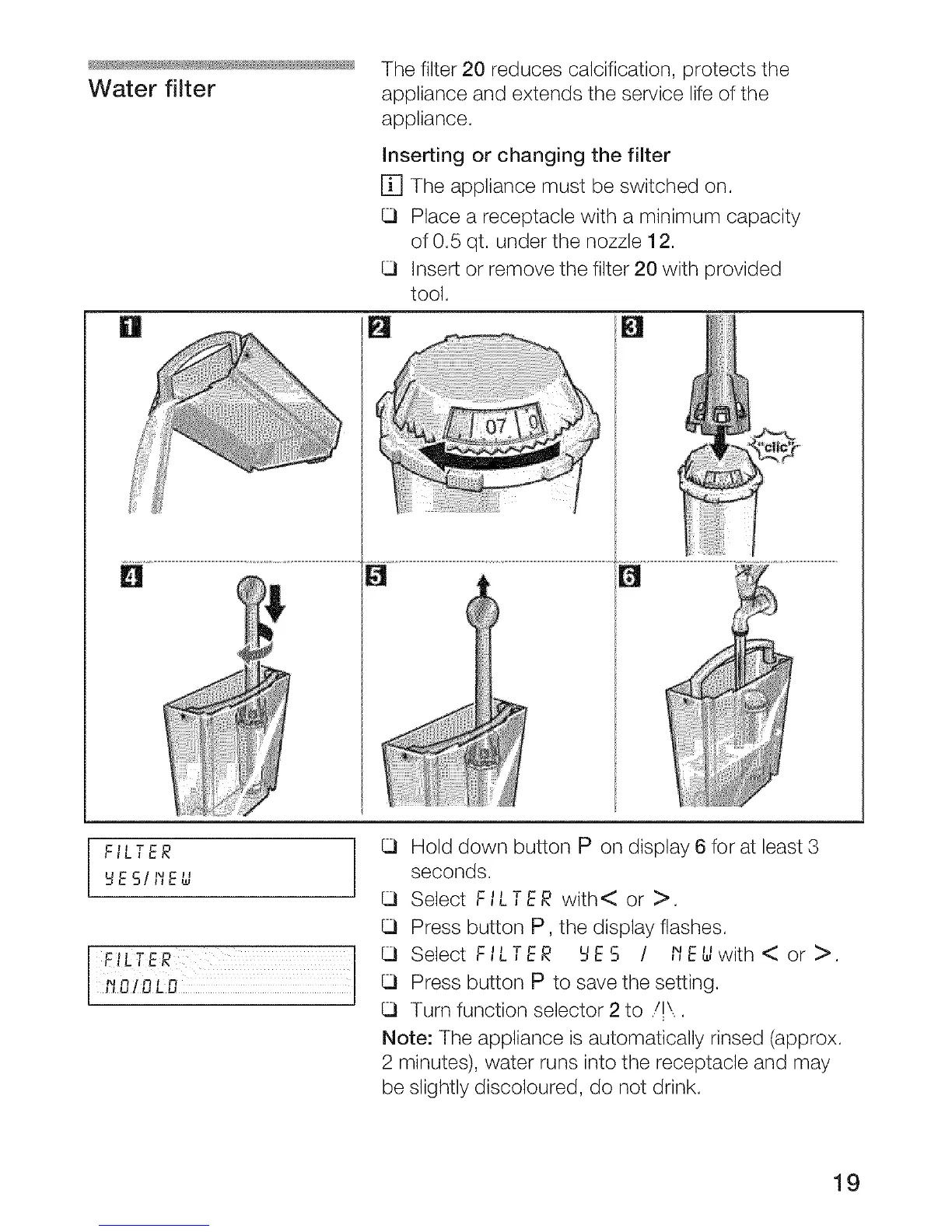
Inserting or changing the filter
[] The appliance must be switched on.
Place a receptacle with a minimum capacity
of 0.5 qt. under the nozzle 12.
Insert or remove the filter 20 with provided
tool.
T
F,L ER
_ESIIIEU
tLTER ]
IIO/OLO I
]
Hold down button P on display 6 for at least 3
seconds.
Select FILTER with< or >.
Press button P, the display flashes.
Select FILTER tIES I l'_E_lwith< or >.
Press button P to save the setting.
Turn function selector 2 to ./!\,.
Note: The appliance _sautomatically rinsed (approx.
2 minutes), water runs into the receptacle and may
be slightly discoloured, do not drink.
19




 To Next Page