Interaction between the eBike system and gear shifting:
The gear shifting should be used with an eBike drive in the same way as
with a normal bicycle (observe the operating instructions of your eBike on
this point).
Irrespective of the type of gear shifting, it is advisable that you briey
reduce the pressure on the pedals when changing gear. This will aid gear
shifting and reduce wear on the powertrain.
By selecting the correct gear, you can increase your speed and range while
applying the same amount of force.
Switching bike lights on/off
Check that your bike lights are working correctly before every use. To
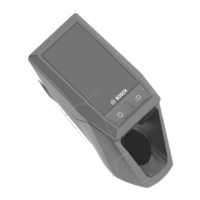
switch on the bike lights, press the (9) button for more than 1 s. You can
use the (11) and (10) buttons to control the brightness of the LEDs on the
operating unit. Please note your bike may not come with lights. Consult your
Whyte retailer for support with lighting options.
Establishing a smartphone connection:
In order to be able to use the following eBike functions, a smartphone with
the eBike Flow application is required. Connection to the app occurs via a
Bluetooth® connection.
Switch on the eBike system and do not start riding the eBike. Begin
Bluetooth® pairing by long pressing (> 3 s) the on/off button (1). Release
the on/off button (1) as soon as the topmost bar on the battery charge
indicator shows the pairing process by ashing blue. Conrm the
connection request in the app.
Activity tracking
In order to record activities, it is necessary to register and log into the eBike
Flow app. To record activities, you must consent to the storage of your
location data in the app. Without this, your activities cannot be recorded in
the app. For location data to be recorded, you must log in as the user.
Lock function
The lock function can be set up and congured via the eBike Flow app.
This stores a digital key on the smartphone, which is required to start
the eBike system.
Once the lock function is switched on, the eBike can only be put into
operation if:
– the congured smartphone is switched on;
– the smartphone has sufcient battery charge;
– and the smartphone is in the immediate vicinity of the operating unit.
Otherwise, motor support remains switched off.
If the key is not veried immediately, the search for the key is shown by
the battery charge indicator (3) and the assistance level LED (5) ashing
white. If the key is found, after ashing white the state of charge of the
battery and the last set assistance level is displayed.
If the key cannot be found on the smartphone, the eBike system
automatically switches off. The displays on the operating unit go out.
Since the smartphone functions only as a contactless key when
switching on, the eBike battery and on-board computer can still be used
on a different, unlocked eBike.
Software updates
Software updates are transferred to the operating unit in the
background of the app as soon as it is connected to the app. During
the update process, a green ashing on the battery charge indicator (3)
shows the progress. The system is then restarted.
You can control the software updates via the eBike Flow app.
WIRELESS SHIFTING, LIGHTS & CONNECTIVITY
LED REMOTE (BRC3600)
19




 To Next Page