Start-up Requirements - The eBike system can only be activated when the
following requirements are met:
– Fully charge the internal battery prior to rst ride
– A sufciently charged battery is inserted.
Note: Always switch off the eBike system when you park the eBike.
Note: If the batteries of the on-board computer are drained, you can still
switch on your eBike using the bike’s battery. It is, however, recommended
that you replace the internal batteries as soon as possible in order to avoid
damage.
Switching the eBike system on/off
The following options are available for switching on the eBike system:
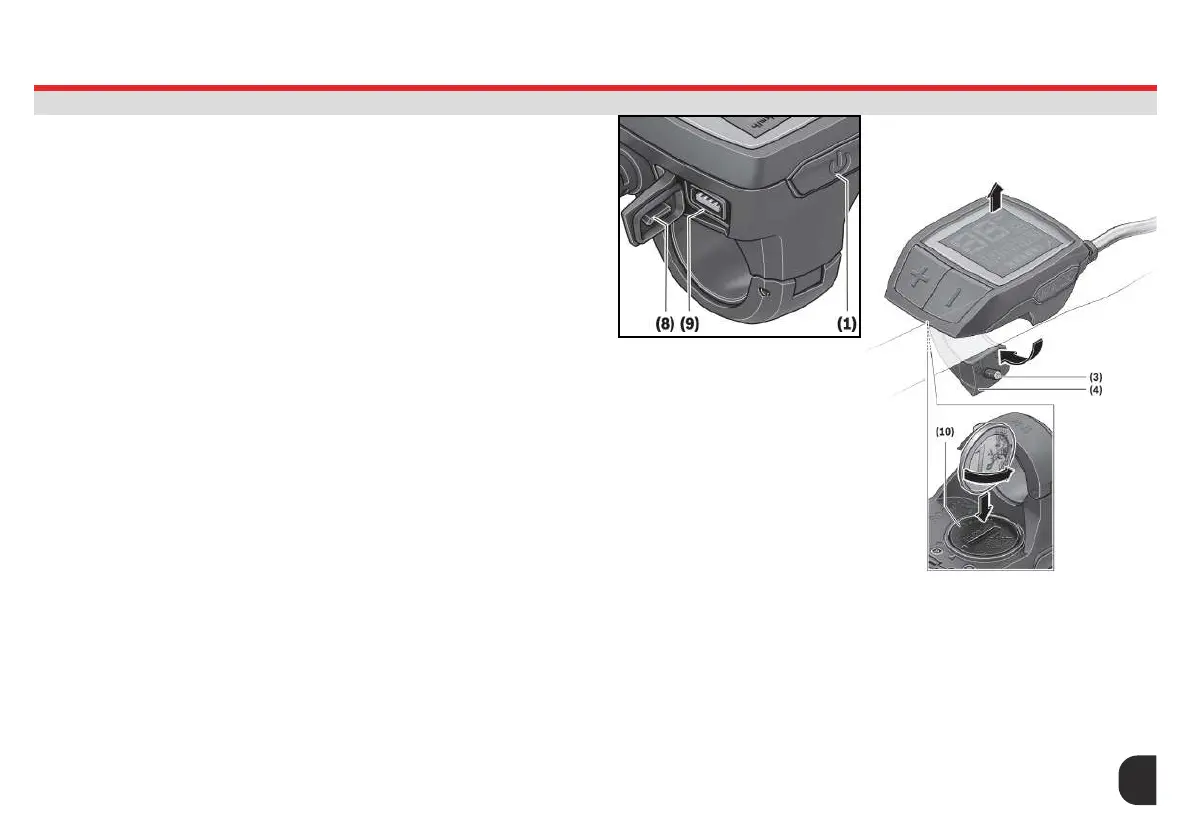
– Press the on/off button (1) of the on-board computer with the eBike
battery inserted.
– Press the on/off button of the eBike battery. The drive is activated as soon
as you start pedalling (except for in the push assistance function or with the
assistance level OFF). The motor output depends on which assistance level is
set on the on-board computer.
As soon as you stop pedalling when in normal operation, or as soon as
you have reached a speed of 25 km/h, the eBike drive unit switches off
the assistance. The drive is automatically re-activated as soon you start
pedalling again and the speed is below 25 km/h.
The following options are available for switching off the eBike system:
– Press the on/off button (1) of the on-board computer.
– Switch off the eBike battery using its on/off button
(some bicycle manufacturer-specic solutions prevent access to the battery
on/off button; see the bicycle manufacturer operating instructions).
The system shuts down after being switched off; this takes approximately
three seconds. It cannot be switched back on until shut-down has been
completed. If the eBike is not moved for approx. Ten minutes and no button
is pressed on the on-board computer, the eBike system switches off
automatically in order to save energy.
Energy supply of the on-board computer:
The on-board computer is supplied with voltage by two CR2016
button cells.
Changing the batteries
If the on-board computer shows LOW BAT on the display, remove the
on-board computer from the handlebars by unscrewing the fastening
screw (3) of the on-board computer. Open the battery compartment
cover (10) using a suitable coin, remove the used batteries and insert
new CR2016 batteries.
START UP ON/OFF
PURION REMOTE
26






 To Next Page