Modes
– OFF: Motor assistance is switched off. The eBike can be moved by
pedalling, as with a normal bicycle. The push assistance cannot be
activated at this assistance level.
– ECO: Effective assistance with maximum efciency, for maximum range
– TOUR: Steady assistance, long range for touring
– SPORT/eMTB: SPORT - Powerful assistance, for mountain biking and for
cycling in urban trafc. eMTB - Optimum assistance whatever the terrain,
rapid acceleration when starting from a standstill, improved dynamics,
top performance (eMTB is only available in combination with drive units
BDU250P CX, BDU365, BDU450 CX and BDU480 CX. This also requires a
software update.)
– TURBO: Maximum assistance even at high pedalling speeds.
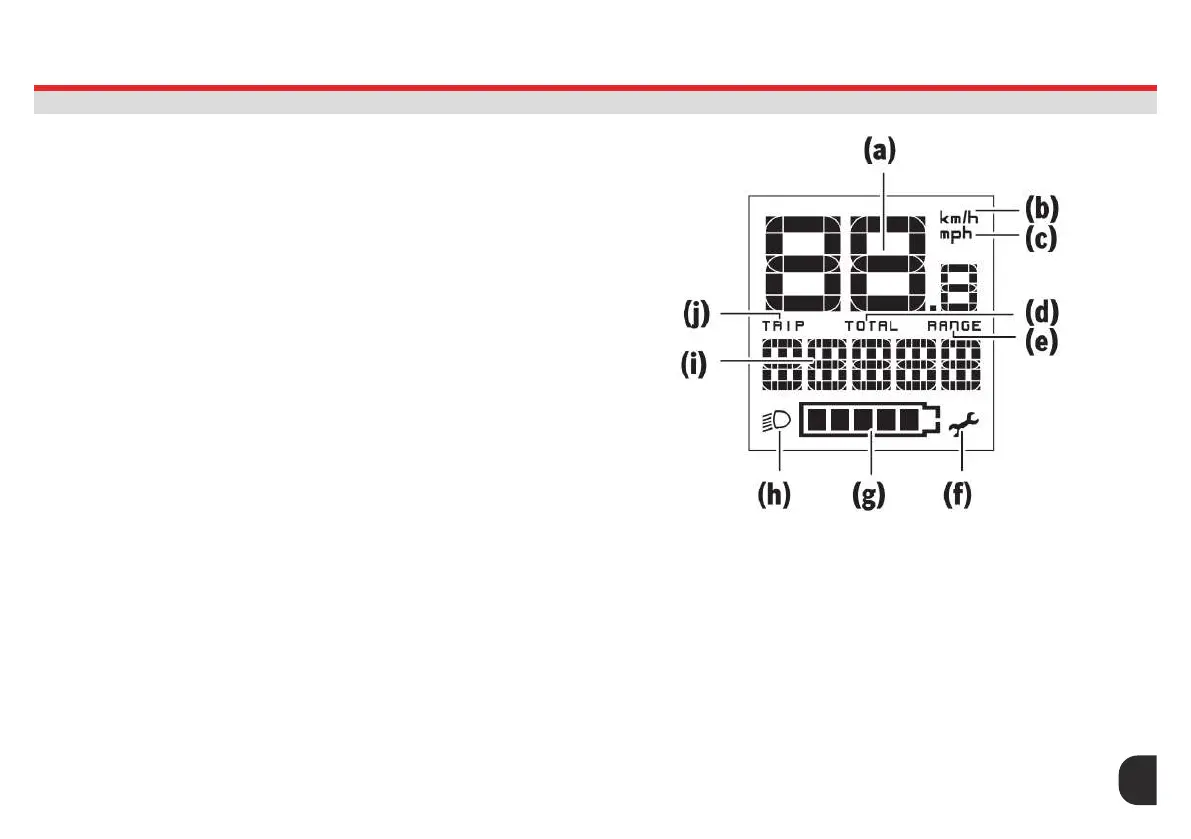
To increase the assistance level, briey press the button + (6) on the on-
board computer repeatedly until the required assistance level appears on
the indicator (i). To decrease the assistance level briey press the button
– (5). If the display is set to TRIP, TOTAL or RANGE, the selected assistance
level will only be shown briey (for approx. one second) on the display
when switching over.
Speed & Distance Indicators
The speedometer (a) always displays the current speed. The indicator (i)
always displays the last setting as standard. Repeated medium-length
presses of the button – will display the trip distance TRIP, the total
distance TOTAL and the battery range RANGE one after the other. (Briey
pressing the button – will decrease the assistance level.) To reset the
trip distance TRIP, select the trip distance TRIP and simultaneously press
and hold the buttons + and –. The display will initially show RESET. If you
continue to press both buttons, the trip distance TRIP will be set to 0.
To reset the battery range RANGE, select the battery range RANGE and
simultaneously press and hold the buttons + and –. The display will initially
show RESET. If you continue to press both buttons, the trip distance TRIP
will be set to 0.
Switching Bike Lights ON/OFF
For the model which has the bike lights powered by the eBike system,
a medium length press of the button + will switch on the front and rear
lights simultaneously. To switch off the bike lights, press and hold the
button +. The lighting symbol (h) is displayed when the light is on. The
on-board computer saves the light status and activates this saved
status accordingly after a restart.
Switching the bike lights on and off has no effect on the back lit display.
27
ASSIST MODES & LIGHTS
PURION REMOTE




 To Next Page