EasyManua.ls Logo

Bose 12 - User Manual

Bose 12
34 pages
Print Icon
To Next Page IconTo Next Page
Loading...
The Bose
®
Lifestyle
®
12 System
Owner’s Guide
December 20, 2001
AM191409_01_V.pdf

Questions and Answers

  • K
    Krista WatsonSep 13, 2025
    What to do if the Bose 12 volume control is too sensitive?
    • J
      Juan WiseSep 13, 2025
      If the volume control on your Bose Media Converter is too sensitive, check to be sure the audio input cable is connected to the music center FIXED OUTPUTs, not to SPEAKERS A or B.
  • L
    Lisa MannSep 15, 2025
    What to do if there is too much sound from center speaker on Bose Media Converter?
    • J
      John NicholsSep 15, 2025
      In STEREO+CENTER mode, press SURROUND –, to decrease center speaker volume on your Bose Media Converter. Alternatively, press and hold the STEREO+CENTER (3-speaker) mode key for 10 seconds to restore the factory preset center volume setting.
  • D
    Diane BryantNov 17, 2025
    What to do if my Bose 12 has no sound?
    • A
      Anna DavisNov 17, 2025
      If your Bose Media Converter isn't producing any sound, try the following: * Ensure the audio input cable is connected to the music center FIXED outputs, the black connector is fully seated in the music center SYSTEM CONTROL 1 jack, and the multi-pin connector is firmly seated in the Acoustimass module jack. * Turn the music center off for ten seconds, then on again, to reestablish communication between the music center and the speakers. * Check the connections for any external components and select the correct source for the desired input. * Check the speaker connections. * Make sure the CD is placed correctly, label-side up, in the music center, and the cover is closed. * Increase the volume. * Check to see if MUTE is lit in the display and unmute if needed. * Disconnect...

Summary

Safety Information

Laser and Emissions Compliance

Product classification as a Class 1 laser product and compliance with Class B digital apparatus emissions regulations.

Battery Disposal and Safety Notes

Guidelines for proper battery disposal and reference to additional safety information.

Important Safety Instructions

Key safety instructions for product usage, covering water, moisture, heat, and ventilation.

Electrical Noise and Grounding

Information on electrical noise generation and procedures for proper antenna grounding.

System Setup and Connections

Initial Setup and Unpacking

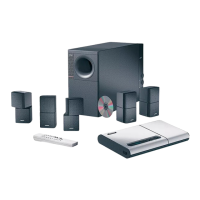
Overview of the Bose Lifestyle 12 system, unpacking components, and checking contents.

Component Placement

Guidelines for positioning speakers and the Acoustimass module for optimal audio experience.

Connecting System Components

Steps for connecting speakers, Acoustimass module, music center, external sources, and antennas.

Remote and Power Setup

Connecting power to the system and setting up the remote control.

Operating Your System

System Controls and Display

Understanding the music center display, console controls, and remote functions for operation.

Listening Modes and Volume Adjustment

Selecting speaker modes (Stereo, Surround) and adjusting volume levels for different audio sources.

Radio Operation

Tuning radio stations, setting presets, and switching between AM/FM bands.

CD and External Component Playback

Loading CDs, playing them, and operating connected external audio devices like tape decks.

Video Sound Operation

Setting up and listening to audio from video sources, including enhanced bass for movie soundtracks.

Maintenance and Troubleshooting

System Fine-Tuning and Acoustics

Adjusting bass and treble controls, and compensating for room acoustics to optimize sound.

Remote Control and Speaker Settings

Procedures for changing remote control house codes and configuring secondary speaker outputs.

Troubleshooting Common Issues

Solutions for common problems like no sound, remote inconsistency, or system malfunctions.

Cleaning, Warranty, and Specifications

Maintenance procedures, warranty information, and technical specifications of the system.

Bose 12 Specifications

General IconGeneral
BrandBose
Model12
CategoryMedia Converter
LanguageEnglish

Related product manuals