EasyManua.ls Logo

Bose PowerMatch PM8250N - User Manual

Bose PowerMatch PM8250N
52 pages
Print Icon
To Next Page IconTo Next Page
Loading...
PowerMatch
®
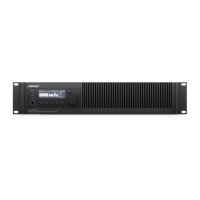
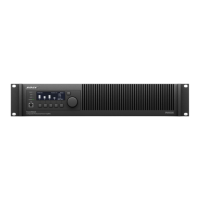
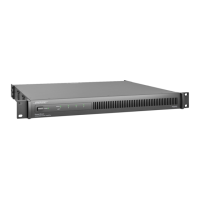
Configurable Professional Power Amplifiers
Installation and Operating Guide
PM8500 / PM8500N
PM8250 / PM8250N
PM4500 / PM4500N
PM4250 / PM4250N

Table of Contents

Questions and Answers

  • C
    corypayneJul 29, 2025
    How to troubleshoot a Bose PowerMatch PM8250N with no power?
    • L
      Laura KellyJul 30, 2025
      To resolve a no power issue with your Bose Amplifier, first, turn on the power switch. The Clip, Limit, and Signal LEDs should light up for about 15 seconds, after which the amplifier should be ready. The LCD screen will display the firmware version for approximately 10 seconds, then switch to the operating screen. Also, check the power cable and ensure the retaining clip is secure, and verify the mains circuit.
  • C
    Cody JenkinsAug 2, 2025
    What to do if my Bose PowerMatch PM8250N Amplifier has power but no sound?
    • A
      Ashley CarterAug 2, 2025
      If your Bose Amplifier has power but no sound, start by checking the LCD screen for output meter activity. If there's no signal, check the Input Meter screen for a signal. If there's still no signal, troubleshoot the source or cabling. Also, ensure that input and output signals are not muted, the Input Routing is configured properly, the Input Source is set to the correct signal type (analog or digital), the Output Attenuate is not set too low, the loudspeakers are correctly wired, the Output Configuration is correctly set, and Standby Mode is not active.
  • J
    Jesse ElliottAug 6, 2025
    Why is the sound so low on my Bose Amplifier?
    • A
      Ashley RichardsAug 6, 2025
      If your Bose Amplifier has power, but the sound is low, verify the source level by monitoring the Input Meter. Also, ensure that Input Routing and Input Sensitivity are set for optimal gain. Then, check that Output Attenuate is not set too low, the loudspeakers are wired correctly, the Output Configuration is correct, and Limiting parameters are set properly.
  • B
    Billy GonzalezAug 11, 2025
    What to do if USB is connected to PC but Bose ControlSpace Designer software doesn't find the Amplifier?
    • W
      Wendy SpencerAug 11, 2025
      If the ControlSpace Designer software isn't detecting your Bose Amplifier when connected via USB, try these steps: 1. Unplug and replug the USB connector. 2. Uninstall the ControlSpace Designer software, download the latest version, and reinstall it. 3. Restart your PC and try again. 4. Try a different USB port on your computer. 5. Try a different USB cable.
  • R
    richardsonlindsayAug 15, 2025
    Why isn't my Bose Amplifier found by ControlSpace Designer software over Ethernet?
    • O
      Olivia FuentesAug 16, 2025
      If your PowerMatch Bose Amplifier isn't being found by the ControlSpace Designer software over the network, check the amplifier's IP address. Ensure no other device on the network has the same address and that ControlSpace Designer is connected to the same subnet as the amplifier. Try a different CAT5/6 cable. You can also launch a Windows Command prompt and "ping" the amplifier's IP address to check for successful replies.
  • T
    Tony PatrickAug 20, 2025
    Why does my Bose PowerMatch PM8250N sound unnatural?
    • T
      Tina ColeAug 20, 2025
      If the sound from your Bose Amplifier is unnatural, check that all DSP functions (EQs, Limiter, Band Pass, Delay) are set appropriately.
  • T
    Teresa FloresAug 25, 2025
    How to unlock the front panel of a Bose Amplifier if the combination is lost?
    • T
      Thomas FloydAug 25, 2025
      To unlock the front panel of your Bose Amplifier when the combination is lost, use ControlSpace® Designer™ software to connect to the amplifier.

Summary

Important Safety Information

PowerMatch Amplifier Line Overview

Controls, Display, and Connectors

Hardware Installation

Rack Mounting Procedures

Provides instructions for mounting the amplifier in a standard 19-inch rack.

Ventilation Requirements

Explains airflow requirements and thermal considerations for safe operation.

AC Power Requirements

Specifies AC power voltage, current, and extension cord guidelines.

Connecting the Amplifier

Initial Setup and Connection Steps

Provides a step-by-step procedure for setting up the amplifier.

Input Connector Wiring

Output Connector Wiring

Setup and Configuration Overview

Front Panel Control Description

Setting the Limiting Function for 3 rd Party Loudspeakers

Maintenance and Updates

Alarm Log and Fault Indicator Details

Troubleshooting Common Issues

Common Technical Specifications

Technical Specifications - PM8500;PM8500 N

Technical Specifications - PM8250;PM8250 N

Technical Specifications - PM4500;PM4500 N

Technical Specifications - PM4250;PM4250 N

Bose PowerMatch PM8250N Specifications

General IconGeneral
Damping factor1000
Amplifier classD
Audio output channels- channels
Peak power per channel- W
Signal-to-Noise Ratio (SNR)99 dB
Total Harmonic Distortion (THD)0.4 %
Bridge-mode power output per channel (4 Ohm)500 W
PurposePerformance/stage
EqualizerYes
Product colorBlack
Connectivity technologyWired
AC input voltage100 - 240 V
AC input frequency50 - 60 Hz
Speakers connectivity type-
Operating temperature (T-T)0 - 40 °C
Operating relative humidity (H-H)10 - 90 %
Weight and Dimensions IconWeight and Dimensions
Depth525 mm
Width483 mm
Height88 mm
Weight11100 g

Related product manuals