3
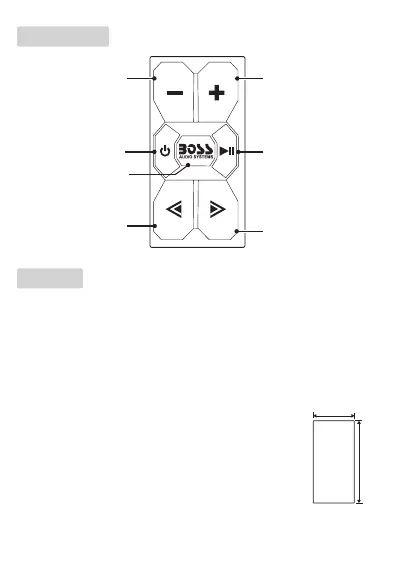
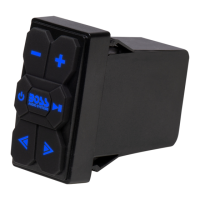
Control Panel
Volume up; hold down
to increase rapidly.
Hold down to switch
between BT and AUX
mode.
Start, pause or resume
playback;
in BT mode, hold
down to disconnect or
re-connect BT;
in AUX mode, press
briey to mute or
unmute volume
Volume down; hold
down to decrease
rapidly.
Select next track.
Hold down to power
on or off.
Select previous track.
Mounting
The unit features rocker switch dimensions, and is designed to directly t
the Carling switch location.
Option 1: Direct t
Simply insert the unit into an available Carling sized cut-out on the
dashboard of your vehicle. No drilling or cutting is required.
Option 2: Hole cutting
Find a suitable location in the dashboard, and cut a
rectangular hole (W x H: 0.85” x 1.45”). Then directly t
the unit in the hole.
Important! When drilling or cutting any holes on your
vehicle, make sure the gas tank, fuel lines, hydraulic lines
and electrical wiring are not damaged.






 To Next Page