88
Wireless Connection with a Mobile Device
Here’s what you can do when the BT-DUAL (sold separately) is connected
to the AC-22LX.
¹ Play music wirelessly from a mobile device
¹ Edit the eects using an app on your mobile device
¹ Control the volume and other parameters from an EV-1-WL wireless MIDI
expression pedal (sold separately)
¹ Connect an FS-1-WL wireless footswitch (sold separately) to this unit
to wirelessly start/stop the rhythm box, switch between memories and
more
* Note that the AC-22LX does not oer Bluetooth functionality. You’ll need
to attach the BT-DUAL (sold separately) to use Bluetooth.
Attaching the BT-DUAL
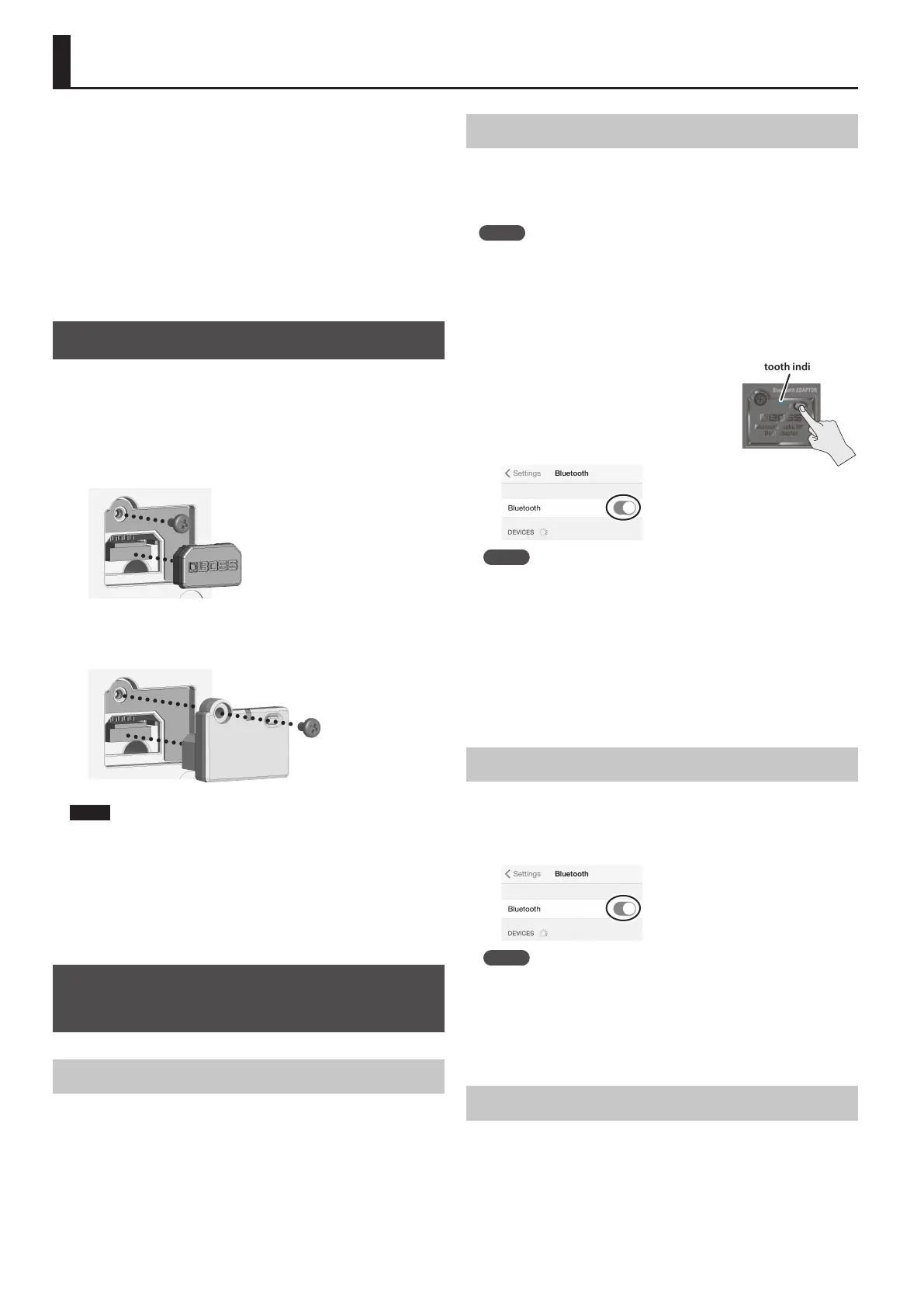
Attach the BT-DUAL to the Bluetooth ADAPTOR connector of the AC-22LX.
1. Power down the AC-22LX and unplug the AC adaptor from
the AC outlet.
2. Remove the cover and screw from the Bluetooth ADAPTOR
connector on the rear panel.
3. Attach the BT-DUAL and fasten the screw that you removed
in step 2 in place.
NOTE
¹ Be sure to use only the screw that was originally mounted on the
Bluetooth ADAPTOR connector. If you use a dierent screw, the unit
may malfunction.
¹ Do not touch any of the printed circuit pathways or connection
terminals.
¹ After you have attached the BT-DUAL, check again whether it is
properly installed.
Listening to Sound via Wireless
Connection with a Mobile Device
Bluetooth® Audio
With the AC-22LX, you can use Bluetooth audio functionality to listen to
music or music video played back on a mobile device through this unit’s
speakers.
Registering a Mobile Device (Pairing)
“Pairing” involves registering the mobile device that you want to use with
the AC-22LX (making the two devices recognize each other).
Here we’ll congure the settings so that music data saved on your mobile
device can be played wirelessly via the AC-22LX.
MEMO
The following explanation is only one example. For details, refer to
the owner’s manual of your mobile device.
1. Turn on the power of the AC-22LX.
2. Place the mobile device that you want to connect close to
the AC-22LX.
3. Hold down the pairing button on the
BT-DUAL until the Bluetooth indicator
blinks rapidly.
4. Turn on the Bluetooth function of the
mobile device.
MEMO
This explanation uses the iPhone as an example. For details, refer to
the owner’s manual of your mobile device.
5. Tap “AC-22LX Audio”, shown on the Bluetooth device
screen of your mobile device.
This pairs the BT-DUAL with your mobile device. When pairing
succeeds, “AC-22LX Audio” is added to the list of “Paired Devices” on
your mobile device.
* If you don’t complete the pairing within a certain time, the Bluetooth
indicator goes dark and the unit exits pairing standby mode.
Connecting an Already-Paired Mobile Device
1. With the BT-DUAL’s Bluetooth indicator o, press the
pairing button.
2. Turn on the Bluetooth function of the mobile device.
MEMO
¹ If you were unable to connect using the steps above, tap “AC-22LX
Audio”, displayed in the Bluetooth device screen of the mobile
device.
¹ To disconnect, press the pairing button on the BT-DUAL to make the
Bluetooth indicator go dark, or turn o the mobile device’s Bluetooth
function.
Adjusting the Volume
1. Adjust the volume on the mobile device.
Adjust the volume of Bluetooth audio.
Bluetooth indicator



 To Next Page