INSTRUCTIONS INSTRUCTIONS
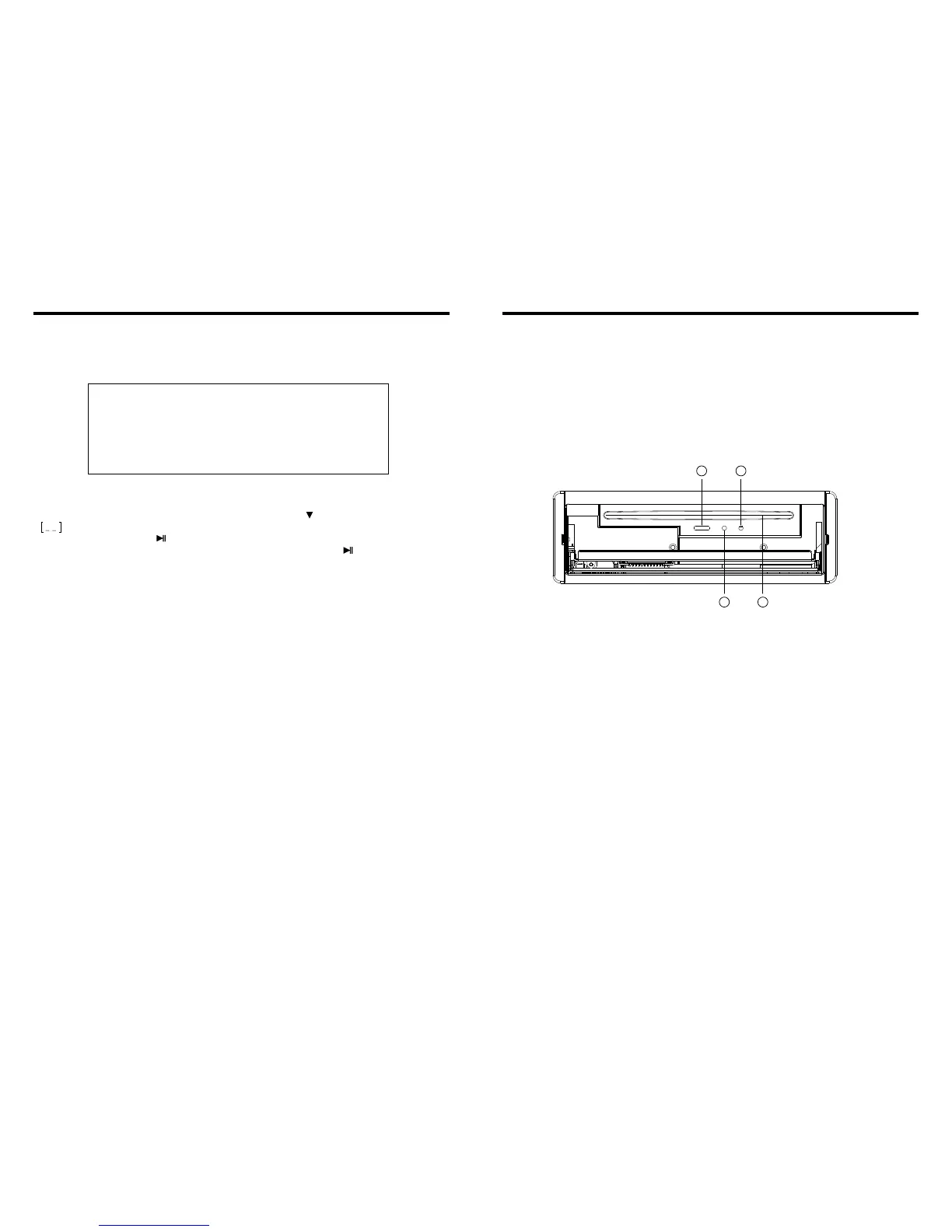
11. Slot indicator light
12. RESET Light
13. RESET Button
Press this button and this unit will be restored to the initial state.
14. Disc Slot
10. CD Program Play
In CD mode, you can set the sequence of playing by the program function, the operation
is as follows:
When CD is playing, press ST/PROG button, then the display shows:
Input the number of the song you want to program by the remote control, program the
first song, input your desired song, for example, the sixth song, and press number button
6 on the remote control. Program the second song, press button move the cursor to
2 . Input your desired song, for example, the ninth song, press number button 9 on
the remote control. Press button to program play.
Back to the normal mode, press the ST/PROG button, then press button.
Note: This function can only be worked by the remote control.
PROG
TC
3__:__
4__:__
TC
7__:__
8__:__
5__:__
6__:__
TC
11__:__
12__:__
9__:__
10__:__
TC
15__:__
16__:__
13__:__
14__:__
PLAY
DELETE
1__:__
2__:__
09
36
11 12
13
14


 To Next Page