1.
Press this button will turn on power, during working longer press this button will turn off
power, on any mode, shortly press will return main menu, rotate this button will adjust
volume level.
2. MUTE button
Press this button to shut off sound output, repress this button to resume sound output;
Press this button longer to turn on/off TFT LCD display.
3. MODE button
When the unit is power on, Repeat press this button can switch to different function
mode as following picture.
Note: When the device without connecting to USB、SD or DVD
no disc inside, the system will automatically skip these related
working mode.
4. SD slot
Insert SD card, the unit will play the files automatically.
5. RST
Press this button and this unit will be restored to the initial state.
6. Dual (front and rear) USB
Insert USB removable device so as to read audio/video files.
Warning: You can only use either front or rear USB at a time. Never connect both
front and rear USB at the same time! This could cause malfunctions.
7. Dual (front and rear) AUX
To input external audio.
Warning: You can only use either front or rear AUX at a time. Never connect both
front and rear AUX at the same time.
8. IR
To receive infrared signal from the remote control.
PWR/VOL button
9.
Press this button can eject the disc.
10. Disk load slot
Opening for disks to enter or retreat.
Media
BT
BASIC FUNCTION
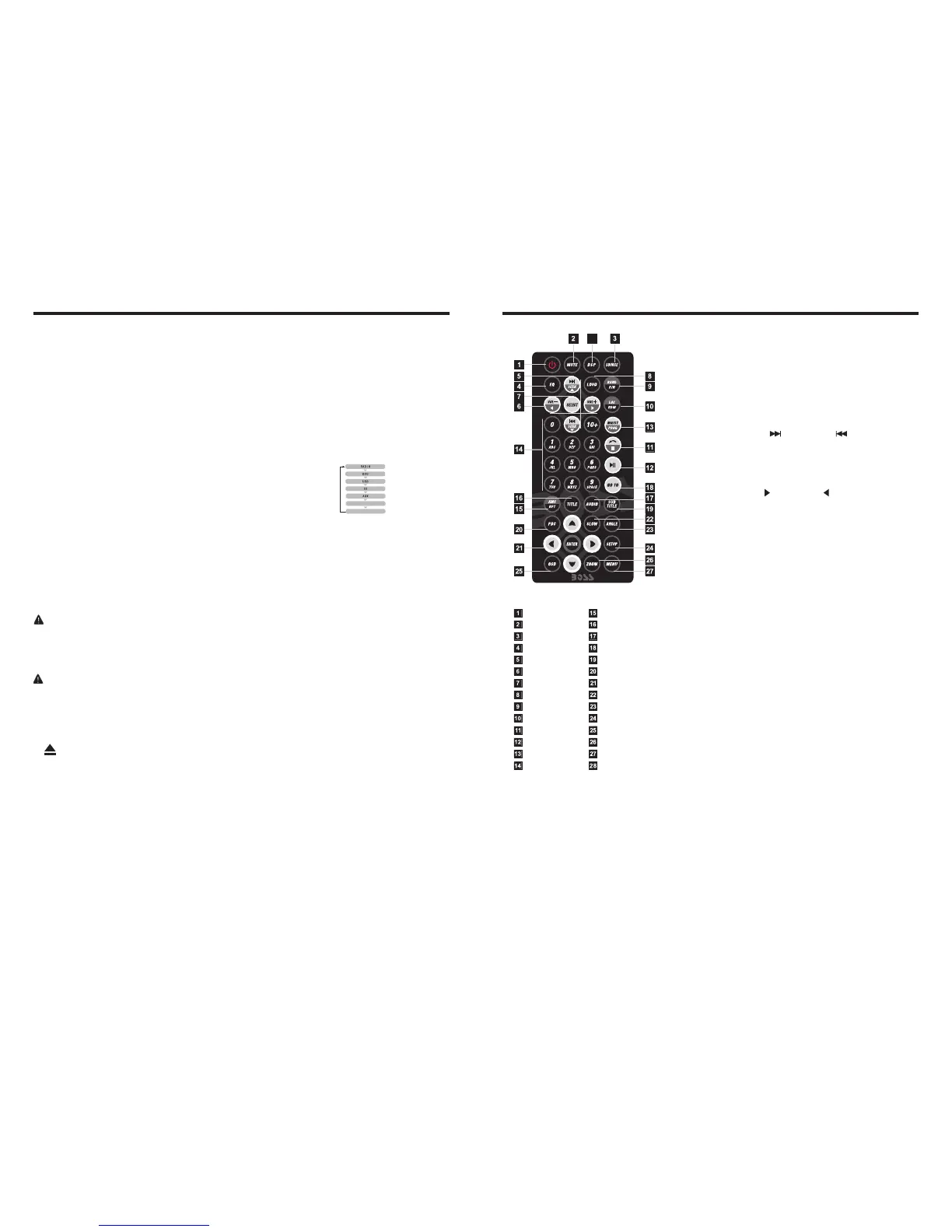
1. POWER
Press once to switch on, press again to
switch off.
2. MUTE Button
Press once to turn off audio output,
press again to resume volume level.
Button
POWER ON/OFF
MUTE
SOURCE
EQ
SEEK+ / SEEK-
VOL+ / VOL-
SEL
LOUD
BAND / P / N
LOC / RDM
STOP
PLAY / PAUSE
ST / PROG
0-10+
DSP
AMS / RPT
TITLE
AUDIO
GO TO
SUBTITLE
PBC
UP / DOWN / L / R ENTER
SLOW
ANGLE
SETUP
OSD
ZOOM
MENU
28
Remote Control Operation
3. SOURCE Button
Press this button to change mode.
4. EQ Button
Press this button to choose POP、ROCK、
CLASSIC、EQ off.
5. SEEK+ ( ) / SEEK- ( ) Button
In normal playback MP3、USB、SD songs,
Press this button to previous song or next
song.
6. VOL+ ( ) / VOL- ( )
Press this button to increase or decrease
volume level.
7. SEL Button
Press this button to choose sound feature.
8. LOUD Button
Press this button to startup LOUD function.
9. BAND-P/N Button
In radio mode, press this button to choose
band.
In VCD、DVD mode, press this button to
choose 、 or NTSC system.
10. LOC / RDM Button
In radio mode, press this button to switch
between local and direction.
In VCD、CD mode, press this key to
randomly play.
11. STOP Button
Press this button to stop playing.
12. PLAY / PAUSE Button
Press this button to switch between play
and pause.
In stop mode, press this button to play.
13. ST / PROG Button
In radio mode, press this button to choose
stereo or mono station.
In audio mode, it can help STOP button to
programmed play.
PAL AUTO



 To Next Page