Basic Operation
POWER ON/OFF
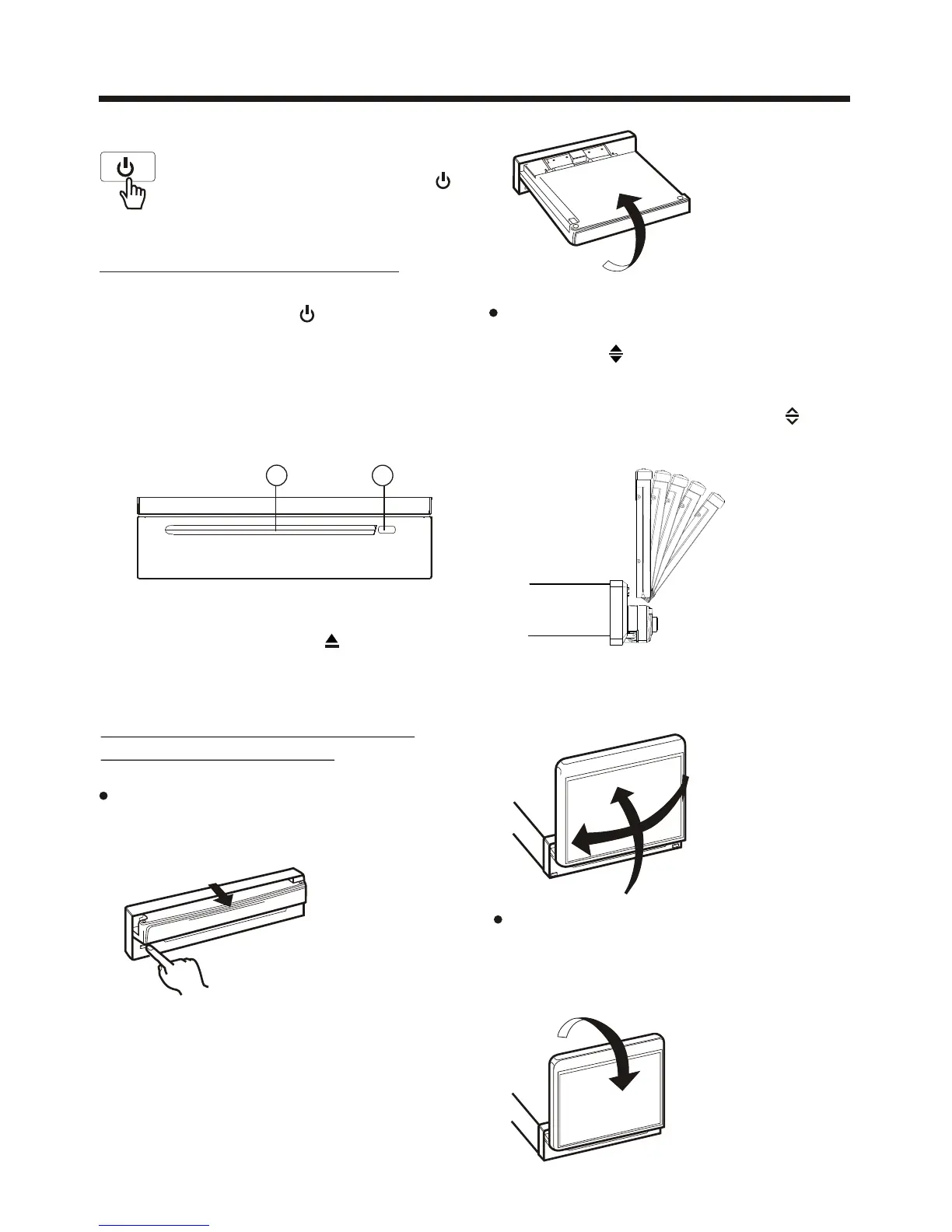
LOADING/EJECTING A DISC
Ejecting a Disc
In disc mode, Press the (2) button on
the front panel to eject the disc .
Loading a Disc
3. The player starts playback the disc
automatically .
2. Insert the disc with printed side facing
up into the disc slot (1) .
1
2
1. Press the POWER ( ) button on the
front panel to turn the device on .
Touch the “OFF” ICON on screen
to turn the unit off . Press the“ ”
onthe front panel to turn It on,
press it again to turn off .
OPEN/CLOSE MONITOR AND
ANGLE ADJUSTMENT
Press OPEN button on front panel, the
monitor will draw out automatically .
OPEN/CLOSE button
FIG.1
When the monitor draws out to a certain
location, it will turn upward automa-
tically and stop at vertical position .
FIG.2
FIG.3
Do not rotate the monitor forcibly to
avoid mechanical damage .
FIG.4
Return the monitor to the central
viewing position, then press OPEN
button on the front panel , the monitor
will turn downward automatically .
FIG.5
Adjusting the viewing angle .
When the monitor does not move, you
long press button on the panel to
turn the monitor upward or downward
at fine steps to get a desired viewing
angle
; short press that button ( ) on
remote is screen move back
or out.



 To Next Page