WIRING DIAGRAM -
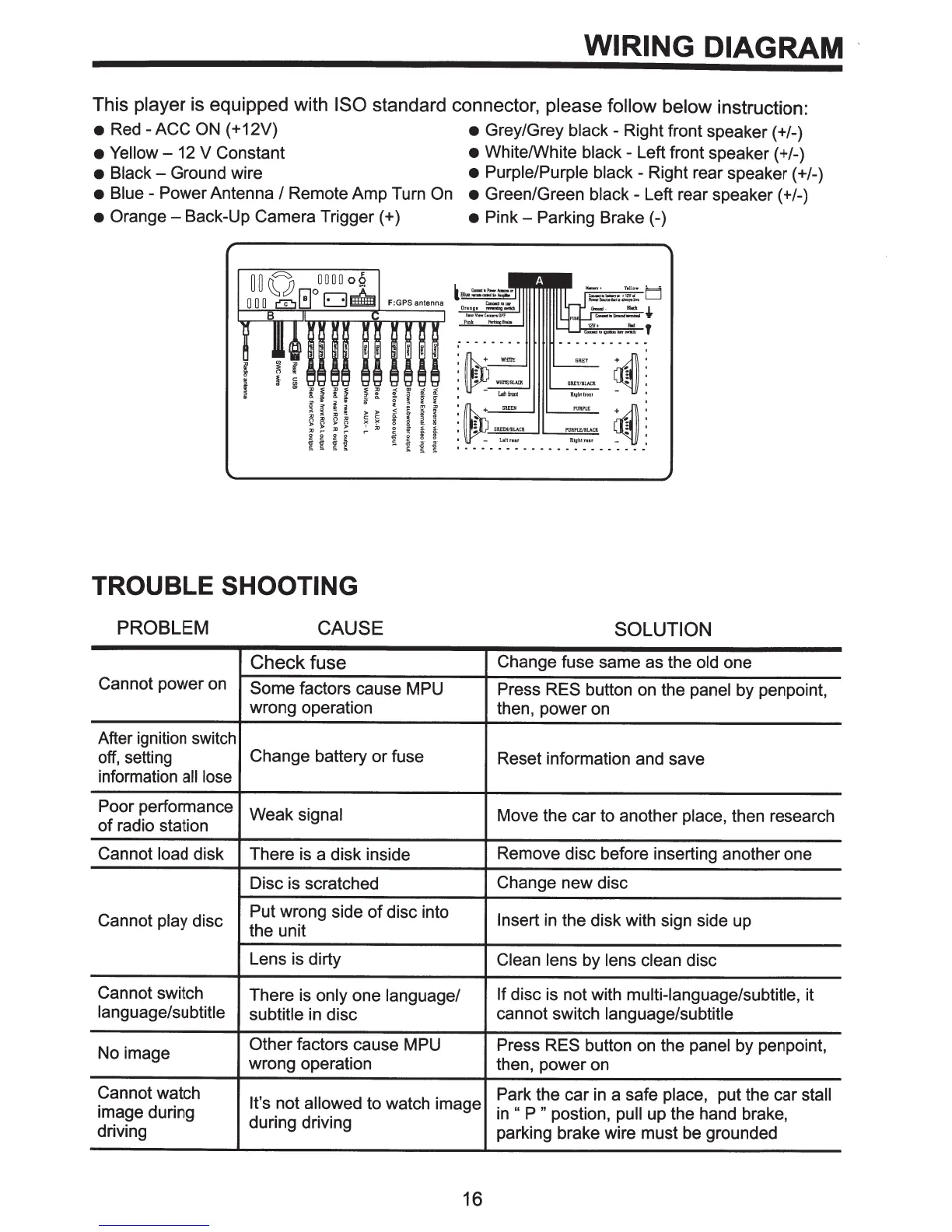
This player is equipped with
ISO
standard connector, please follow
below instruction:
•
Red -
ACC ON
(
+
12V)
•
Grey/Grey black - Right front speaker ( +/-)
• Yellow
- 12 V Constant
•
White/White black - Left front speaker ( +/-)
•
Black-
Ground wire
•
Purple/Purple black - Right rear speaker ( +/-)
•
Blue - Power Antenna
I
Remote Amp Turn
On •
Green/Green black - Left rear speaker ( +/-)
•
Orange-
Back-Up Camera
Trigger(+)
•
Pink-
Parking
Brake(-)
~:
Rtghtfrant
1
:~+GREEN
'
:
I :
GREEMJILACI
•
-
Laltnar
~:.
Rlghtrm
~
I •
•
• • • • • • • • • • • • • • • • • • • •
TROUBLE
SHOOTING
PROBLEM
CAUSE
SOLUTION
Check fuse
Change fuse same as the old one
Cannot power on
Some
factors cause MPU Press
RES
button on the panel by penpoint,
wrong operation then, power on
After ignition switch
off, setting
Change battery
or
fuse
Reset information and save
information
all
lose
Poor performance
Weak
signal
Move the car to another place, then research
of
radio station
Cannot load disk
There is a disk inside
Remove disc before inserting another one
Disc is scratched
Change
new
disc
Cannot play disc
Put wrong side
of
disc into
Insert
in the disk with sign
side up
the unit
Lens is dirty
Clean lens by lens clean disc
Cannot switch
There is only one language/
If disc is not with multi-language/subtitle, it
language/subtitle
subtitle
in disc
cannot switch language/subtitle
No image
Other factors cause MPU
Press
RES button on the panel by penpoint,
wrong operation
then, power on
Cannot watch
It's
not allowed to watch image
Park the car
in
a safe place, put the car
stall
image during
in
"
P "
postion,
pull
up the hand brake,
driving
during driving
parking brake wire must be grounded
16



 To Next Page