EasyManua.ls Logo

Boss DD-5 - Making the Connections

Boss DD-5
14 pages
Print Icon
To Next Page IconTo Next Page
To Previous Page IconTo Previous Page
Loading...
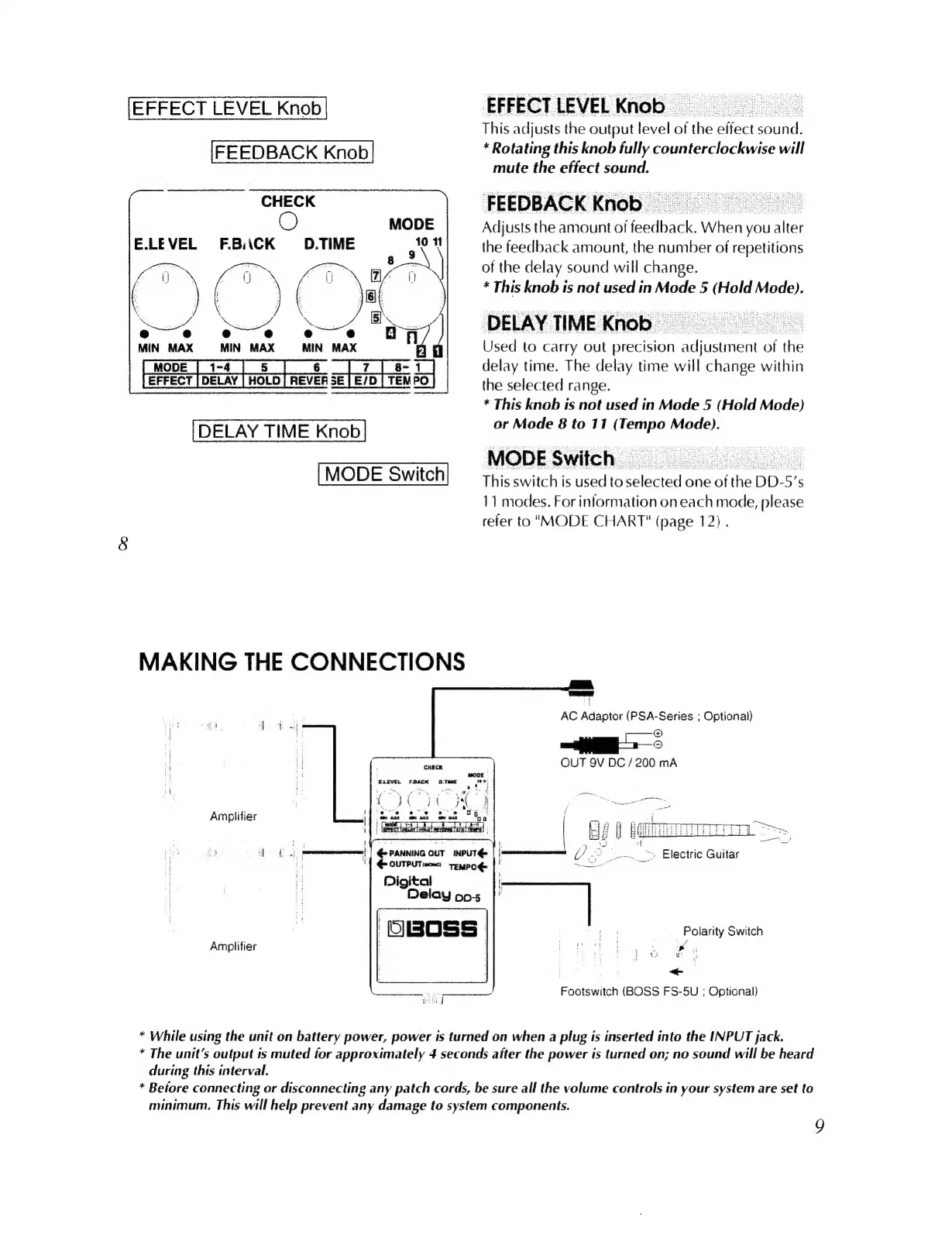
EFFECT
LEVEL
Knob
This
adjusts
the
output
level
of
ihe
effect
sud:
[FEEDBACK
Knob
|
*
Rotating
this
knob
fully
counterclockwise
will
mute
the
effect
sound.
FEEDBACK
Knob
|
Adjusts
the
amount
of
feedback
When;
you
alter
the
feedback
amount,
the
number
of
repetitions
of
the
delay
sound
will
change.
*
This
knob
is
not
used
in
Mode
5
(Hold
Mode).
DELAY
TIME
Knob
Used
to
carry
out
precision
ana
of
the
delay
time.
The
delay
time
will
change
within
the
selected
range.
[
MODE
|
1-4
|
5
|
6
8-
1
REVER
SE
TEMPO
*
This
knob
is
not
used
in
Mode
5
(Hold
Mode)
DELAY
TIME
Knob
or
Mode
8
to
11
(Tempo
Mode).
-
MODE
Switch
=
.
MODE
Switch
This
switch
is
used
to
selected
one
nae
DD-5
5's
11
modes.
For
information
on
each
mode,
"ed
refer
to
"MODE
CHART"
(page
12)
.
CHECK
O
E.LEVEL
F.BACK
D.TIME
MAKING
THE
CONNECTIONS
AC
Adaptor
(PSA-Series
;
Optional)
nad
i
oai
©
©
OUT
9V
DC
/
200
mA
CHECK
MODE
ELEVEL
FBACK
OTME
"
2
i
.
Amplifier
|
-
Log
|
©
PANNING
our
INPUT@
|
y
a
E
=
'|
OUTPUT
MCN
TEMPOÉ>
LES
eU
Digital
T
Delay
pos
|'
|
|
i
;
Polarity
Switch
Amplifier
|
aped
Li
<
Footswitch
(BOSS
FS-5U
;
Optional)
*
While
using
the
unit
on
battery
power,
power
is
turned
on
when
a
plug
is
inserted
into
the
INPUT
jack.
*
The
unit's
output
is
muted
for
approximately
4
seconds
after
the
power
is
turned
on;
no
sound
will
be
heard
during
this
interval.
*
Before
connecting
or
disconnecting
any
patch
cords,
be
sure
all
the
volume
controls
in
your
system
are
set
to
minimum.
This
will
help
prevent
any
damage
to
system
components.
9

Related product manuals