Need help?
Do you have a question about the Boss DM-101 and is the answer not in the manual?
Details the controls and indicators on the top panel of the DM-101 pedal.
Details the input/output jacks and connectors on the rear panel of the DM-101 pedal.
Illustrates connections for expression pedals and footswitches to the DM-101.
Provides the correct procedure for powering the DM-101 unit on and off safely.
Explains the different delay modes available on the DM-101, their characteristics, and settings.
Step-by-step instructions on how to save user-edited settings to the DM-101's memory.
Instructions on how to recall saved memories on the DM-101.
Explains the MANUAL mode where effects are controlled by knob positions.
Guide to configuring the expression pedal's control over various parameters.
Instructions for assigning functions to external footswitches connected to the CTL jacks.
Explains how to configure output modes for direct and effect sound routing.
Describes the CARRYOVER setting to control effect tail behavior when switching effects off.
How to set the maximum number of selectable memories.
Details the configuration for MIDI communication, channels, and messages.
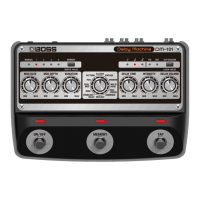
The BOSS DM-101 is a sophisticated Delay Machine designed to offer a wide range of delay effects, from classic analog warmth to modern, complex patterns. This pedal is built for musicians who seek extensive control over their delay sounds, offering both intuitive knob-based adjustments and advanced customization options through external pedals and MIDI.
The DM-101 operates as a versatile delay effect unit for electric guitars, keyboards, and other musical instruments. It features a variety of delay modes, each offering a distinct sonic character and control parameters. Users can select from modes such as CLASSIC, VINTAGE, MODERN, MULTI-HEAD, NON-LINEAR, AMBIENCE, REFLECT STEREO, DOUBLING+DELAY STEREO, WIDE STEREO, DUAL MOD STEREO, PAN STEREO, and PATTERN STEREO. Each mode provides unique tonal characteristics and modulation options, allowing for a broad spectrum of delay effects, from subtle echoes to expansive soundscapes.
Core controls include MOD RATE and MOD DEPTH for adjusting modulation, a VARIATION knob to fine-tune tonal character, and a Mode knob for selecting the desired delay type. DELAY TIME, INTENSITY (repeats), and DELAY VOLUME knobs provide precise control over the delay's duration, feedback, and mix. The unit also features ON/OFF, MEMORY, and TAP switches for real-time control and memory management.
The DM-101 supports external control via CTL 1, 2/EXP jacks, allowing for the connection of footswitches or expression pedals. This expands its functionality, enabling users to switch memories, turn effects on/off, tap in tempos, or continuously vary multiple effect parameters simultaneously. MIDI IN/OUT connectors further enhance its integration into complex setups, allowing for external control over memories and synchronization with other MIDI devices.
The DM-101 is designed for both live performance and studio use, offering a blend of immediate control and deep customization.
Memory Management: The unit can store up to 127 user memories, plus a MANUAL setting. Memories 1-4 are directly accessible via the [MEMORY] button, while memories 5-127 can be recalled via MIDI. The MANUAL mode allows users to operate the pedal based on the physical positions of the knobs, providing an "always on" feel for spontaneous adjustments. Saving settings to memory is straightforward, involving a long-press of the [MEMORY] button, selection of a memory slot, and another long-press to confirm. This allows musicians to quickly recall their favorite delay sounds.
Tap Tempo and Division: The [TAP] switch enables users to tap in the tempo of their song, automatically setting the delay time to match. The [TAP DIVISION] button, along with its indicator, allows for precise control over the delay time relative to the BPM, offering options like dotted half notes, half notes, quarter notes, and various triplets and eighth notes. This feature is crucial for rhythmic precision in live settings.
Expression Pedal Control: Connecting an expression pedal to the CTL 1, 2/EXP jack unlocks continuous control over various parameters. Users can define the MIN and MAX values for any knob (except the Mode knob) that the expression pedal will sweep between. This allows for dynamic, real-time manipulation of delay time, modulation, intensity, or volume, creating expressive effects like swells, pitch shifts, or dynamic feedback changes. Multiple parameters can be assigned to a single expression pedal, enabling complex, multi-faceted transitions.
Footswitch Functions: External footswitches (connected to CTL 1, 2/EXP) can be configured to perform several functions, including selecting the next/previous memory, toggling effects on/off, or acting as a tap tempo switch. This provides hands-free control during performances, enhancing usability.
Output Modes: The DM-101 offers flexible output configurations, allowing users to choose how the direct and effect sounds are routed. Options include normal stereo output, separate outputs for direct and effect sounds (useful for send/return loops on mixers), or muting the direct sound entirely to output only the effect. This adaptability ensures seamless integration into various audio setups.
Carryover Function (Trails): A key feature for many delay users is the ability to preserve the "tail" of an effect when the pedal is switched off. The DM-101 includes a CARRYOVER setting that allows the delay repeats to naturally decay even after the effect is disengaged. This prevents abrupt cuts in sound, maintaining a smooth transition. Users can also choose to cut off the repeats immediately if desired.
Panel Lock: To prevent accidental changes during performance or transport, the DM-101 features a panel lock function. Long-pressing the [TAP DIVISION] button locks the knobs and buttons, indicated by a blinking TAP DIVISION indicator if an attempt is made to operate them while locked.
MIDI Integration: The MIDI IN/OUT connectors facilitate advanced control and synchronization. Users can select memories 5-127 via MIDI program change messages and synchronize the DM-101's delay time to an external MIDI clock. The unit also supports MIDI Thru functionality and configurable MIDI Device IDs for exclusive messages, making it a powerful component in MIDI-controlled rigs.
The DM-101 is designed for durability and ease of use, with minimal specific maintenance requirements beyond general care for electronic devices.
Firmware Updates: The USB port is primarily used for program updates, ensuring the device can receive future enhancements and bug fixes. This allows the DM-101 to remain current with evolving technology and user needs.
Factory Reset: In case of configuration issues or when preparing the unit for a new user, a factory reset function is available. This restores all settings to their default values, providing a clean slate for setup. The process is simple, involving a combination of switch presses during power-on.
Physical Protection: The inclusion of rubber feet helps protect both the unit and the surface it rests on, preventing scratches and providing stability. Users are advised to handle the unit carefully, especially when turning it over, to protect the knobs and switches from damage.
Power Supply: The DM-101 uses a specified AC adaptor (PSA-series) for power, ensuring consistent and reliable operation. Proper power supply helps maintain the longevity and performance of the device.
Overall, the BOSS DM-101 is a comprehensive delay pedal that combines a rich array of delay effects with extensive control options, making it a versatile tool for musicians seeking to sculpt their sound with precision and creativity.
 General
| Type | Analog Delay |
|---|---|
| Technology | Bucket Brigade Device (BBD) |
| Controls | Mode, Time |
| Inputs | 1 x 1/4" |
| Outputs | 1/4" |
| Bypass | Buffered |
| Power Supply | 9V DC |
| Connectors | 1/4" |

 To Next Page