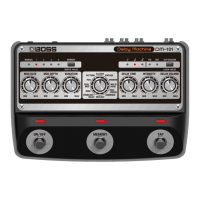
Panel Descriptions
8
Mode List
support for
[VARIATION] knob function
that’s characteristic of
Adjusts the modulation waveform.
The MIN setting produces a triangle wave,
the center setting produces a sine wave;
and the closer you get to the MAX setting,
the more complex the waveform becomes.
Simulates the sound of the
BOSS DM-2.
sound with a distinct high
HEAD
Produces a deep echo-like
effect.
Selects the head pattern (delay pattern) (10
types). (*1, *2)
When you turn the knob, MEMORY
indicators 1–4 indicate the head pattern
you selected.
The indicators return to the normal
memory display after a little while.
LINEAR
reversed effect.
Adjusts the volume for each delay interval.
very narrow space.
reflection) MIN:
140–160 ms
VARIATION (Early
reflection) MAX:
Adds the sounds of early reflections.
Produces a reverb-like
effect.
Produces a pre-delay effect (40–290 ms).
DELAY
Produces a short doubling
delay that adds thickness
to the sound, along with
Adjusts the doubling delay time (10–20
ms).
OUTPUT A/B delay times to
create a more expansive
Adjusts the time difference for the OUTPUT
A/B delay time.
Gives a modulation effect
with different phases for
Adjusts the modulation phase for OUTPUT
A/B. The MAX setting inverts the phase for
outputs the delay sound
with different timings for
Adjusts the time difference for the OUTPUT
A/B delay time.
effect.
50–300 ms
VARIATION (Pattern) 2:
60–300 ms
VARIATION (Pattern) 3:
60–300 ms
VARIATION (Pattern) 4:
40–190 ms
VARIATION (Pattern) 5:
30–190 ms
VARIATION (Pattern) 6:
50–300 ms
VARIATION (Pattern) 7:
60–290 ms
VARIATION (Pattern) 8:
20–80 ms
VARIATION (Pattern) 9:
60–300 ms
VARIATION (Pattern) 10:
Selects the delay pattern (10 types). (*1)


 To Next Page